



TP-Link
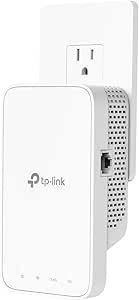
TP-Link ELCM AC750 WiFi Range Extender RE230
The RE230 eliminates Wi-Fi dead zones across up to 1,200 sq. ft. with dual-band AC750 speeds and a plug-in form factor that takes under five minutes to deploy.
$49.99*
View on Amazon
✓ In Stock on Amazon.com
*Price sourced from Amazon.com. Last updated:Oct 23, 2026.Price and availability are subject to change — details.
Affiliate Disclosure: As an Amazon Associate, Studio Supplies earns from qualifying purchases made through links on this page, at no additional cost to you. This helps support our editorial team.
Notice a mistake? Let Us Know
Overview
Key Features
Extend Wi-Fi Coverage - Boost Internet Wi-Fi Coverage up to 1200 Square feet and connects up to 20 devices - Compatible with Wi-Fi Router, Gateway, Access Point ( 2.4GHz - 300Mbps ; 5GHz - 433Mbps )
Fast Ethernet Port: Experience wired speed and reliability anywhere in your home by connecting your favorite device to the fast ethernet port
Set Up in Minutes: Easily set up and manage your Wi-Fi in a few quick and easy steps using the TP-Link Tether app (Android, iOS). Find the optimal location for the best Wi-Fi connection with an intelligent signal indicator
Universal Compatibility: The RE230 range extender is compatible with all Wi-Fi-enabled devices and routers or access points.[2]
All Wi-Fi extenders are designed to increase or improve Wi-Fi coverage, not to directly increase speed. In some cases improving signal reliability can affect overall throughput
The Ethernet port of RE230 can easily turn your wired Internet connection into a wireless access point. It can also function as a wireless adapter to connect wired devices, like Blu-ray player, game console or smart TV
TP-Link is the provider of consumer Wi Fi for 7 consecutive years according to an IDC Q2 2018 report. Operating Temperature- 0°C-40°C (32°F-104°F)
If you experience any trouble during or after set up, please contact us. TP Link offers a 2 year
Specifications
Wi-Fi Standard
AC750 Dual-Band
2.4GHz Speed
Up to 300Mbps
5GHz Speed
Up to 433Mbps
Coverage
Up to 1,200 sq. ft.
Connected Devices
Up to 20
Ethernet Port
1x Fast Ethernet (100Mbps)
OneMesh Compatible
Yes
Setup App
TP-Link Tether (iOS/Android)
Operating Temperature
0°C–40°C (32°F–104°F)
Frequently Asked Questions
What are the actual throughput speeds on each band of the RE230?
The RE230 delivers 300Mbps on the 2.4GHz band and 433Mbps on the 5GHz band for a combined AC750 class throughput. These are link-rate maximums — real-world throughput will be lower depending on signal strength, interference, and the number of connected devices.
Does the RE230 work with any router, or only TP-Link routers?
It works with any Wi-Fi router or access point regardless of brand. The universal compatibility claim is accurate — it connects to any 802.11b/g/n/ac network during setup without requiring a TP-Link gateway.
What is the total combined bandwidth of this extender, and how does that translate to real throughput?
AC750 combines 300Mbps on 2.4GHz and 433Mbps on 5GHz for a theoretical 733Mbps total. Real-world throughput is lower — the extender must receive and retransmit on the same radio, which roughly halves effective bandwidth. Devices connected through the extender will see speeds lower than the router's native output.
Will the RE230 work with my existing router regardless of brand?
Yes. The RE230 is universally compatible with any Wi-Fi router, gateway, or access point regardless of brand. It creates an extended network from your existing signal and does not require router-specific firmware or configuration.
Does the RE230 support TP-Link OneMesh to create a seamless roaming network?
Yes, the RE230 is OneMesh compatible. When paired with a OneMesh-capable TP-Link router, it creates a unified network where devices seamlessly roam between the router and extender without manually switching networks.
Can the Ethernet port on the RE230 connect a wired device, or is it only for setup purposes?
The Fast Ethernet port is functional for wired device connectivity at up to 100Mbps. It can also convert a wired connection into a wireless access point, or connect a smart TV, game console, or Blu-ray player that lacks built-in Wi-Fi.
What is the TP-Link Tether app, and is it required for setup?
Tether is TP-Link's free iOS/Android app that provides guided setup and placement recommendations via an intelligent signal strength indicator. It's the easiest setup path but not mandatory — the extender can also be configured through a web browser interface.
Can the RE230's Ethernet port be used to connect a wired device, or is it only for uplink?
The RE230's Fast Ethernet port serves dual purposes: it can connect the extender to a wired network to create a wireless access point, or it can provide a wired backhaul from a wireless connection to a wired device such as a game console, smart TV, or Blu-ray player.
How do I find the optimal placement location for the RE230?
The TP-Link Tether app (available for Android and iOS) includes an intelligent signal indicator that guides placement to the optimal position between your router and the Wi-Fi dead zone. Placement too close to the router wastes range extension; placement too far from it degrades the extender's own signal quality.
Is the RE230 OneMesh compatible, and what does that mean?
Yes — with a compatible TP-Link OneMesh router, the RE230 can join a seamless mesh network where devices roam between the router and extender without manually switching SSIDs. With non-TP-Link routers, it functions as a standard extender with a separate network name.
Related Products


