



TP-Link
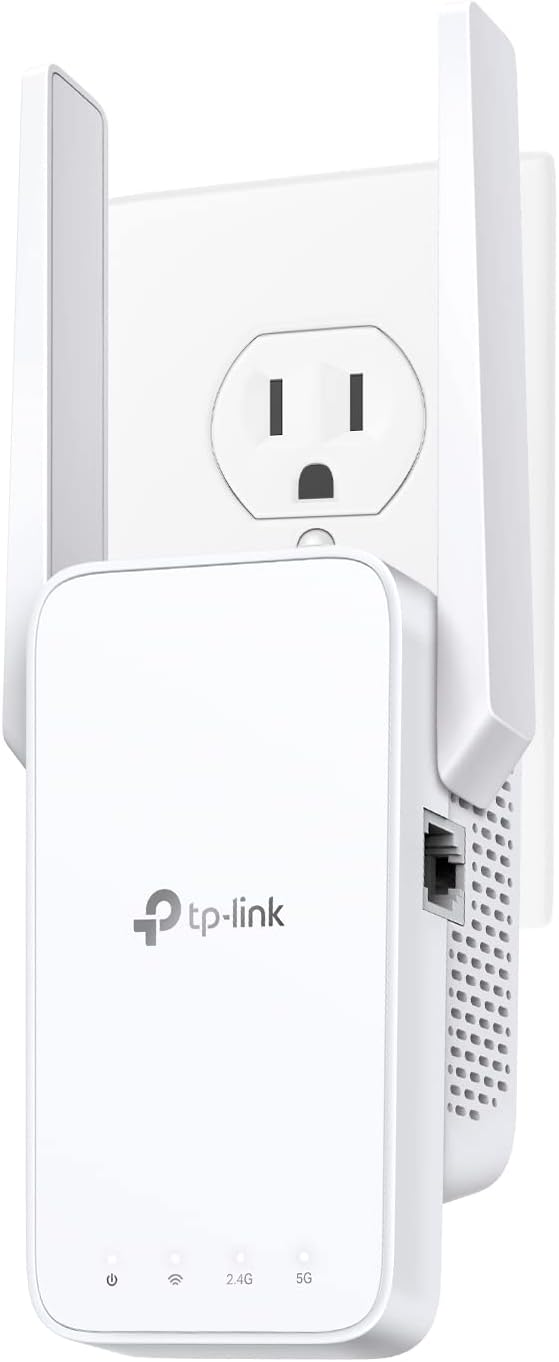
TP-Link RE215 AC750 WiFi Range Extender/Repeater (Dual Band)
★★★★★
Kill your Wi-Fi dead zones and connect up to 20 devices across 1,500 sq. ft. with dual-band AC750 throughput that actually reaches the back of the house.
View price on Amazon
Affiliate Disclosure: Studio Supplies may earn a commission from qualifying purchases made through links on this page, at no additional cost to you. This helps support our editorial team.
Notice a mistake? Let Us Know
Overview
Key Features
Extend Wi-Fi Coverage - Boost Internet WiFi coverage up to 1500 Square feet and connects up to 20 devices - Compatible with Wi-Fi Router, Gateway, Access Point (2.4GHz - 300Mbps / 5GHz - 433Mbps)¹
Fast Ethernet Port: Experience wired speed and reliability anywhere in your home by connecting your favorite device to the fast Ethernet port
Set Up in Minutes: Easily set up and manage your Wi-Fi in a few quick and easy steps using the TP-Link Tether app (Android, iOS). Find the optimal location for the best Wi-Fi connection with an intelligent signal indicator
OneMesh Technology - Enables the creation of a OneMesh network for seamless roaming when paired with the Archer A7 Router (more devices to be updated in the future)
Universal Compatibility: The RE215 range extender is compatible with all Wi-Fi-enabled devices and routers or access points²
Access Point Mode: The Ethernet port of RE215 can easily turn your wired Internet connection into a wireless access point. It can also function as a wireless adapter to connect wired devices, like Blu-ray player, game console or smart TV
Set Up in Minutes: Easily set up and manage your Wi-Fi in a few quick and easy steps using the TP-Link Tether app (Android, iOS). Find the optimal location for the best Wi-Fi connection with an intelligent signal indicator.
All Wi-Fi extenders are designed to increase or improve Wi-Fi coverage, not to directly increase speed. In some cases improving signal reliability can affect overall throughput.
Specifications
Wi-Fi Coverage Boost
Up to 1500 Square feet
Connected Devices Supported
Up to 20 devices
Wi-Fi Bands
Dual Band (2.4GHz / 5GHz)
2.4GHz Speed
300Mbps
5GHz Speed
433Mbps
Ethernet Port
Fast Ethernet Port
Management App
TP-Link Tether app (Android, iOS)
Setup Feature
Intelligent signal indicator for optimal location
Mesh Technology
OneMesh (when paired with compatible routers like Archer A7)
Operating Modes
Range Extender, Access Point
Compatibility
Universal with Wi-Fi-enabled devices, routers, and access points
Pros & Cons
👍 Pros
- Dual-band operation allows 5GHz (433Mbps) to serve nearby high-bandwidth devices while 2.4GHz (300Mbps) handles range-sensitive coverage — reducing congestion across both zones.
- Access Point mode eliminates retransmission speed penalties entirely when a wired Ethernet run to the extender is possible.
- The integrated signal indicator removes guesswork from placement — a measurable indicator of link quality that cheaper extenders omit.
- OneMesh integration with compatible TP-Link routers enables seamless client roaming without network name switching.
- Fast Ethernet port doubles as a wireless adapter for wired-only devices like smart TVs, game consoles, or Blu-ray players.
👎 Cons
- The 433Mbps 5GHz ceiling is a meaningful bandwidth constraint for households running multiple 4K streams simultaneously — the hardware was designed for light-to-moderate load environments.
- OneMesh seamless roaming is limited to TP-Link ecosystem devices; users with non-TP-Link routers get standard extender behavior without the mesh-like handoff.
- The Fast Ethernet port tops out at 100Mbps, which bottlenecks wired device connections on gigabit ISP plans — not ideal for a wired gaming console or NAS.
- Single-unit coverage of 1,500 sq. ft. assumes ideal, open-plan conditions; walls, floors, and appliance interference will reduce the effective coverage area in practice.
Frequently Asked Questions
Will the RE215 work with my existing router, or does it require a specific brand?
It's universally compatible — the RE215 works with any 802.11a/b/g/n/ac Wi-Fi router or access point regardless of brand. The OneMesh seamless roaming feature, however, is currently limited to pairing with TP-Link's Archer A7 and select other TP-Link routers.
What does the AC750 speed rating actually mean for my connection?
AC750 is the combined theoretical maximum across both bands: 300Mbps on 2.4GHz and 433Mbps on 5GHz. In practice, expect real-world throughput of roughly half those figures at the extender's location. The 5GHz band handles bandwidth-intensive tasks like streaming 4K or gaming where available; 2.4GHz covers longer range at lower speeds.
Does using the RE215 in extender mode cut my speeds in half?
In standard single-band extender mode, yes — the RE215 uses the same radio to receive and rebroadcast, which typically halves throughput. For minimal speed impact, position it where it gets a strong signal from the router and consider using the 5GHz band to backhaul if your router supports it.
Can I use the RE215 as a wired access point instead of an extender?
Yes — in Access Point mode, you run an Ethernet cable from your router to the RE215's Fast Ethernet port, and it broadcasts a wireless network from that location. This eliminates the half-speed retransmission penalty and is the preferred setup when a wired run is feasible.
How do I find the optimal placement location?
The RE215 includes an intelligent signal indicator — a light that changes color based on received signal strength from the host router. Green means strong signal; red means too far. TP-Link recommends placing it halfway between your router and the dead zone for best results.
Related Products


