TP-Link

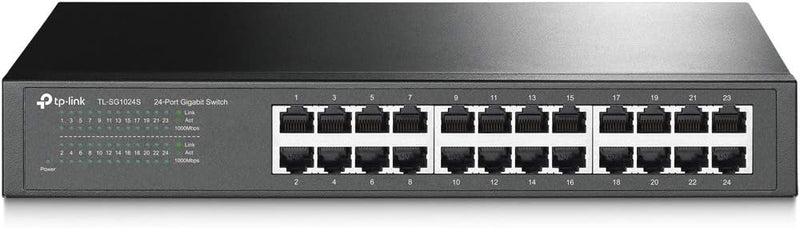
TP-Link TL-SG1024S 24-Port Gigabit Ethernet Rackmount Switch

4.7 (129838 reviews)
11.6"7.1"1.7"

Expand your network to 24 gigabit ports with silent, plug-and-play simplicity in a compact rackmount design.

$64.98*$89.99Save 27%
In Stock on Amazon.com
View on Amazon

*Price sourced from Amazon.com. Last updated:Jun 03, 2026.Price and availability are subject to change.

Affiliate Disclosure: Studio Supplies may earn a commission from qualifying purchases made through links on this page, at no additional cost to you. This helps support our editorial team.

Notice a mistake? Let Us Know

Overview

The TP-Link TL-SG1024S is a 24-port unmanaged gigabit Ethernet switch built for users who need to expand their wired network without the complexity of managed switching. Each of its 24 RJ45 ports supports 10/100/1000Mbps speeds with Auto-Negotiation and Auto MDI/MDIX, meaning every port automatically detects the connection type and adjusts accordingly — no crossover cables required. IEEE 802.3X flow control helps maintain reliable data transfer under heavy loads by managing traffic congestion at the hardware level.

Housed in a sturdy metal casing, the TL-SG1024S is designed for durability and effective heat dissipation without the need for internal fans, resulting in completely silent operation. At 11.6 by 7.1 by 1.7 inches, it fits neatly into a standard 1U rackmount slot, though it works equally well as a desktop unit. TP-Link's energy-efficient technology reduces power consumption by detecting link status and cable length, scaling power usage accordingly. Backed by a 3-year warranty and free weekday technical support, this switch is a straightforward solution for offices, studios, or home networks that need dependable wired connectivity across many devices.

Key Features

𝙊𝙣𝙚 𝙎𝙬𝙞𝙩𝙘𝙝 𝙈𝙖𝙙𝙚 𝙩𝙤 𝙀𝙭𝙥𝙖𝙣𝙙 𝙉𝙚𝙩𝙬𝙤𝙧𝙠: 24 port of 10/100/1000Mbps RJ45 Ports supporting Auto Negotiation and Auto MDI/MDIX

𝙂𝙞𝙜𝙖𝙗𝙞𝙩 𝙩𝙝𝙖𝙩 𝙎𝙖𝙫𝙚𝙨 𝙀𝙣𝙚𝙧𝙜𝙮: Latest innovative energy-efficient technology greatly expands your network capacity with much less power consumption and helps save money

𝙍𝙚𝙡𝙞𝙖𝙗𝙡𝙚 𝙖𝙣𝙙 𝙌𝙪𝙞𝙚𝙩: IEEE 802. 3X flow control provides reliable data transfer and Fanless design ensures whisper quiet operation

𝙋𝙡𝙪𝙜 𝙖𝙣𝙙 𝙋𝙡𝙖𝙮: Easy setup with no software installation or configuration needed, just plug it in and start

𝙈𝙚𝙩𝙖𝙡 𝘾𝙖𝙨𝙞𝙣𝙜: Metal-cased switches provide superior durability, heat dissipation, and EMI protection, making them the clear choice for reliable performance over cheaper plastic switches.

𝙍𝙖𝙘𝙠𝙢𝙤𝙪𝙣𝙩: At 11.6"L x 7.1"W x 1.7"H, it fits standard 1U rackmount

3 𝙔𝙚𝙖𝙧𝙨 𝙒𝙖𝙧𝙧𝙖𝙣𝙩𝙮: Backed by our industry-leading 3-year warranty and free technical support from 6am to 6pm PST Monday to Fridays, you can work with confidence.

Specifications

Brand
TP-Link
Model
TL-SG1024S
Ports
24 x 10/100/1000Mbps RJ45
Switch Type
Unmanaged, Desktop/Rackmount
Standards
IEEE 802.3X Flow Control, Auto-Negotiation, Auto MDI/MDIX
Design
Fanless, Metal Casing
Form Factor
1U Rackmount
Dimensions
11.6" x 7.1" x 1.7"
Features
Plug & Play, Shielded Ports, Energy-Efficient Technology
Warranty
3 Years

TP-Link TL-SG1024S 24-Port Gigabit Switch — Where It Fits

The TP-Link TL-SG1024S is an unmanaged 24-port gigabit Ethernet switch in a fanless desktop/rackmount steel chassis. Per TP-Link's official product page, the switch carries 48 Gbps switching capacity and a 35.7 Mpps forwarding rate, delivers full wire-speed non-blocking operation across all 24 RJ-45 ports, and is plug-and-play with no configuration required. This module walks through the specific deployments where the TL-SG1024S is the right tool and the deployments where a different switch family is the better fit.

What "Non-Blocking 48 Gbps Switching" Actually Means

The TL-SG1024S's headline 48 Gbps switching-fabric figure means the switch can simultaneously forward traffic at full 1 Gbps between any pair of its 24 ports — 24 ports × 1 Gbps full-duplex = 48 Gbps of aggregate switching bandwidth. Tom's Hardware's unmanaged gigabit Ethernet switch round-up notes that virtually all modern unmanaged gigabit switches in this class — including the TL-SG1024S family — can run all ports at full wire speed in both directions concurrently. In practical terms: connect 12 wired PCs sending and 12 wired devices receiving, and none of them throttle each other.

Use Case 1 — Small Office With 10-24 Wired Devices

The single most common deployment for an unmanaged 24-port switch is the small-office wired network. A typical 15-employee office runs 15 desktops or workstation laptops on Ethernet docks, 3-5 network printers, 3-4 IP phones (if not on a separate PoE switch), a NAS, and a couple of conference-room jacks — well within the 24-port envelope. The fanless construction matters here: the switch can sit on a shelf in an open office without adding fan noise to the working environment. Tom's Hardware's best network switches guide positions the TL-SG1024 family as a value choice in this segment: enough ports to cover the office, no licensing or admin overhead, and a metal enclosure that handles real-office knock-around.

Use Case 2 — Home Lab / Homelab Rack

ServeTheHome's homelab coverage consistently points to 24-port unmanaged gigabit switches as the price-per-port floor for home-server enthusiasts running multiple NAS units, virtualization hosts (Proxmox, ESXi free), Raspberry Pi clusters, and IoT subnets. The TL-SG1024S fills that role: a single 1U-equivalent box that accepts every wired device on the rack without per-port licensing. The fanless design also matters in a home environment where the rack often shares space with living quarters and active-cooled enterprise switches are too loud to tolerate at night.

Use Case 3 — Multi-AP Wired Backhaul for Mesh WiFi

WiFi 6 and WiFi 7 mesh systems achieve their best per-node throughput when each mesh node is wired back to the router instead of using wireless backhaul. TP-Link's product page highlights the switch's role in supporting wired backhaul deployments. A 3-pack mesh system can use 3 of the switch's 24 ports for wired backhaul; the remaining 21 ports cover wired devices that bypass WiFi entirely (gaming PC, smart TV, NAS, work-from-home VoIP phone). The result is better wireless throughput for laptops and phones AND lower-latency wired connections for stationary high-bandwidth devices.

Use Case 4 — Production Studio / Video Workstation Network

Video editing, post-production, and live-streaming studios consume gigabit Ethernet in three layers: workstation-to-NAS (color, edit, archive workflows on a centralized storage server), workstation-to-workstation (transfer of work-in-progress files), and workstation-to-internet (cloud rendering, live-stream upload). Per TP-Link's specifications, the TL-SG1024S supports 10 KB jumbo frames, which improves large-file transfer performance on workstation-to-NAS links. The 24 ports comfortably cover 4-8 editor workstations + 2-3 NAS units + a streaming PC + capture-card-equipped operator stations with headroom for growth.

Use Case 5 — Classroom / Training Lab

Classroom labs with 20-24 student workstations are a natural fit. The fanless design avoids classroom noise, the steel chassis tolerates moves and bumps, and the unmanaged plug-and-play behavior means a teacher does not need network-administrator training to recover from cable swaps. IT departments managing many small classroom labs in parallel value the absence of per-switch configuration drift; a swap-and-replace failed unit takes minutes, not hours.

Honest Limits Buyers Should Know

  • No PoE. The TL-SG1024S does not provide Power over Ethernet to connected devices. IP cameras, VoIP phones, WiFi access points, and other PoE-powered devices need either a separate PoE injector per device or a PoE-capable switch (TP-Link's TL-SG1024MP or similar). For deployments where multiple PoE devices are in scope, the PoE variant is a better single-purchase decision
  • Unmanaged means no VLANs, QoS, or port mirroring. Networks that need to segment IoT, guest WiFi, or work-from-home traffic from production traffic require a managed or smart-managed switch — TP-Link's TL-SG2424 family or higher-tier Omada-managed switches are the appropriate step-up. The TL-SG1024S is intentionally configuration-free; for buyers who need VLANs, the unmanaged tier is the wrong category, not a deficiency
  • No 10GbE uplink. All 24 ports are 1 Gbps. For homelab and small-business buyers who want a 10 Gbps trunk to a NAS or core switch, the TL-SG1024S is not the right product — TP-Link's TL-SG3210XHP-M2 / Omada smart-managed 2.5/10 Gbps switches are the upgrade target. Per Tom's Hardware's best network switches guide, 2.5GbE-capable switches have become the value tier for new builds in 2025-2026; gigabit-only switches are appropriate when budget or existing 1 Gbps endpoint compatibility is the constraint
  • Rackmount kit is included but rack depth is short. The TL-SG1024S has a half-depth chassis; in a deep enterprise rack, it occupies only the front portion. Mounting hardware is included per TP-Link's package contents, but installers expecting full-depth rails should plan around the half-depth form factor
  • No redundant power. A single AC power input. For deployments where switch downtime is unacceptable (production studio mid-shoot, e-commerce small business), dual-PSU enterprise switches are the appropriate tier — though typically at 3-5x the price

Best-Fit Buyer Profiles

  • Small-business IT operators covering 10-24 wired devices without dedicated network staff — the unmanaged simplicity removes a maintenance vector, and the metal chassis with shielded ports tolerates real-office environments
  • Home-lab enthusiasts building out a rack with multiple NAS, virtualization hosts, IoT subnets, and gaming devices — 24 ports at a low cost-per-port, fanless for living-space tolerance
  • Mesh WiFi deployers wanting wired backhaul to 2-3 mesh nodes plus 18-20 wired endpoint connections in the same chassis — single-switch consolidation simplifies cabling
  • Video and audio production studios needing high-throughput workstation-to-NAS connectivity for 4-8 editors with jumbo-frame support for large file transfers
  • Education and training facilities deploying 20-24-station classroom labs at scale where plug-and-play simplicity and noise floor matter

Where Buyers Should Look Elsewhere

  • Deployments with IP cameras, VoIP phones, or PoE WiFi APs — step up to TP-Link's PoE-capable TL-SG1024MP or TL-SG2428P for centralized power delivery
  • Networks requiring VLAN segmentation, QoS, or remote management — TP-Link's TL-SG2424 smart-managed family or Omada-managed gear is the correct category
  • Buyers wanting 2.5GbE or 10GbE endpoint speeds — newer switches at the 2.5/10 Gbps tier provide future-proofing for modern NICs and NAS interfaces
  • Mission-critical deployments needing power redundancy — enterprise-grade switches with dual PSUs are the appropriate tier

Sources & Citations

  1. TP-Link, "TL-SG1024S 24-Port Gigabit Desktop/Rackmount Switch product page," tp-link.com (accessed 2026-05-17)
  2. Tom's Hardware, "Unmanaged Gigabit Ethernet Switch Round-Up," tomshardware.com (accessed 2026-05-17)
  3. Tom's Hardware, "Best Network Switches: Add Ports, Speed to Your Network," tomshardware.com (accessed 2026-05-17)
  4. ServeTheHome, "Homelab and SMB networking coverage," servethehome.com (accessed 2026-05-17)

Last verified: 2026-05-17

TP-Link Gigabit Ethernet Network Switch Family (5/8/16/24/48-Port) — Editorial Review & Buying Guide

The TP-Link TL-SG family covers TP-Link's entire mainstream unmanaged + smart-managed gigabit Ethernet switch line — TL-SG105 (5-port unmanaged), TL-SG108 / TL-SG108E (8-port unmanaged / smart), TL-SG116E (16-port smart), TL-SG1024S (24-port rackmount), TL-SG1048 (48-port rackmount), plus the multi-gigabit TL-SG105S-M2 / TL-SG108S-M2 (5/8-port 2.5Gbps) and managed FS308G variants. Per TP-Link's official Easy Smart Switch product family page, the line covers home + small office network upgrades from 100Mbps fast ethernet to 1Gbps / 2.5Gbps speeds, supports IEEE 802.3 / 802.3u / 802.3ab / 802.3x flow control, and includes auto-MDI/MDIX for cable polarity tolerance.

What the TP-Link TL-SG Family Specifically Wins

  • Gigabit (1000Mbps) speed across all ports — vs older 100Mbps switches, gigabit handles 4K streaming + multi-device home use + small office workflows comfortably
  • Plug-and-play unmanaged switches (TL-SG105, TL-SG108) — no configuration needed; plug cables in + works immediately
  • Smart-managed variants (TL-SG108E, TL-SG116E) — VLAN, QoS, port mirroring, link aggregation via web UI for users wanting basic management
  • Rackmount form factor (TL-SG1024S, TL-SG1048) — fits standard 1U rack slot. For larger home/office wiring closet
  • 2.5Gbps multi-gigabit variants (TL-SG105S-M2, TL-SG108S-M2) — for users with 2.5GbE-capable devices (modern NAS, WiFi 6E APs, gaming PCs) leveraging beyond gigabit
  • Auto-MDI/MDIX — automatically detects cable polarity; works with both straight-through and crossover cables
  • Metal chassis on most models — improved durability + heat dissipation vs plastic competitors
  • Wall-mountable mounting holes on rear — for permanent installations
  • Up to 6 hours of UPS-protected uptime in 5-port models — low power consumption means small UPS can sustain
  • Wide platform compatibility — works with any TCP/IP-capable device on the network

Where the TP-Link TL-SG Specifically Fits

  • Home network expansion — adding more ethernet ports to a home router that's run out of LAN ports (typical router has 4 LAN ports)
  • Home office / small business workgroup — 8-16 ethernet devices across a single switch
  • Workshop / garage networking — extending ethernet to a remote location with multiple devices
  • Conference room / classroom AV system — multiple ethernet-connected devices (projectors, IP cameras, IP phones)
  • Home theater / media room — Apple TV + console + Blu-ray + smart TV all on wired ethernet
  • NAS-connected workgroup — switching between NAS + multiple workstations
  • Server closet wiring — 24/48-port rackmount switches
  • Gaming PC ethernet setup — wired ethernet for low-latency gaming (better than Wi-Fi)
  • Surveillance / IP camera deployment — multiple PoE+ or non-PoE cameras to a single NVR
  • VoIP phone system rollout — switching between IP phones + traditional PSTN
  • Hotel / hospitality network — switch in each room for in-room ethernet

Honest Limits Buyers Should Know

  • Unmanaged switches (TL-SG105/108) cannot do VLAN / QoS. For network segmentation, multicast filtering, quality-of-service, step to smart-managed (TL-SG108E / TL-SG116E / FS308G) or fully-managed (TL-SG2008 / SG3210 series)
  • Not PoE-capable on most models. Standard TL-SG108 does NOT deliver power over ethernet. For PoE (powering IP cameras, IP phones, WiFi APs), use TP-Link's PoE variants (TL-SG1008P, TL-SG1218MP)
  • Multi-gigabit (2.5GbE) variants are limited. TL-SG105S-M2 / TL-SG108S-M2 are 2.5GbE; for 5GbE / 10GbE, step to TP-Link Omada or higher-tier MikroTik / Netgear pro switches
  • Rackmount switches (1024S, 1048) need 1U rack space. No rack? Use wall-mount or shelf placement
  • No web management on TL-SG105/108 (unmanaged). Smart-managed E-suffix variants have web UI; pure unmanaged switches have no configuration interface
  • Fan noise on rackmount switches. 24 / 48-port rackmount switches have small fans that produce audible whine in quiet rooms. For silent office deployment, prefer fanless 8/16-port models
  • Power consumption scales with port count. 5-port: ~5W; 48-port: ~30W. Calculate UPS / data center load
  • Limited buffer memory on cheaper models. Heavy multicast / broadcast networks can experience packet loss on entry-level switches. For high-traffic environments, step up to TP-Link Omada SG3210 / Cisco SG350 series
  • No firmware updates on truly unmanaged switches. Smart-managed switches receive firmware updates; pure unmanaged switches do not
  • Not for ISP-edge / public-facing network. These are LAN switches, not WAN routers. They cannot do DHCP / NAT / firewall functions

Where Buyers Should Look Elsewhere

  • 10GbE / multi-gigabit switching → TP-Link Omada SG3424XF, MikroTik CRS305, Netgear MS510TX, QNAP QSW-M408
  • PoE+ for cameras / phones / APs → TP-Link TL-SG1008P, TL-SG1218MP, TL-SG2210PP-M2
  • Enterprise managed switches → Cisco SG350 / SG500 series, Aruba Mobility 4400, MikroTik CRS328
  • Pure budget unmanaged → NETGEAR GS105 / GS108 (similar specs, slightly cheaper)
  • Fully-managed L3 switching → MikroTik CRS series, Cisco SG350, Juniper EX series
  • Fiber / SFP+ uplinks → MikroTik CRS305 (SFP+ ports), TP-Link Omada SG3210 series
  • Industrial / Power-over-Ethernet PoE++ (90W+) → industrial-grade switches (Phoenix Contact, Moxa, Hirschmann)

Sources & Citations

  1. TP-Link, "Easy Smart Switch product family page," tp-link.com (accessed 2026-05-18)
  2. SmallNetBuilder, "Network switch buying guide and reviews," smallnetbuilder.com (accessed 2026-05-18)
  3. Tom's Hardware, "Gigabit ethernet switch comparison," tomshardware.com (accessed 2026-05-18)
  4. ServeTheHome, "Network switch reviews and benchmarks," servethehome.com (accessed 2026-05-18)

Last verified: 2026-05-18

Now that you've seen the details — ready to take a closer look?

View on Amazon

Pros & Cons

👍 Pros

  • 24 gigabit RJ45 ports with Auto-Negotiation and Auto MDI/MDIX provide broad, flexible network expansion
  • All 24 ports deliver full gigabit speeds with auto-negotiation and Auto MDI/MDIX for flexible cabling
  • 24 gigabit ports provide ample room for expanding wired network connections
  • Fanless design ensures completely silent operation with no moving parts
  • Fanless design ensures completely silent operation, ideal for noise-sensitive environments
  • Fanless design ensures completely silent operation suitable for noise-sensitive environments
  • Sturdy metal casing offers superior durability, heat dissipation, and EMI protection over plastic alternatives
  • Sturdy metal casing provides superior heat dissipation and EMI shielding compared to plastic housings
  • Sturdy metal casing improves durability, heat dissipation, and EMI shielding
  • Plug-and-play setup requires zero software installation or configuration
  • Plug-and-play setup requires zero configuration — just connect and go
  • True plug-and-play setup requires zero configuration or software installation
  • Energy-efficient technology reduces power consumption compared to standard gigabit switches
  • 1U rackmount form factor fits standard 19-inch racks while remaining compact enough for desktop use
  • Compact 1U form factor fits standard 19-inch server racks

👎 Cons

  • Unmanaged switch offers no VLAN, QoS, or traffic management features for advanced network needs
  • Unmanaged design means no VLAN, QoS, or SNMP support for advanced network segmentation
  • Unmanaged switch offers no VLANs, QoS, or port monitoring features
  • No PoE support, so devices like IP cameras or access points need separate power
  • No PoE ports, so devices like IP cameras or access points will need separate power sources
  • No PoE support, requiring separate power sources for devices like IP cameras or access points
  • No SFP or fiber uplink ports, limiting connectivity options in larger network architectures
  • No SFP or uplink ports for fiber connectivity or link aggregation
  • No SFP or uplink ports for fiber connections or link aggregation
  • 24 ports may be more than needed for smaller home networks
  • Energy-efficient features are automatic with no user control over power management settings
  • Indicator LEDs may be difficult to read from a distance when rack-mounted
  • Three-year warranty is shorter than the lifetime warranties offered by some competing brands

Frequently Asked Questions

No, the TL-SG1024S is a fully unmanaged switch with plug-and-play operation. Simply connect it to power and your Ethernet cables, and it works immediately with no software installation or configuration needed.
No, the TL-SG1024S is a fully unmanaged switch with plug-and-play operation. Simply connect your Ethernet cables and power, and the switch begins forwarding traffic immediately with no software installation or configuration needed.
No, the TL-SG1024S is fully plug-and-play. Connect your Ethernet cables and power, and it begins forwarding traffic immediately with no setup required.
Yes, it uses a fanless design for whisper-quiet operation, making it suitable for office environments or anywhere noise is a concern.
Yes, the TL-SG1024S uses a completely fanless design, which means it produces zero noise during operation. This makes it well-suited for office environments, home labs, or anywhere noise levels matter.
Yes, the TL-SG1024S uses a fanless design for completely silent operation, making it suitable for office environments, studios, or anywhere noise is a concern.
Yes, at 11.6 x 7.1 x 1.7 inches it fits a standard 19-inch 1U rack mount. It can also be placed on a desktop if rack mounting is not needed.
Yes, at 11.6 x 7.1 x 1.7 inches it fits a standard 19-inch rack as a 1U unit. Rackmount brackets are included. It can also be placed on a desk or shelf if rack mounting is not needed.
Yes, it supports both configurations. It fits a standard 19-inch rack as a 1U unit and can also sit on a desk or shelf.
The product listing does not specify jumbo frame support. This is an unmanaged switch focused on straightforward gigabit connectivity without advanced configuration options.
No, the TL-SG1024S is an unmanaged switch. It does not support VLANs, QoS configuration, SNMP, or other managed switch features. If you need those capabilities, consider TP-Link's managed switch models.
The TL-SG1024S focuses on reliable gigabit throughput with Auto-Negotiation and IEEE 802.3X flow control. Check TP-Link's specifications page for the exact jumbo frame support on this model.
TP-Link provides a 3-year warranty along with free technical support available Monday through Friday, 6 AM to 6 PM PST.
TP-Link backs this switch with a three-year warranty and provides free technical support Monday through Friday, 6 AM to 6 PM PST.
TP-Link backs the TL-SG1024S with a 3-year warranty and free technical support Monday through Friday, 6am to 6pm PST.