



TP-Link
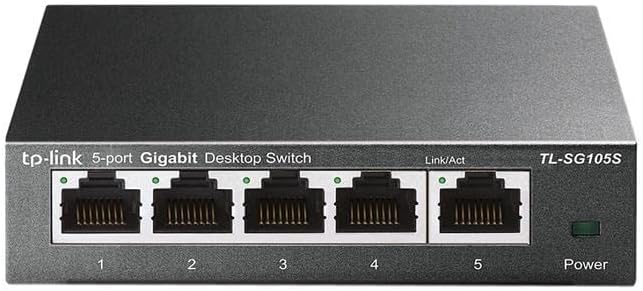
TP-Link TL-SG105S 5-Port Gigabit Ethernet Switch
★★★★★
Expand Your Network with the TP-Link TL-SG105S 5-Port Gigabit Ethernet SwitchThe TP-Link TL-SG105S is a 5-Port Gigabit Ethernet Switch designed for desktop or wall-mount use. With a sturdy metal case, plug-and-play setup, and fanless design, it offers a reliable and silent networking solution. Fe...
$19.99*$21.99Save 9%
View on Amazon
✓ In Stock on Amazon.com
*Price sourced from Amazon.com. Last updated:Jun 04, 2026.Price and availability are subject to change.
Affiliate Disclosure: Studio Supplies may earn a commission from qualifying purchases made through links on this page, at no additional cost to you. This helps support our editorial team.
Notice a mistake? Let Us Know
Overview
Expand Your Network with the TP-Link TL-SG105S 5-Port Gigabit Ethernet Switch
The TP-Link TL-SG105S is a 5-Port Gigabit Ethernet Switch designed for desktop or wall-mount use. With a sturdy metal case, plug-and-play setup, and fanless design, it offers a reliable and silent networking solution. Features like 802.1p/DSCP QoS and IGMP Snooping optimize network traffic for smooth performance.
- Ports: 5 Gigabit Ethernet Ports
- Design: Desktop/Wall-Mount with Sturdy Metal Case
- Setup: Plug & Play
- Cooling: Fanless Design
- Features: 802.1p/DSCP QoS & IGMP Snooping
- Dimensions: 3.94"L x 3.86"W x 0.98"H
Key Features
𝐅𝐮𝐥𝐥 𝐆𝐢𝐠𝐚𝐛𝐢𝐭 𝐂𝐨𝐧𝐧𝐞𝐜𝐭𝐢𝐨𝐧: 5× 10/100/1000Mbps RJ45 Ports expand network capacity and provide stable gigabit speed
𝐏𝐥𝐮𝐠 𝐚𝐧𝐝 𝐏𝐥𝐚𝐲: A plug-and-play design makes for easy deployment, no technician needed. Auto-negotiation on each port senses the link speed of a network device and intelligently adjusts to ensure full compatibility and optimal performance
𝐀𝐝𝐯𝐚𝐧𝐜𝐞𝐝 𝐒𝐨𝐟𝐭𝐰𝐚𝐫𝐞 𝐅𝐞𝐚𝐭𝐮𝐫𝐞𝐬: Prioritize your traffic and guarantee high quality of video or voice data transmission with Port-based 802.1p/DSCP QoS and IGMP Snooping
𝐅𝐥𝐞𝐱𝐢𝐛𝐥𝐞 𝐃𝐞𝐬𝐢𝐠𝐧: Durable metal casing and desktop/wall-mounting design are well-suited for different environments
𝐓𝐏-𝐋𝐢𝐧𝐤 𝐒𝐞𝐜𝐮𝐫𝐞𝐝 𝐏𝐫𝐨𝐭𝐞𝐜𝐭𝐢𝐨𝐧: Backed by our industry-leading 3 year warranty, you can work with confidence
Specifications
Ports
5× 10/100/1000Mbps RJ45 Ports
Features
Plug and Play, Auto-negotiation
Advanced Software Features
Port-based 802.1p/DSCP QoS, IGMP Snooping
Casing Material
Metal
Mounting Options
Desktop, Wall-mounting
Pros & Cons
👍 Pros
- Achieve stable gigabit speeds across your network with five 10/100/1000Mbps RJ45 ports for expanded capacity.
- Deploy the switch with ease thanks to its plug-and-play design, requiring no technical expertise for setup.
- Benefit from auto-negotiation on each port, which intelligently adjusts for optimal performance and compatibility.
- Prioritize critical data with Port-based 802.1p/DSCP QoS and IGMP Snooping for high-quality video and voice transmission.
- Ensure durability and flexible placement with a robust metal casing and options for desktop or wall-mounting.
👎 Cons
- As a 5-port switch, it may not provide sufficient port capacity for very large or expanding home/office networks.
- The device's advanced software features like QoS require understanding network concepts to fully utilize.
- While versatile for desktop/wall mounting, it does not include rack-mounting capabilities suitable for server environments.
Frequently Asked Questions
What kind of network speeds can I expect from the TP-Link TL-SG105S?
The TP-Link TL-SG105S features five 10/100/1000Mbps RJ45 ports, providing full gigabit connection speeds for your expanded network.
Is this network switch difficult to set up?
No, it boasts a plug-and-play design that allows for easy deployment without the need for a technician, thanks to auto-negotiation on each port.
How does this switch ensure high quality for video and voice data?
It includes advanced software features such as Port-based 802.1p/DSCP QoS and IGMP Snooping, which prioritize your traffic to guarantee high quality for video or voice data transmission.
Can the TL-SG105S be mounted in different ways?
Yes, its flexible design features a durable metal casing and supports both desktop and wall-mounting, making it suitable for various environments.
What are the benefits of the auto-negotiation feature?
Auto-negotiation on each port senses the link speed of a connected network device and intelligently adjusts to ensure full compatibility and optimal performance without manual configuration.
Related Products


