


TP-Link
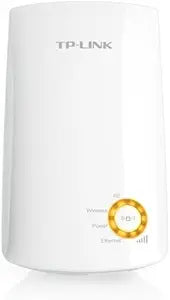
TP-Link TL-WA750RE N150 Universal Wireless Range Extender
★★★★★
The TP-Link TL-WA750RE eliminates 2.4GHz dead zones by repeating your existing Wi-Fi signal at N150 speeds — simple wall-plug deployment, no configuration expertise required.
Check availability
Affiliate Disclosure: Studio Supplies may earn a commission from qualifying purchases made through links on this page, at no additional cost to you. This helps support our editorial team.
Notice a mistake? Let Us Know
Overview
Specifications
Wireless Standard
IEEE 802.11b/g/n
Wireless Speed
Up to 150Mbps (N150)
Frequency Band
2.4GHz (ISM Band)
Type
Universal Wi-Fi range extender / repeater
Form Factor
Wall-plug
Pairing
WPS or manual SSID configuration
Brand
TP-Link
Model
TL-WA750RE
Frequently Asked Questions
Does the TL-WA750RE need to match my router's brand or firmware to function as a repeater?
No — the TL-WA750RE is a universal range extender operating on standard IEEE 802.11n protocol, which means it is compatible with any 802.11b/g/n 2.4GHz router regardless of brand or firmware. It connects to your existing network via WPS or manual SSID configuration.
What is the practical throughput of N150, and what use cases does 150Mbps support?
N150 specifies a maximum theoretical PHY rate of 150Mbps on a single 2.4GHz spatial stream. Real-world throughput is typically 40–70% of the rated maximum due to wireless overhead, distance, and interference — meaning the TL-WA750RE is suited for web browsing, HD video streaming, and light file transfers, but is not the right tool for NAS access or simultaneous 4K multi-device streaming.
Does the extender create a separate SSID, or does it extend the existing network name?
By default, the TL-WA750RE creates a separate extended network SSID (typically appended with "_EXT"). Devices connecting in the extended range area connect to this SSID rather than seamlessly handing off from the router SSID — this is standard behavior for non-mesh range extenders at this tier.
Where is the optimal physical placement for the TL-WA750RE to maximize coverage extension?
The extender should be placed at the midpoint between your router and the dead zone — close enough to receive a strong signal from the router (ideally above -70dBm), but far enough to rebroadcast meaningful coverage into the target area. Placing it too close to the router wastes the extension; too far and it repeats a weak signal, amplifying noise along with the usable signal.
Does the TL-WA750RE support 5GHz band operation?
No — the TL-WA750RE operates exclusively on the 2.4GHz ISM band. It cannot extend 5GHz networks. If your primary router operates on 5GHz and your dead-zone devices require 5GHz connectivity, a dual-band extender would be required.
Related Products


