



TP-Link
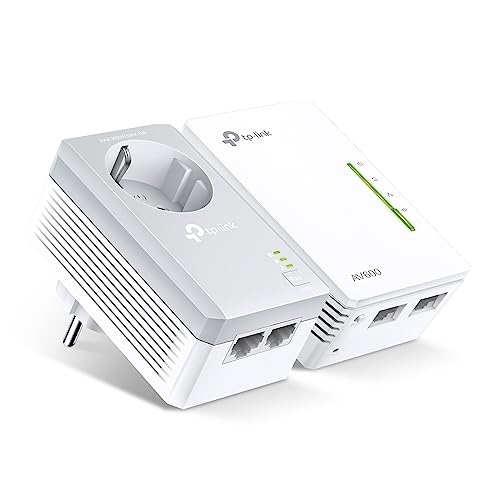
TP-Link TL-WPA4226KIT AV500 Powerline WiFi Extender Kit
Run stable wired-speed networking to any room by converting your home's existing electrical wiring into a 500Mbps network backbone.
$69.99*
View on Amazon
✓ In Stock on Amazon.com
*Price sourced from Amazon.com. Last updated:Oct 22, 2026.Price and availability are subject to change — details.
Affiliate Disclosure: As an Amazon Associate, Studio Supplies earns from qualifying purchases made through links on this page, at no additional cost to you. This helps support our editorial team.
Notice a mistake? Let Us Know
Overview
Key Features
Data Link Protocol:Ethernet, Fast Ethernet, IEEE 802.11b, IEEE 802.11g, IEEE 802.11n, HomePlug AV (HPAV)
Encryption Algorithm:WPA, WPA2, WPA-PSK, 128-bit AES, WPA2-PSK, WEP
Device Type:Bridge
Compliant Standards:IEEE 802.3, IEEE 802.3u, IEEE 802.11b, IEEE 802.11g, IEEE 802.11n , FCC, RoHS
Enclosure Type:Wall-pluggable
Specifications
Brand
TP-Link
Model
TL-WPA4226KIT
Powerline Standard
HomePlug AV (HPAV)
Powerline Speed
Up to 500Mbps (theoretical)
Wi-Fi Standards
IEEE 802.11b/g/n
Data Link Protocol
Ethernet, Fast Ethernet
Encryption
128-bit AES (powerline), WPA, WPA2, WPA-PSK, WPA2-PSK, WEP (Wi-Fi)
Device Type
Bridge
Form Factor
Wall-pluggable
Compliant Standards
IEEE 802.3, 802.3u, 802.11b/g/n, FCC, RoHS
Frequently Asked Questions
What actual throughput should I expect from an AV500 powerline kit in a real home environment?
AV500 refers to the theoretical maximum of 500Mbps over the powerline segment. Real-world throughput in a typical home will land between 80–150Mbps depending on wiring quality, circuit distance, and electrical noise on the line. This is adequate for HD streaming and general browsing but is not a substitute for a direct Ethernet run for latency-sensitive applications.
Does this kit work across different electrical circuits or breaker panels?
Powerline performance degrades significantly — or fails entirely — across separate electrical circuits or sub-panels. Both adapters should ideally be on the same circuit for reliable performance. Phase-separation in a home's wiring is the most common cause of poor powerline throughput.
What wireless standard does the extender adapter support, and what range can I expect?
The extender unit broadcasts 802.11n Wi-Fi (2.4GHz band). 802.11n delivers theoretical speeds up to 300Mbps on 2.4GHz, though practical wireless throughput will be limited by the powerline segment upstream. Range is comparable to a typical wireless router — expect adequate coverage for a single room or adjacent area.
Can I plug this adapter into a power strip or surge protector?
No — powerline adapters should always be plugged directly into a wall outlet. Surge protectors and power strips filter electrical frequencies, which degrades or eliminates the powerline signal. This is the single most common setup mistake with powerline kits.
How does the 128-bit AES encryption on the powerline segment work?
The AV500 standard includes 128-bit AES encryption for the data transmitted over the electrical wiring, preventing neighbors on a shared electrical infrastructure (in apartments, for example) from intercepting the signal. Pairing the adapters activates this encryption.
Related Products


