

TP-Link
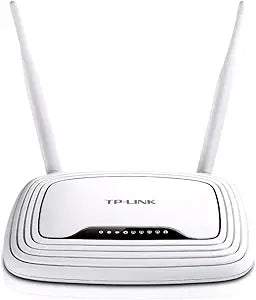
TP-Link TL-WR843ND N300 Wireless AP/Client Router POE
Flexible Wireless Connectivity for Your Network The TP-Link TL-WR843ND Wireless Router provides versatile wireless connectivity with multiple operation modes, including Access Point, WISP, and Client. With speeds up to 300Mbps and Passive POE support, this router is ideal for a variety of networ...
Check availability
Affiliate Disclosure: As an Amazon Associate, Studio Supplies earns from qualifying purchases made through links on this page, at no additional cost to you. This helps support our editorial team.
Notice a mistake? Let Us Know
Overview
Flexible Wireless Connectivity for Your Network
The TP-Link TL-WR843ND Wireless Router provides versatile wireless connectivity with multiple operation modes, including Access Point, WISP, and Client. With speeds up to 300Mbps and Passive POE support, this router is ideal for a variety of network configurations.
- Wireless Speed: Up to 300Mbps
- Operation Modes: Access Point, WISP, Client Router
- Passive POE: Supported
- Wireless Standards: 802.11b/g/n
Key Features
300Mbps wireless data transfer ideal for interruption sensitive applications like HD video streaming
Client Router Mode supports WISP Internet connection, allowing users to share an Internet connection wirelessly or via cables
WAN Port supports up to 30 meters (100 feet) Passive Power over Ethernet
Easily setup a WPA2 encrypted secure connection at a push of the WPS button
Provide hardware switch to change the device’s operation mode easily
WDS wireless bridge provides seamless bridging to expand the wireless network
IP based Bandwidth Control allows administrators to determine how much bandwidth is allotted to each PC
Live Parental Controls allow parents or administrators to established restricted access policies for children or staff. IP and MAC binding effectively prevents ARP attacks
Specifications
Brand
TP-Link
Model
TL-WR843ND N300
Wireless Speed
300Mbps
PoE Support
WAN Port supports Passive Power over Ethernet (up to 30 meters)
Security
WPA2 encrypted connection (via WPS button)
Operation Modes
Client Router Mode, WDS wireless bridge
Control Features
IP based Bandwidth Control, Live Parental Controls, IP and MAC binding
Frequently Asked Questions
What is the maximum wireless data transfer speed of the TP-Link TL-WR843ND router?
This router provides a maximum wireless data transfer speed of 300Mbps.
Does this router support Power over Ethernet (PoE)?
Yes, its WAN Port supports Passive Power over Ethernet, effective up to 30 meters (100 feet).
Can this router be used to expand an existing wireless network?
Yes, it includes WDS wireless bridge functionality for seamless wireless network expansion.
What security features does the TL-WR843ND offer for wireless connections?
It offers easy setup of a WPA2 encrypted secure connection at the push of the WPS button.
Does this router allow for control over internet access for specific users?
Yes, it features Live Parental Controls, allowing administrators to establish restricted access policies.
Is it possible to manage bandwidth for different devices using this router?
Yes, IP based Bandwidth Control is available, allowing administrators to determine bandwidth allocation for each PC.
Can the operation mode of the device be easily changed?
Yes, it provides a hardware switch to change the device’s operation mode easily.
Related Products


