



TP-Link
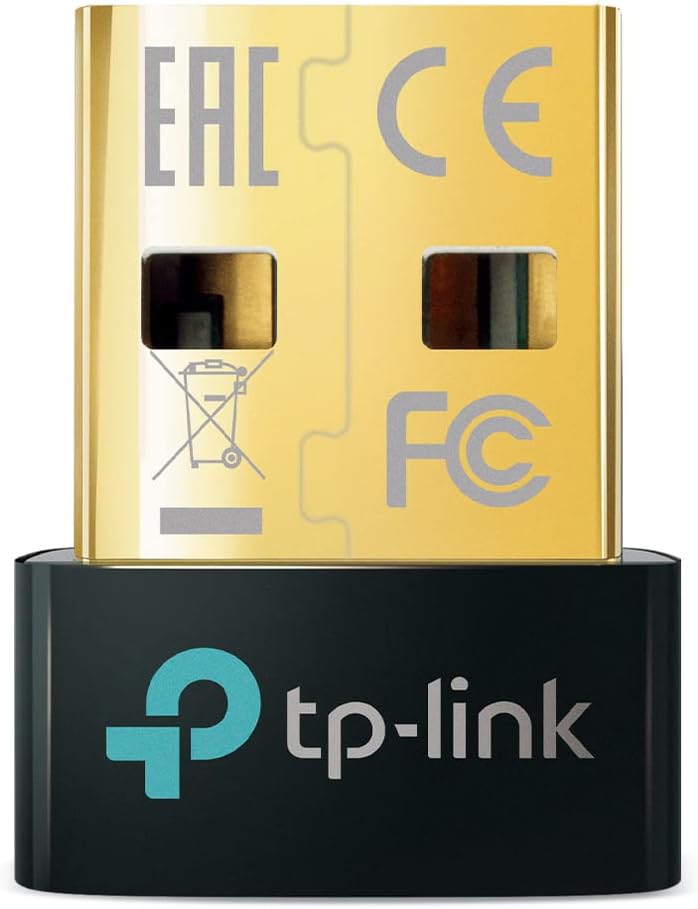
TP-Link UB500 Bluetooth 5.0 USB Adapter
★★★★★
Bluetooth 5.0Bluetooth 5.4Bluetooth 4.0
A nano-sized USB adapter that adds Bluetooth 5.0 connectivity to any Windows PC with simple plug-and-play setup.
View price on Amazon
Affiliate Disclosure: Studio Supplies may earn a commission from qualifying purchases made through links on this page, at no additional cost to you. This helps support our editorial team.
Notice a mistake? Let Us Know
Overview
Key Features
Bluetooth 5.4 + Broad Compatibility - Provides Bluetooth 5.4 plus EDR technology and is backward compatible with Bluetooth V5.3/5.0/4.2/4.0/3.0/2.1/2.0/1.1.
Faster Speed, Extended Range - Get up to 2x faster data transfer and 4x broader coverage compared to Bluetooth 4.0 — perfect for smooth audio streaming and stable connections.
EDR and BLE Technology - This Bluetooth dongle is quipped with enhanced data rate and Bluetooth low energy, UB500 has greatly improved data transfer speed and operates at the optimal rate of power consumption
Nano-Sized - A sleek, ultra-small design means you can insert the Nano Bluetooth receiver into any USB port and simply keep it there regardless of whether you are traveling or at home
Plug & Play with Free Driver Support - Plug and play for Windows 8.1/10/11 (internet required). Supports Win7 (driver required and can be downloaded from website for free). Download the latest driver from TP-Link website to utilize Bluetooth 5.4
Reliable Multi-Device Support - Enables wireless communication with Bluetooth-enabled desktop, printers, phones and headsets. Utilizes Bluetooth low energy technology for energy-saving wireless connectivity
Compatibility NOTE: UB500 is for Windows PCs only and does not support macOS, Linux, TVs, or Windows 8. Not for direct console use (PS5/PS4/Xbox), but controllers can be connected via PC. Two UB500 cannot pair with each other
Setup Tip - Disable any existing internal Bluetooth in Device Manager before using UB500 to avoid driver conflicts.
Specifications
Brand
TP-Link
Model
UB500
Bluetooth Version
5.0 (Upgradable to 5.4 via Driver)
Backward Compatibility
V4.2 / 4.0 / 3.0 / 2.1 / 2.0 / 1.1
Interface
USB 2.0 Type-A
Technology
EDR + BLE (Bluetooth Low Energy)
OS Support
Windows 7, 8.1, 10, 11
Plug and Play
Yes (Windows 8.1 / 10 / 11)
Dimensions
0.74 x 0.58 x 0.27 in
Weight
0.071 oz (2 g)
Pros & Cons
👍 Pros
- Nano-sized design sits nearly flush in a USB port, making it unobtrusive for permanent use
- Plug-and-play on Windows 8.1, 10, and 11 with no driver installation needed
- Bluetooth 5.0 delivers up to 2x faster data transfer and 4x broader range than Bluetooth 4.0
- BLE (Bluetooth Low Energy) support minimizes power draw for compatible devices
- Backward compatible with Bluetooth versions all the way back to 1.1
👎 Cons
- Windows-only — does not support macOS, Linux, or Chrome OS
- Requires a free driver download for Windows 7, not truly plug-and-play on that OS
- Built-in Bluetooth must be manually disabled in Device Manager to avoid conflicts
- Cannot be used directly with game consoles like PS5 or Xbox
- USB-A form factor may require a hub or adapter on laptops with only USB-C ports
Frequently Asked Questions
Which operating systems does the UB500 support?
It supports Windows 7, 8.1, 10, and 11. It is not compatible with macOS, Linux, or Chrome OS. Windows 8.1/10/11 offer plug-and-play support, while Windows 7 requires a free driver download from TP-Link's website.
Can I use this adapter to connect a game controller to my PC?
Yes, you can pair Bluetooth controllers (including PS and Xbox controllers) to your PC through the UB500. However, the adapter cannot be plugged directly into a console — it is for PC use only.
Is it backward compatible with older Bluetooth devices?
Yes, the UB500 is backward compatible with Bluetooth V4.2, 4.0, 3.0, 2.1, 2.0, and 1.1, so it works with both newer and older Bluetooth peripherals.
Do I need to disable my PC's built-in Bluetooth before using this?
Yes — TP-Link recommends disabling any existing internal Bluetooth adapter in Device Manager before using the UB500 to avoid driver conflicts.
Can two UB500 adapters be paired with each other?
No, two UB500 units cannot pair directly with one another. The adapter is designed to connect a PC to Bluetooth-enabled peripherals, not to bridge two computers.
Related Products


