



Western Digital
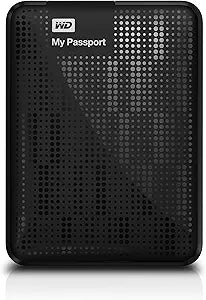
Western Digital WDBY8L0020BBK 2TB My Passport Portable Hard Drive
USB 3.0USB 2.0
2TB of bus-powered portability with USB 3.0 speeds and AES hardware encryption built in — your data vault that fits in a shirt pocket.
Check availability
Affiliate Disclosure: As an Amazon Associate, Studio Supplies earns from qualifying purchases made through links on this page, at no additional cost to you. This helps support our editorial team.
Notice a mistake? Let Us Know
Overview
Key Features
Sleek compact design with plenty of storage
Ultra-fast data transfers with USB 3.0 interface
USB 3.0 and USB 2.0 compatibility
Automatic backup software
Password protection and hardware encryption
2-Year Limited Warranty
Sleek, compact design
Automatic backup software
Password protection and hardware encryption
Specifications
Storage Capacity
2TB
Interface
USB 3.0, USB 2.0
Warranty
2-Year Limited
Frequently Asked Questions
What's the real-world transfer speed difference between USB 3.0 and USB 2.0 on this drive?
USB 3.0 tops out at 5Gbps theoretical bandwidth versus USB 2.0's 480Mbps ceiling — roughly a 10x improvement on paper. In practice, the My Passport's 5400 RPM spinning platter is the actual bottleneck, delivering sequential reads around 100–120 MB/s over USB 3.0. That's still 3–4x faster than the same drive on a USB 2.0 port, where you'd see 25–40 MB/s. For a 2TB backup job, the port choice matters.
Is the hardware encryption on this drive always active, or only when a password is set?
The AES 256-bit hardware encryption engine is always running at the controller level — all data is encrypted on the platter regardless of whether you've set a password via WD Security software. Setting a password simply controls whether the encryption key is accessible at power-on. This means there's no performance penalty for enabling password protection; it's already encrypted.
Does this drive require external power or does USB alone power it?
It's fully bus-powered from the USB port — no AC adapter or separate power brick required. The drive draws power through the same cable used for data. This is part of what makes it genuinely portable; just the drive and a single USB cable.
The product is formatted NTFS out of the box — what's involved in using it with a Mac?
NTFS is read-only on macOS without additional software. To use the My Passport as a read-write drive on a Mac, you'll need to reformat it to exFAT (cross-platform, no journaling) or APFS/HFS+ (Mac-native). Reformatting erases all existing data. WD's included software does not run natively on macOS without this step.
Does the included backup software run automatically in the background?
WD Backup software supports scheduled automatic backups on Windows — you configure a schedule and it runs silently. It is not a continuous sync tool; it operates on your set interval (hourly, daily, etc.) rather than monitoring for real-time file changes.
Related Products
