



Western Digital
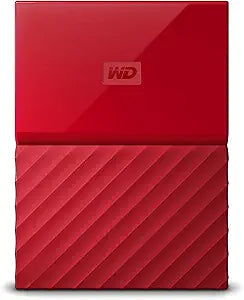
Western Digital WDBYFT0040BRD-WESN 4TB Red My Passport Portable HDD
USB 3.0USB 2.0
Four terabytes of portable storage in USB 3.0 form factor — hardware-encrypted, auto-backup capable, bus-powered from any host.
$199.99*
Check availability
*Price sourced from Amazon.com. Last updated:Aug 28, 2026.Price and availability are subject to change — details.
Affiliate Disclosure: As an Amazon Associate, Studio Supplies earns from qualifying purchases made through links on this page, at no additional cost to you. This helps support our editorial team.
Notice a mistake? Let Us Know
Overview
Key Features
Auto backup with included WD Backup software
Password protection with hardware encryption
Trusted drive built with WD reliability
USB 3.0 port; USB 2.0 compatible. SYSTEM COMPATIBILITY: Windows 10, Windows 8.1, Windows 7. Requires reformatting for Mac OS X operating system
3-year manufacturer's limited warranty
Specifications
Capacity
4TB
Interface
USB 3.0 (USB 2.0 compatible)
Form Factor
2.5-inch Portable
Encryption
256-bit AES Hardware Encryption
Color
Red
OS Compatibility
Windows 10, 8.1, 7 (Mac requires reformatting)
Warranty
3-Year Manufacturer's Limited
Included Software
WD Backup (Windows)
Frequently Asked Questions
Does this drive require an external power adapter, or is it entirely bus-powered via USB?
It is fully bus-powered through the USB connection — no AC adapter required. A single USB 3.0 port provides sufficient power for operation. On older USB 2.0 ports, some users may need a Y-cable to draw power from two USB ports simultaneously due to the increased power demands of the larger platter.
What are the real-world read and write speeds over USB 3.0?
WD does not publish official sequential transfer specifications for this model. In practice, portable HDDs of this class typically deliver 100–130 MB/s read and 90–120 MB/s write over USB 3.0 — performance limited by the 5400 RPM mechanical platter, not the USB interface. USB 3.0's 5 Gbps theoretical ceiling is not the bottleneck here.
Does the hardware encryption on this drive encrypt all data automatically, or only password-protected files?
The 256-bit AES hardware encryption encrypts the entire drive. When you set a password using WD Security software, all data on the drive becomes inaccessible without that password on any host system. Without a password set, the drive operates without encryption active in the encryption path.
Is this drive compatible with macOS, or does it require reformatting?
Out of the box, the drive is formatted as NTFS — readable but not natively writable on macOS without third-party software. To use it as a read/write drive on a Mac, you must reformat to exFAT (cross-platform) or HFS+ (Mac-only). Reformatting erases all contents, so do this before first use.
What does the included WD Backup software actually do, and does it run on Windows 11?
WD Backup is a scheduled backup utility that copies files from specified folders on a Windows PC to the drive at set intervals. It is designed for Windows and works on Windows 10; compatibility with Windows 11 varies by version. Mac users cannot use WD Backup and should use Time Machine or third-party software instead.
Related Products
