



Acer
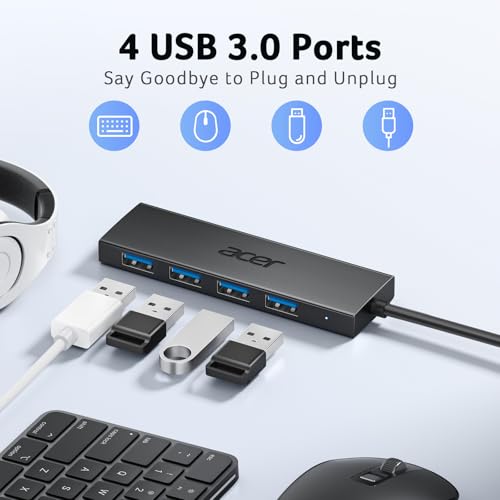
Acer 4-Port USB 3.0 Hub with Power Input
Turn one USB-A port into four full-speed USB 3.0 connections with a dedicated power input for stable hard-drive transfers
$9.87*$11.99Save 17%
View on Amazon
✓ In Stock on Amazon.com
*Price sourced from Amazon.com. Last updated:Nov 02, 2026.Price and availability are subject to change — details.
Affiliate Disclosure: As an Amazon Associate, Studio Supplies earns from qualifying purchases made through links on this page, at no additional cost to you. This helps support our editorial team.
Notice a mistake? Let Us Know
Overview
Key Features
【4 Ports USB 3.0 Hub】Acer USB Hub extends your device with 4 additional USB 3.0 ports, ideal for connecting USB peripherals such as flash drive, mouse, keyboard, printer
【5Gbps Data Transfer】The USB splitter is designed with 4 USB 3.0 data ports, you can transfer movies, photos, and files in seconds at speed up to 5Gbps. When connecting hard drives to transfer files, you need to power the hub through the 5V USB C port to ensure stable and fast data transmission
【Excellent Technical Design】Build-in advanced GL3510 chip with good thermal design, keeping your devices and data safe. Plug and play, no driver needed, supporting 4 ports to work simultaneously to improve your work efficiency
【Portable Design】Acer multiport USB adapter is slim and lightweight with a 2ft cable, making it easy to put into bag or briefcase with your laptop while traveling and business trips. LED light can clearly tell you whether it works or not
【Wide Compatibility】Crafted with a high-quality housing for enhanced durability and heat dissipation, this USB-A expansion is compatible with Acer, XPS, PS4, Xbox, Laptops, and works on macOS, Windows, ChromeOS, Linux
📌NOTE: A separate wall charger/power adapter and charging cable are not included. Please use a 5V USBC power source. High voltage may cause overheating or damage. This USB C port (with IN 5V printed) CANNOT be used for transferring data and charging other devices. It can only supply power for the other 4 USB A ports, which can make data transfer more stable.
Specifications
Brand
Acer
Ports
4x USB 3.0 (USB-A)
Data Transfer Speed
Up to 5Gbps
Controller Chip
GL3510
Power Input
5V USB-C (power only)
Cable Length
2 feet
Indicator
LED status light
Installation
Plug and play, no driver needed
Compatibility
Windows, macOS, ChromeOS, Linux, PS4, Xbox
Frequently Asked Questions
Can the USB-C port on this hub be used to charge my phone or transfer data?
No. The USB-C port marked IN 5V is power-input only. It supplies power to the four USB-A ports to stabilize transfers and cannot charge devices or move data itself.
Do I need to plug in extra power to use the four USB ports?
Not for light peripherals like a mouse, keyboard, or flash drive. Acer recommends connecting the 5V USB-C power input when using external hard drives to keep data transfer stable and fast.
How fast is the data transfer on these ports?
Each of the four ports supports USB 3.0 speeds up to 5Gbps, letting you move movies, photos, and large files in seconds rather than minutes.
Does this hub work with game consoles and different operating systems?
Yes. Acer lists compatibility with PS4 and Xbox alongside laptops and desktops, and it works on Windows, macOS, ChromeOS, and Linux.
Does the Acer hub require installing drivers before use?
No. It is plug and play, so you connect it and all four ports work simultaneously without any driver installation.
How long is the cable and is it easy to travel with?
The hub has a slim, lightweight housing and a fixed 2-foot cable, making it easy to slip into a bag or briefcase for trips.
Related Products


