



Acer
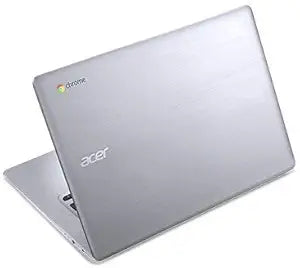
Acer 14inch Chromebook Quad-Core HD (Renewed)
1366 x 76814inch32GB SSDUSB 3.0
A renewed Atom-powered Chromebook that trades raw speed for simplicity, portability, and zero maintenance overhead.
View on Amazon for pricing
Affiliate Disclosure: As an Amazon Associate, Studio Supplies earns from qualifying purchases made through links on this page, at no additional cost to you. This helps support our editorial team.
Notice a mistake? Let Us Know
Overview
Key Features
Intel Atom E8000 Quad-core Processor (Up to 2.00GHz, 2MB Cache), 4GB DDR3 RAM, 32GB SSD
14 HD Widescreen LED-backlit ComfyView Display (1366 x 768), Intel HD Graphics
IEEE 802.11a/b/g/n/ac, Bluetooth, 1x HDMI, 2x USB 3.0, 1x Headphone/Speaker Combo Jack,
Open/Edit MS Office Files Using Free Embedded Quick Office Editor or Google Docs for Free
Chrome OS, 3-Cell Battery Life
Specifications
Processor
Intel Atom E8000 Quad-Core, up to 2.0GHz, 2MB Cache
Graphics
Intel HD Graphics (integrated)
Memory
4GB DDR3
Storage
32GB SSD
Display
14" HD (1366x768) LED-Backlit
Operating System
Chrome OS
Wireless
IEEE 802.11a/b/g/n/ac, Bluetooth
Ports
2x USB 3.0, 1x HDMI, 1x Headphone/Speaker Combo Jack
Battery
3-Cell
Condition
Renewed (professionally inspected and tested)
Frequently Asked Questions
What workloads is the Intel Atom E8000 actually capable of handling at up to 2.0GHz?
The Atom E8000 handles web browsing, Google Docs, YouTube, and light productivity tasks adequately under Chrome OS. It is not capable of running demanding web apps, video editing, or multiple heavy browser tabs simultaneously without noticeable lag. Chrome OS's lightweight architecture is specifically designed to compensate for the Atom's limited instruction throughput.
Does 32GB of eMMC/SSD storage fill up quickly under Chrome OS?
Chrome OS itself consumes roughly 5–8GB, leaving approximately 24GB usable. Since Chrome OS is designed around cloud storage and web apps, local storage pressure is lower than on Windows machines. However, if you install Android apps or store local media files, 32GB constrains your headroom meaningfully. Google Drive integration mitigates this for most users.
Is the 1366x768 display a limitation for productivity work?
At 14 inches, 1366x768 produces a pixel density that is noticeably soft compared to 1080p displays of the same size. Web pages and text render adequately but lack the clarity of higher-resolution panels. For document editing and browsing it is functional; for detailed photo work or fine-text reading over long sessions, eye fatigue can become a factor.
What does "renewed" mean for this Chromebook, and what condition should I expect?
Renewed means the unit has been professionally inspected, tested, and confirmed to function as designed. Cosmetic condition varies by renewal grade — minor scratches or wear marks are possible. All functional components should work correctly, but the unit is not new and does not carry an original manufacturer warranty in the traditional sense.
Can this Chromebook run Microsoft Office or Windows applications?
No Windows applications run on Chrome OS. Microsoft Office files can be opened and edited using the built-in Quick Office editor or Google Docs, which handle .docx and .xlsx formats adequately for basic editing. Full Microsoft 365 features require a browser-based Office 365 session, which runs acceptably on this hardware for standard documents.
Related Products


