



AOC
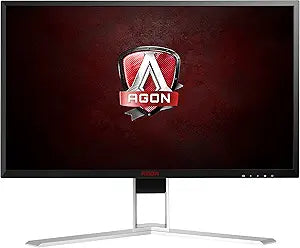
AOC AG271QX AGON 27" Gaming Monitor QHD 144Hz FreeSync
QHD2560x1440USB3.0USB 2.0
QHD resolution at 144Hz on a 27-inch TN panel gives competitive gamers the pixel density and frame-rate headroom to eliminate both blur and detail compromise.
Check availability
Affiliate Disclosure: As an Amazon Associate, Studio Supplies earns from qualifying purchases made through links on this page, at no additional cost to you. This helps support our editorial team.
Notice a mistake? Let Us Know
Overview
Key Features
27" TN Panel, 2560x1440 Resolution, 144hz Response Time, 1ms, Adaptive Sync
Brightness- 350 cd/m2, Dynamic Contrast Ratio- 50,000,000:1,16:9 Aspect Ratio
Connectivity-VGA,DVI,DP,HDMI-MHL, (2) USB3.0, (2) USB 2.0.
Speakers, Audio line-in/out, Quick Switch Controller
Height and Pivot Adjustable, Wall Mountable
Specifications
Screen Size
27 inches
Panel Type
TN
Resolution
2560 x 1440 (QHD)
Refresh Rate
144Hz
Response Time
1ms (GTG)
Adaptive Sync
FreeSync (Adaptive-Sync)
Brightness
350 cd/m²
Contrast Ratio
50,000,000:1 (Dynamic)
Aspect Ratio
16:9
Connectivity
DisplayPort, HDMI, DVI-D, VGA, 2x USB 3.0, 2x USB 2.0
Audio
Integrated speakers, audio line-in/out
VESA Mount
100 x 100mm
Ergonomics
Height, pivot, swivel, tilt adjustable
Frequently Asked Questions
Does the AG271QX support both FreeSync and G-Sync?
The AG271QX supports AMD FreeSync (Adaptive-Sync over DisplayPort and HDMI) natively. It is not certified for NVIDIA G-Sync. However, many NVIDIA GTX 10-series and newer GPUs can drive FreeSync monitors in "G-Sync Compatible" mode — users should verify this in the NVIDIA Control Panel, as it is not guaranteed on this model.
What is the actual variable refresh rate range for FreeSync on this monitor?
AOC specifies the AG271QX's FreeSync range at 30–144Hz over DisplayPort. Running outside this window — particularly below 30 FPS — will cause FreeSync to disengage and may result in tearing. Maintaining frame rates within the 30–144Hz range is required to sustain tear-free operation.
Does the 1ms response time apply to all brightness transitions, or only specific ones?
On TN panels, the rated 1ms GTG (gray-to-gray) applies to mid-tone transitions under ideal conditions. Transitions involving dark-to-dark or bright-to-dark pixels typically take longer. In practice, the AG271QX's TN panel is among the fastest available for pixel response, but the 1ms figure represents peak performance, not a universal guarantee across all transition types.
How does 2560x1440 at 27 inches affect GPU requirements compared to 1080p?
QHD at 27 inches is 78% more pixels than 1080p at the same size, yielding approximately 109 PPI versus 82 PPI. Driving the AG271QX at 144Hz will demand significantly more GPU horsepower than a 1080p 144Hz target. Mid-range GPUs will need to accept lower quality settings to sustain high frame rates within the FreeSync range.
What mounting options does the AG271QX support?
The monitor supports VESA 100x100mm wall mounting and includes an ergonomic stand with height and pivot adjustment. Swivel and tilt are also supported via the stand, making third-party arm mounting straightforward with a standard VESA bracket.
Related Products


