

Apple
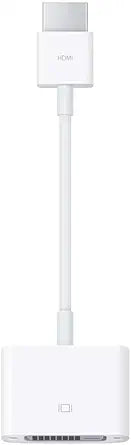
Apple HDMI to DVI Display Adapter
★★★★★
The Apple HDMI to DVI Adapter unlocks dual-display capability on any HDMI-equipped Mac — a passive, no-driver signal conversion that just works.
$12.99*
View on Amazon
✓ In Stock on Amazon.com
*Price sourced from Amazon.com. Last updated:Jul 14, 2026.Price and availability are subject to change.
Affiliate Disclosure: Studio Supplies may earn a commission from qualifying purchases made through links on this page, at no additional cost to you. This helps support our editorial team.
Notice a mistake? Let Us Know
Overview
Key Features
The Apple HDMI to DVI adapter allows you to connect your Mac with built-in HDMI to a DVI display or projector.
You can use an external display as your primary display, extend your desktop to a second display, or work in mirroring mode with a projector so you can view what your audience sees.
Compatible with Mac systems with built-in HDMI
Specifications
Type
HDMI to DVI Adapter (Passive)
Model
MJVU2AM/A
Compatibility
Mac with built-in HDMI
Signal Type
Video only (no audio)
Display Modes
Primary, Extended Desktop, Mirroring
Direction
HDMI output → DVI input (one-way)
Pros & Cons
👍 Pros
- Passive design requires no drivers or software installation — connect it and macOS immediately recognizes the DVI display
- Supports primary display, extended desktop, and mirroring modes, covering the full range of common Mac display workflows
- Apple build quality provides a reliable, snug connector fit that resists intermittent signal loss from a loose connection
- Compact form factor adds negligible weight or bulk to a laptop bag or desk setup
- Straightforward compatibility with any Mac featuring a built-in HDMI port
👎 Cons
- Carries video signal only — DVI has no audio channel, so audio routing requires a separate output path
- No support for display resolutions beyond what the connected DVI monitor's input accepts, which caps out at 1920×1200 on most DVI hardware
- Single-direction only — cannot be used to input a DVI signal into an HDMI port
- No Thunderbolt or USB-C compatibility; useful only on Macs with a physical HDMI port, which excludes most current MacBook models
- Adds one more adapter to a chain that may already include hubs or docks, increasing potential failure points
Frequently Asked Questions
Does this adapter carry audio to the DVI display?
No. DVI is a video-only standard and carries no audio signal. If you need audio output alongside your DVI display, you'll need a separate audio connection from your Mac — a 3.5mm output to powered speakers or a USB audio device are the typical solutions.
Will this adapter work with HDMI ports on non-Apple computers or devices?
The adapter will function with any standard HDMI output, but Apple designates it as compatible with Mac systems with built-in HDMI. Performance on third-party devices is not officially supported or guaranteed.
What display resolutions does this adapter support?
The adapter passes through whatever the source HDMI signal supports, up to the resolution limits of the HDMI specification on the connected Mac. Most modern DVI monitors accept up to 1920×1200 at 60Hz — confirm your display's maximum DVI input resolution before purchasing.
Is this adapter compatible with Thunderbolt-to-HDMI dongles chained together to reach a DVI display?
Daisy-chaining adapters introduces signal integrity risk and is not recommended or officially supported. For a Thunderbolt Mac connecting to a DVI display, use a dedicated Thunderbolt-to-DVI adapter rather than stacking this adapter on a Thunderbolt-to-HDMI converter.
Does this adapter support mirroring and extended desktop modes?
Yes. When connected, macOS treats the DVI display as a standard external monitor. You can configure it as a primary display, extend your desktop for additional screen real estate, or use mirroring mode for presentations — all via the standard Displays preference pane.
Related Products


