
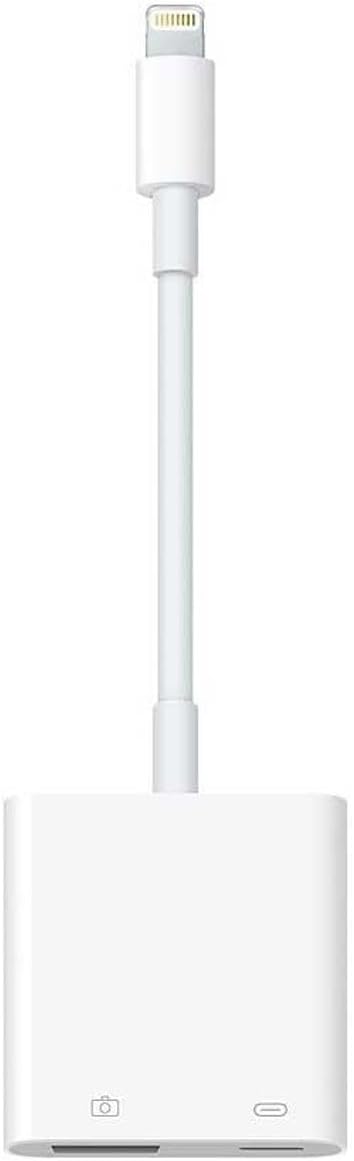


Apple Lightning to USB 3 Camera Adapter — Editorial Review & Use Cases
The Apple Lightning to USB 3 Camera Adapter (MK0W2AM/A) is Apple's powered USB-A adapter for Lightning-port iPads — adds a USB-A 3.0 port for connecting external USB cameras, USB hubs, USB MIDI devices, USB microphones, USB audio interfaces, and USB-class-compliant storage to Lightning iPads. Per Apple's official MK0W2AM/A product page, the adapter includes a pass-through Lightning port for simultaneous charging, supports USB 3.0 SuperSpeed transfer rates (vs the basic Lightning-to-USB Camera Adapter that's USB 2.0 only), and provides the higher power budget needed for class-compliant audio interfaces.
Compatibility — Which iPads Use This Adapter
- Compatible (Lightning-port iPads): iPad Pro 12.9" (1st & 2nd gen, Lightning), iPad Pro 10.5", iPad Pro 9.7", iPad 5/6/7/8/9, iPad mini 4/5, iPad Air 2/3
- NOT compatible (USB-C iPads — use USB-C hub instead): iPad Pro 11"/12.9" 3rd gen+, iPad Air 4+, iPad mini 6+, iPad 10/11
- NOT for iPhone (the iPhone Lightning bus doesn't power USB 3 devices — use Apple's USB-A camera adapter for iPhones, which is USB 2.0 only)
What the USB 3 Camera Adapter Specifically Wins
- True USB 3.0 SuperSpeed transfer rates — vs the basic Lightning-to-USB Camera Adapter (USB 2.0 only at ~480 Mbps), this unit handles 5 Gbps for fast SD/CF/USB-C SSD downloads from cameras
- Class-compliant USB audio interface support — Focusrite Scarlett Solo, Steinberg UR22 mkII, Behringer UMC22 + similar interfaces work for iOS music production via GarageBand / iOS Logic Pro / iOS audio recording apps
- Powered pass-through — plug the iPad's Lightning charger into the adapter's Lightning port; the iPad charges while the USB-A port stays active for the connected device. Critical for sustained USB device sessions that would otherwise drain the iPad
- USB MIDI device compatibility — connects USB MIDI keyboards, controllers, DJ devices for iOS music production
- SD card / USB drive read via Files app for fast photo / video ingest from cameras
- USB microphone support — Shure MV7, Blue Yeti, HyperX QuadCast, Rode NT-USB+ all work for podcast recording on Lightning iPads
- USB ethernet adapter support — wired LAN for iPads in stable-network environments
Where the USB 3 Camera Adapter Specifically Fits
- Photographers / videographers ingesting RAW files from SD/CF cards in the field on iPad Pro (Lightning gen) — speed matters when shoots produce 50-100 GB of files
- iOS music production / iOS GarageBand / iOS Logic Pro on Lightning iPad Pros needing class-compliant audio interface + MIDI input
- Podcasters using iPad as the primary recorder with USB mic (Shure MV7, Blue Yeti)
- iPad-as-DJ-rig setups with USB DJ controllers (Pioneer DDJ family with iOS apps)
- iOS film/TV editorial on iPad (LumaFusion, Premiere Rush) needing fast SD card import
- Field journalism / on-location reporting from Lightning iPads needing audio interface for interviews
- Older Lightning-iPad-Pro users not ready to upgrade to USB-C iPad Pro — extends the Lightning iPad's lifespan for prosumer workflows
Honest Limits Buyers Should Know
- Lightning-only — USB-C iPads NOT compatible. Modern iPad Pro 11/12.9 (3rd gen+), iPad Air 4+, iPad 10+, iPad mini 6+ all use USB-C and need a USB-C hub (Apple USB-C Digital AV Multiport, OWC USB-C Travel Dock) instead. Verify the iPad's port type before purchase
- Charging is REQUIRED for power-hungry USB devices. Without pass-through Lightning charging connected, the iPad's Lightning bus provides only limited power to the USB device — class-compliant audio interfaces typically REQUIRE the pass-through charging connection to operate. Plan to keep the iPad plugged in during USB sessions
- Not all USB peripherals work. The iPad's Lightning USB bus is class-compliant only — non-class-compliant devices (Windows-only printers, proprietary drivers, professional audio interfaces requiring driver installation) won't enumerate. Stick to class-compliant devices: USB audio class 2, USB MIDI class, USB Mass Storage
- Pass-through Lightning port is power only. Cannot pass data through; the Lightning port on the adapter only accepts iPad charging input (no sync, no other Lightning accessory)
- USB-A only — no USB-C. Modern peripherals with USB-C cables need USB-C-to-USB-A adapters. Most pro audio interfaces still ship with USB-A; consumer USB-C peripherals may need adapter chain
- Lightning port is end-of-life on Apple's roadmap. Future iPad models will all be USB-C — this adapter is for current Lightning iPads, not a long-term investment
Where Buyers Should Look Elsewhere
- USB-C iPads → Apple USB-C Digital AV Multiport Adapter (HDMI + USB-A + USB-C charging), OWC USB-C Travel Dock, third-party USB-C hubs
- iPhone Lightning USB needs (basic USB 2.0) → Apple Lightning to USB Camera Adapter (cheaper, slower, no power passthrough on iPhone)
- iPad Pro M4 / M2 / M1 → native USB-C; no adapter needed beyond cables / hubs
- iPad-to-large-storage workflows → USB-C iPad + Thunderbolt SSD (Sony / SanDisk Pro-Blade or LaCie Mobile SSD)
- Pure budget photo ingest → wireless camera-to-iPad transfer (most modern cameras support this) instead of wired adapter
Sources & Citations
- Apple, "Lightning to USB 3 Camera Adapter product page — MK0W2AM/A," apple.com (accessed 2026-05-18)
- Apple Support, "Use a Lightning to USB Camera Adapter with iPhone, iPad, or iPod touch," support.apple.com (accessed 2026-05-18)
- Apple, "iPad & iPhone connectivity accessories overview," apple.com (accessed 2026-05-18)
Last verified: 2026-05-18


