

Apple
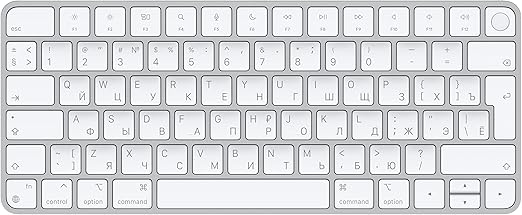
Apple Magic Keyboard Touch ID Wireless Russian White
USB-C
Unlock Seamless Productivity with the Apple Magic Keyboard with Touch ID The Apple Magic Keyboard with Touch ID offers a streamlined and secure typing experience for your Mac. Featuring wireless Bluetooth connectivity, a rechargeable battery, and the convenience of Touch ID for quick and secure a...
View price on Amazon
Affiliate Disclosure: As an Amazon Associate, Studio Supplies earns from qualifying purchases made through links on this page, at no additional cost to you. This helps support our editorial team.
Notice a mistake? Let Us Know
Overview
Unlock Seamless Productivity with the Apple Magic Keyboard with Touch ID
The Apple Magic Keyboard with Touch ID offers a streamlined and secure typing experience for your Mac. Featuring wireless Bluetooth connectivity, a rechargeable battery, and the convenience of Touch ID for quick and secure access, this keyboard enhances your productivity with a touch of elegance. Designed to work seamlessly with Mac computers with Apple silicon.
Specifications:
- Brand: Apple
- Model: Magic Keyboard with Touch ID
- Connectivity: Wireless, Bluetooth
- Battery: Rechargeable Internal
- Compatibility: Mac computers with Apple silicon (macOS 11.4 or later)
- Security: Touch ID
- Cable: USB-C to Lightning Cable
- Key Layout: Russian - White Keys
Key Features
WIRELESS, RECHARGEABLE CONVENIENCE — Magic Keyboard with Touch ID connects wirelessly to your Mac via Bluetooth. And the rechargeable internal battery means no loose batteries to replace.
WORKS WITH ANY MAC WITH APPLE SILICON — It pairs automatically with your Mac with Apple silicon so you can get to work right away. See the list of compatible devices above. Requires a Mac with Apple silicon using macOS 11.4 or later.
ENHANCED TYPING EXPERIENCE — Magic Keyboard delivers a remarkably comfortable and precise typing experience.
QUICK UNLOCK WITH TOUCH ID — Touch ID gives you a fast, easy, secure way to unlock your Mac and sign in to apps and sites.
GO WEEKS WITHOUT CHARGING — The incredibly long-lasting internal battery will power your keyboard for about a month or more between charges. (Battery life varies by use.) Comes with a woven USB-C to Lightning Cable that lets you pair and charge by connecting to a USB-C port on your Mac.
Specifications
Connectivity
Wireless (Bluetooth)
Battery Type
Rechargeable internal battery
Compatibility
Mac with Apple silicon (macOS 11.4 or later)
Security Feature
Touch ID
Typing Experience
Comfortable and precise
Charging Cable
USB-C to Lightning Cable
Battery Life
Approximately a month or more between charges
Language Layout
Russian
Frequently Asked Questions
How does the Apple Magic Keyboard with Touch ID connect to a Mac?
The Apple Magic Keyboard with Touch ID connects wirelessly to your Mac using Bluetooth, providing convenience and a tidy desk.
What kind of battery does this keyboard use?
It is equipped with a rechargeable internal battery, meaning you don't need to replace disposable batteries.
Which Mac models are compatible with this keyboard?
This Magic Keyboard is compatible with Macs that have Apple silicon and are running macOS 11.4 or later.
What is the main security feature of this keyboard?
The main security feature is Touch ID, which allows for quick, easy, and secure unlocking of your Mac and signing into apps and sites.
How long can the keyboard be used between charges?
The internal battery is designed to last for about a month or even more between charges, though actual battery life varies with use.
What cable is provided for charging and pairing?
A woven USB-C to Lightning Cable is included, which facilitates both pairing the keyboard with your Mac and charging its internal battery.
Does this keyboard have a specific language layout?
Yes, this particular model of the Apple Magic Keyboard with Touch ID features a Russian language layout.
Related Products


