
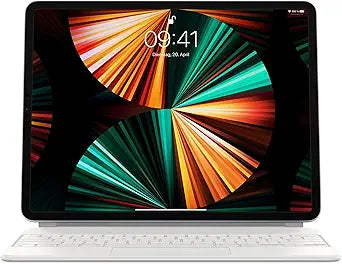


Apple Magic Keyboard for iPad Pro & iPad Air — Editorial Review
The Apple Magic Keyboard for iPad (MXQT2LL/A and locale variants) is Apple's flagship iPad keyboard accessory — a magnetic-attach case + keyboard + trackpad + pass-through USB-C charging combination that converts the iPad into a laptop-class productivity workflow. Per Apple's iPad keyboard accessories page, the Magic Keyboard family covers 11-inch and 13-inch (formerly 12.9-inch) iPad Pro / iPad Air sizes, with multi-language / color variants (Black, White, German, French, Spanish, Italian, Danish, Ukrainian, Arabic, etc.) all sharing the same hardware base.
What the Magic Keyboard Specifically Wins
- Floating cantilever design with adjustable viewing angle — the iPad floats above the keyboard base with adjustable tilt, mimicking laptop ergonomics in a way clip-on detachable keyboards can't
- Built-in trackpad — multi-touch precision trackpad with iPad gesture support (two-finger scroll, three-finger Mission Control / app switcher equivalents). Game-changer for iPadOS productivity workflows in Stage Manager and split-screen apps
- Pass-through USB-C charging — the keyboard hinge includes a USB-C port that charges the iPad without requiring the iPad's own USB-C port to be in use. The iPad's USB-C is then free for SSD, hub, display output
- Backlit keys with auto-brightness sensor — laptop-class key illumination that adjusts to ambient room light
- Scissor-mechanism keys with 1mm travel — same key feel as recent MacBook Air; meaningfully better than chiclet membrane keys on cheap iPad cases
- Magnetic attach + alignment — drops onto the iPad's magnetic ridge and pairs automatically without Bluetooth setup; no charging required (drives off the iPad's Smart Connector)
Compatibility — Critical Before Buying
Magic Keyboard variants are size + generation specific. Per Apple's compatibility documentation:
- 11" Magic Keyboard: fits iPad Pro 11" (1st-4th gen), iPad Air 4-5
- 12.9" Magic Keyboard (older): fits iPad Pro 12.9" (3rd-6th gen)
- 13" Magic Keyboard (M4 generation): fits iPad Pro 13" M4 (different design, with function row and aluminum top)
- NOT compatible with: iPad (9th, 10th, 11th gen entry tier) — those iPads use the Smart Keyboard Folio or Magic Keyboard Folio (a separate, lower-tier product)
Per MacRumors' Magic Keyboard buyers guide, the M4 iPad Pro generation introduced a redesigned Magic Keyboard with function row + aluminum top + larger trackpad — buyers on M4 iPad Pro should buy the new design specifically; the older Magic Keyboard will not properly support the M4's redesigned magnetic interface.
Where the Magic Keyboard Specifically Fits
- iPad-as-laptop-replacement workflows — the trackpad + adjustable cantilever + pass-through charging delivers the closest iPad-to-laptop experience available
- Field journalism / mobile content creation — single iPad + Magic Keyboard package replaces laptop + iPad for portable workflows
- Pro creators using Stage Manager + iPadOS 17+ — trackpad navigation is essential for windowed multi-app iPadOS workflows
- Travel-priority users — the iPad + Magic Keyboard combination is lighter than equivalent-display laptop tier
- Apple ecosystem users who specifically value the seamless magnetic-attach + auto-pair experience
Honest Limits Buyers Should Know
- Premium price tier ($299-$349 for 11", $349-$399 for 12.9"/13"). Substantially more expensive than third-party iPad keyboard cases (Logitech Combo Touch, ZAGG Pro Keys at $130-180 tier)
- Adds significant weight to the iPad. Per Apple's specs, the Magic Keyboard roughly doubles the iPad's total weight when attached. Travelers prioritizing lightest-possible weight may prefer detachable Bluetooth keyboards
- Cantilever design isn't lap-friendly. The Magic Keyboard works well on a desk but is awkward on a lap — the floating-iPad design lacks the stability of a laptop hinge. For lap-heavy use, the Logitech Combo Touch's kickstand may be preferable
- Locale variants are tied to the keyboard layout. Buyers should verify the SKU language matches their typing preference — switching between an Arabic layout and an English typing workflow within iPadOS is awkward
- Older 12.9" Magic Keyboard does not fit M4 iPad Pro 13". The M4 generation requires the new Magic Keyboard design; buyers upgrading from older 12.9" iPad Pro must also buy a new keyboard
- Trackpad gestures require iPadOS 16+ for full feature set. Older iPadOS versions support basic cursor but not the full Stage Manager / Mission Control gesture set
Where Buyers Should Look Elsewhere
- Entry-tier iPad (9th, 10th, 11th gen) → Apple Smart Keyboard Folio or Apple Magic Keyboard Folio (the lower-tier folio model, NOT the Magic Keyboard covered here)
- Budget alternatives → Logitech Combo Touch (with kickstand + trackpad at lower price), ZAGG Pro Keys, Brydge Pro+
- Lap-friendly typing → Logitech Combo Touch (kickstand provides lap stability)
- Bluetooth-keyboard standalone use (no case) → Apple Magic Keyboard (standalone, not the iPad-case variant), Logitech MX Keys Mini, Keychron K-series
- M4 iPad Pro owners → new Magic Keyboard with function row + aluminum top + larger trackpad
Sources & Citations
- Apple, "iPad Keyboards product page," apple.com (accessed 2026-05-18)
- MacRumors, "Apple Magic Keyboard for iPad buyer's guide," macrumors.com (accessed 2026-05-18)
- Apple, "iPad Magic Keyboard — Tech Specs," apple.com (accessed 2026-05-18)
Last verified: 2026-05-18


