Apple

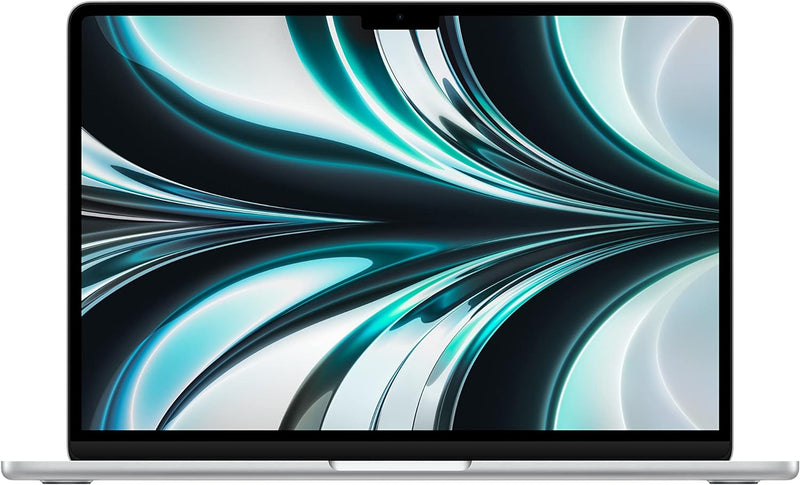
Apple MC7V4LL/A M2 MacBook Air 13.6" 16GB RAM 256GB SSD

4.7 (979 reviews)
1080pApple M216GB RAM256GB SSD

M2's unified memory architecture and 8-core CPU push laptop performance past Intel-class ultrabooks — in a fanless 2.7-pound Silver chassis built to run all day.

$799.00*$999.00Save 20%
Check availability

*Price sourced from Amazon.com. Last updated:Jun 19, 2026.Price and availability are subject to change.

Affiliate Disclosure: Studio Supplies may earn a commission from qualifying purchases made through links on this page, at no additional cost to you. This helps support our editorial team.

Notice a mistake? Let Us Know

Overview

The Apple MC7V4LL/A is the 2022 MacBook Air M2 in Silver — Apple's clean, neutral finish on the same M2 platform that redefined ultrabook performance benchmarks. The M2 chip packages an 8-core CPU and up to 10-core GPU alongside 16GB of unified memory in a single die, eliminating the discrete memory bus that adds latency in conventional architectures. What this means practically: the CPU, GPU, and Neural Engine all pull from the same high-bandwidth memory pool at chip-level speeds. Application performance in memory-intensive workflows — Lightroom catalogues, multi-track audio sessions, large spreadsheets, active compilation — is noticeably tighter than 16GB LPDDR5 systems in comparable form factors.

The Silver finish MacBook Air is the M2 in its most versatile visual form — works in any professional setting, shows fingerprints less aggressively than Midnight, and doesn't draw attention. At 2.7 pounds with a passive thermal design, it's built for professionals who need to move. The 13.6-inch Liquid Retina display at 500+ nits covers P3 wide color, making it accurate enough for photo editing and design review without an external reference monitor. The 256GB SSD is the configuration detail that requires the most scrutiny: it handles a standard macOS install plus a reasonable app library cleanly, but any workflow involving local raw media storage, virtualization, or large development dependencies will close in on the ceiling quickly. Storage cannot be upgraded after purchase — this is the one decision that should be made carefully before ordering.

Key Features

STRIKINGLY THIN DESIGN — The redesigned MacBook Air is more portable than ever and weighs just 2.7 pounds. It’s the incredibly capable laptop that lets you work, play or create just about anything — anywhere.

SUPERCHARGED BY M2 — Get more done faster with a next-generation 8-core CPU, up to 10-core GPU and up to 24GB of unified memory.

BUILT FOR APPLE INTELLIGENCE—Apple Intelligence is the personal intelligence system that helps you write, express yourself, and get things done effortlessly. With groundbreaking privacy protections, it gives you peace of mind that no one else can access your data—not even Apple.*

UP TO 18 HOURS OF BATTERY LIFE — Go all day and into the night, thanks to the power-efficient performance of the Apple M2 chip.

BIG, BEAUTIFUL DISPLAY — The 13.6-inch Liquid Retina display features over 500 nits of brightness, P3 wide color and support for 1 billion colors for vibrant images and incredible detail.

ADVANCED CAMERA AND AUDIO — Look sharp and sound great with a 1080p FaceTime HD camera, three-mic array and four-speaker sound system with Spatial Audio.

VERSATILE CONNECTIVITY — MacBook Air features a MagSafe charging port, two Thunderbolt ports and a headphone jack.

EASY TO USE — Your Mac feels familiar from the moment you turn it on, and works seamlessly with all your Apple devices.

BUILT TO LAST — The all-aluminum unibody enclosure is exceptionally durable. And free software updates keep things running smooth and secure for years to come.

SIMPLY COMPATIBLE — All your go-to apps run lightning-fast — including Microsoft 365, Zoom, and many of your favorite iPhone and iPad apps.

Specifications

Chip
Apple M2 (8-Core CPU, up to 10-Core GPU)
Memory
16GB Unified Memory
Storage
256GB SSD
Display
13.6-inch Liquid Retina
Brightness
500 nits
Color
Silver
Weight
2.7 pounds
Battery Life
Up to 18 hours
Camera
1080p FaceTime HD
Audio
Three-mic array, four-speaker system with Spatial Audio
Connectivity
MagSafe, 2x Thunderbolt/USB 4, Headphone jack
Operating System
macOS
Brand
Apple
Model
MC7V4LL/A

Apple MacBook Air (M2) — Editorial Review

The M2 MacBook Air was a ground-up redesign of Apple's most popular laptop: a flat, thinner chassis, MagSafe charging, a larger notched Liquid Retina display, and the M2 chip — all fanless and silent. As Tom's Hardware summarized, it's thinner and better than the outgoing wedge design, if more expensive. Apple still sells it as the entry-level Air, which makes it one of the best-value Mac laptops.

Featured Video Review

The Definitive M2 MacBook Air Review
Snazzy Labs · "The Definitive M2 MacBook Air Review" · Watch on YouTube

Silent, refined, all-day

Tom's Guide and Computerworld both praise the combination of strong M2 performance for everyday work, total silence (no fan), excellent battery life, and the premium redesigned build with MagSafe. For web, office, and light creative work it's quick and effortless. In Snazzy Labs' "definitive" review — featured above — the verdict is that the M2 Air nails the fundamentals of a mainstream laptop, with the trade-offs below worth understanding before you configure one.

Honest cons

  • Fanless throttling. Under sustained heavy loads (long exports, gaming) performance drops because there's no fan to shed heat — fine for everyday use, limiting for prolonged demanding work.
  • 8GB base RAM + single-NAND 256GB SSD. The base configuration shows real slowdowns in memory-heavy tasks and slower base-SSD speeds; reviewers recommend 16GB since memory isn't upgradeable.
  • The notch. Some find the display notch visually disruptive, especially in full-screen apps.
  • Priced above the old Air. The redesign came with a price bump over the previous wedge model.

Where this laptop fits

  • Students and everyday users who want a silent, premium, all-day ultraportable for web, office, and light creative work at the entry Mac price.
  • Value buyers who don't need the latest M-series chip and want the best price on a modern MacBook Air.
  • Light creators who should configure 16GB / 512GB rather than the base tier for headroom.
  • Not sustained-export pros or gamers (a MacBook Pro's active cooling is better), or anyone who needs the absolute newest chip.

Sources & Citations

  1. Tom's Hardware, "MacBook Air (M2) Review: Thinner, Better, More Expensive," tomshardware.com (accessed 2026-05-25)
  2. Tom's Guide, "MacBook Air M2 (2022) review," tomsguide.com (accessed 2026-05-25)
  3. Computerworld, "Review: Apple's M2 MacBook Air," computerworld.com (accessed 2026-05-25)

Last verified: 2026-05-25

Now that you've seen the details — ready to take a closer look?

Check availability

Pros & Cons

👍 Pros

  • M2 8-core CPU delivers multi-core throughput competitive with plugged-in Intel Core i7 machines at a fraction of the power draw
  • 16GB unified memory provides higher effective bandwidth than conventional LPDDR5 configurations, measurably improving memory-bound workloads
  • Four-speaker system with Spatial Audio and three-mic array produce genuinely above-average audio I/O for a thin-and-light laptop
  • Aluminum unibody enclosure is exceptionally rigid — no chassis flex under keyboard pressure, consistent with long-term durability in daily carry
  • MagSafe charging preserves both Thunderbolt ports for active peripheral use simultaneously

👎 Cons

  • 256GB SSD is a tight allocation for creative professionals and developers — external storage becomes a workflow requirement, not an option
  • Storage is soldered with no upgrade path; capacity is determined at purchase and cannot be changed
  • Single external display support limits desktop expansion for multi-monitor power users
  • Two Thunderbolt ports requires a hub for most desk setups involving external storage, display, and peripherals simultaneously
  • No HDMI output and no SD card slot natively — common media workflow connectors require adapters

Frequently Asked Questions

MC7V4LL/A is Apple's North American part number for the 2022 MacBook Air M2 in Silver with 16GB unified memory and 256GB SSD. The configuration is identical in performance to Midnight and Starlight variants at the same specs — the differentiator is the Silver anodized aluminum finish.
The M2 eliminates two bottlenecks simultaneously: CPU power consumption (lower draw enables fanless design without throttling) and memory bus latency (unified memory removes the bandwidth gap between CPU and GPU). The net result is faster sustained performance and longer battery life than the Intel-based MacBook Airs it replaced.
The M2's power envelope is conservative enough that Apple's passive thermal design keeps performance stable across typical productivity, creative, and development workloads. Under prolonged maximum CPU and GPU load — extended video export queues, heavy simulation — the chip will taper performance modestly compared to actively cooled MacBook Pro variants. For the vast majority of real-world workloads this is not detectable.
No. The M2 MacBook Air supports one external display natively via Thunderbolt. Connecting two external displays simultaneously requires a third-party workaround (DisplayLink adapter) and has associated driver and performance trade-offs. This is an architectural limitation of the M2 Air, not the Silver color variant.
Microsoft 365, Zoom, Slack, and most enterprise productivity software run natively on Apple Silicon with full feature parity. Some specialized enterprise software may require Rosetta 2 translation for x86 binaries — which runs transparently and performs well — but this is increasingly rare as vendors ship native ARM versions.