Apple

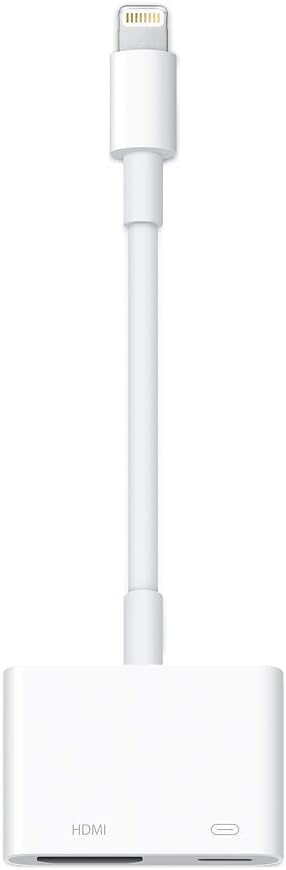
Apple MD826AM/A Lightning to Digital AV Adapter

4.6 (68325 reviews)
1080p

Apple's official Lightning-to-HDMI adapter for mirroring your iPhone or iPad screen to any display in up to 1080p HD.

$39.00*$49.00Save 20%
In Stock on Amazon.com
View on Amazon

*Price sourced from Amazon.com. Last updated:Jun 19, 2026.Price and availability are subject to change.

Affiliate Disclosure: Studio Supplies may earn a commission from qualifying purchases made through links on this page, at no additional cost to you. This helps support our editorial team.

Notice a mistake? Let Us Know

Overview

The Apple Lightning Digital AV Adapter (MD826AM/A) provides a direct, wired connection between any Lightning-equipped iPhone, iPad, or iPod touch and an HDMI-compatible display. Once connected, it mirrors your device's screen — including apps, presentations, websites, photos, and slideshows — on a TV, monitor, or projector at up to 1080p HD resolution. It also supports direct video output, so movies, TV shows, and captured video play on the big screen with both video and audio transmitted over the single HDMI connection. The setup is entirely plug-and-play: connect the adapter to your Lightning port, run an HDMI cable to your display, and the output begins automatically with no software or configuration needed.

As an official Apple accessory, the MD826AM/A is built for seamless compatibility with iOS 9 and later, which covers the vast majority of Lightning-equipped Apple devices still in active use. The adapter includes a Lightning pass-through port on its body, so you can keep your device charging during extended presentations or movie sessions without interrupting the video feed. Its compact, white plastic design is lightweight and easy to toss into a laptop bag or travel kit. While the 1080p maximum resolution means it will not deliver 4K output, it remains a practical and dependable solution for anyone who regularly needs to share their iOS device screen on an external display.

Key Features

Use the Lightning Digital AV Adapter with your iPhone, iPad, or iPod with Lightning connector.

The Lightning Digital AV Adapter supports mirroring of what is displayed on your device screen — including apps, presentations, websites, slideshows, and more — to your HDMI-equipped TV, display, projector, or other compatible display in up to 1080p HD.

It also outputs video content — movies, TV shows, captured video — to your big screen in up to 1080p HD.

Simply attach the Lightning Digital AV Adapter to the Lightning connector on your device and then to your TV or projector via an HDMI cable (sold separately).

Requires an HDMI cable (sold separately) for connection to your TV or projector. Supports both video and audio output.

Specifications

Brand
Apple
Model
MD826AM/A
Connector Type
Lightning to HDMI
Maximum Resolution
1080p HD
Video Output
Yes
Audio Output
Yes
Compatibility
iPhone, iPad, iPod touch with Lightning (iOS 9 or later)
HDMI Cable Included
No (sold separately)
Color
White

Apple Lightning to Digital AV Adapter (MD826AM/A) — Editorial Review

The Apple Lightning to Digital AV Adapter (MD826AM/A) is Apple's HDMI-out adapter for Lightning-port iPhones and iPads — converts Lightning to HDMI for mirroring or video-out to TVs, projectors, and monitors. Per Apple's official MD826AM/A product page, the adapter supports up to 1080p video output, includes a pass-through Lightning port for simultaneous charging, and works with iPhone (5+) through iPhone 14 generations, iPad (4th gen onward through iPad-with-Lightning models), and the iPod touch.

Compatibility — Which Devices Use This Adapter

The MD826AM/A is the Lightning adapter. Per Apple's compatibility documentation:

  • Compatible: iPhone 5 through iPhone 14, iPad 4th gen through iPad 9th gen, iPad mini 1-5, iPad Air 1-3, iPad Pro (1st gen with Lightning), all generations of iPod touch with Lightning
  • NOT compatible (use USB-C adapter): iPhone 15 and later, iPad 10/11, iPad mini 6+, iPad Air 4+, iPad Pro 11" (1st-gen and later), iPad Pro 12.9" (3rd-gen and later) — all USB-C devices need the Apple USB-C Digital AV Multiport Adapter instead

What the Adapter Specifically Does

  • Lightning → HDMI output up to 1080p — mirrors the iPhone / iPad screen to TVs / projectors / monitors
  • Pass-through Lightning charging — plug the iPhone's Lightning charger into the adapter's Lightning port to charge while using HDMI out (the iPhone Lightning port itself is occupied by the adapter)
  • Mirror and extend modes — apps that support extended-mode (Keynote, Pages, video apps) can use the HDMI output for a different image than the iPhone screen
  • HDCP-protected video playback — streaming apps (Netflix, Disney+, Apple TV+) honor copy-protection signaling over HDMI
  • No driver / setup required — class-compliant HDMI from iOS

Where the Adapter Specifically Fits

  • Presenters using Lightning iPads / iPhones for Keynote / PowerPoint to projectors in classrooms, boardrooms, conference rooms
  • Video playback from iPhone / iPad to hotel TVs when traveling (where the iPhone is the only video source)
  • iPad-as-camera-monitor for Lightning iPads connected to HDMI capture cards for streaming workflows
  • FaceTime / Zoom on big screens by mirroring iPhone / iPad to HDMI display
  • Backup adapter for emergency presentation use when device-native HDMI / USB-C-to-HDMI is unavailable

Honest Limits Buyers Should Know

  • 1080p output only — no 4K. Per Apple's spec, the adapter caps at 1080p. For 4K video output, users need the iPhone / iPad's USB-C port + USB-C Digital AV Multiport Adapter, or a more recent device entirely
  • iPhone 15+ / current iPads with USB-C are NOT compatible. Lightning is end-of-life across Apple's current lineup. Buyers with USB-C devices need the USB-C Digital AV Multiport Adapter (different SKU). Verify the device's connector before purchasing
  • HDMI cable is NOT included. The adapter has a female HDMI port; users supply their own standard HDMI cable
  • Some apps don't support extended mode. Many iOS apps only mirror; the extended-mode behavior depends on individual app support
  • Latency over HDMI is fine for video but not gaming. Mirror-mode introduces ~50-100ms latency; competitive gaming via mirror is impractical
  • Lightning passthrough port handles power only, not data. The passthrough is for charging the device — it doesn't support sync, USB-data, or external accessory connection while in HDMI mode

Where Buyers Should Look Elsewhere

  • USB-C iPhone 15+ / current iPads → Apple USB-C Digital AV Multiport Adapter
  • 4K HDMI output → USB-C Digital AV Multiport on USB-C-port iPads / iPhone 15 Pro+
  • Wireless mirroring → Apple TV 4K (use AirPlay from any iPhone / iPad to Apple TV-connected HDMI display)
  • USB-C-to-HDMI on Mac → standard USB-C to HDMI cable, or Apple USB-C Digital AV Multiport Adapter
  • Multi-display setups → Apple's USB-C Multiport Adapter has additional ports (USB-A, USB-C charging) beyond just HDMI

Sources & Citations

  1. Apple, "Lightning Digital AV Adapter product page — MD826AM/A," apple.com (accessed 2026-05-18)
  2. Apple Support, "Use a Lightning Digital AV Adapter or Lightning to VGA Adapter with iPhone, iPad, or iPod touch," support.apple.com (accessed 2026-05-18)
  3. Apple, "iPhone & iPad AV cables and adapters," apple.com (accessed 2026-05-18)

Last verified: 2026-05-18

Now that you've seen the details — ready to take a closer look?

View on Amazon

Pros & Cons

👍 Pros

  • Official Apple product ensures reliable compatibility with Lightning-equipped iOS devices
  • Supports both screen mirroring and direct video output up to 1080p HD
  • Outputs audio and video simultaneously over a single HDMI connection
  • Simple plug-and-play setup with no drivers, apps, or configuration required
  • Compact and portable design is easy to carry in a bag or pocket

👎 Cons

  • Maximum output is 1080p, which does not take advantage of 4K displays
  • Only works with Lightning-equipped Apple devices, offering no USB-C compatibility
  • No HDMI cable included in the box, requiring a separate purchase
  • Mirrored content from some streaming apps may be restricted by DRM policies

Frequently Asked Questions

It works with any iPhone, iPad, or iPod touch that has a Lightning connector and runs iOS 9 or later.
The adapter supports screen mirroring and video output at up to 1080p HD resolution.
Yes, you need an HDMI cable (sold separately) to connect the adapter to your TV, projector, or display. The adapter itself plugs directly into your device's Lightning port.
The adapter includes a Lightning pass-through port, allowing you to connect a charging cable while simultaneously outputting video to a display.
Yes, the Lightning Digital AV Adapter outputs both video and audio over HDMI, so sound from your device plays through your connected display or its speakers.