



Apple
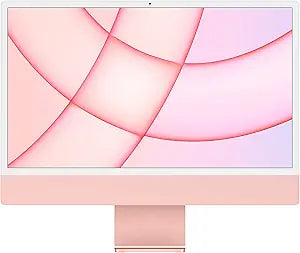
Apple MGPM3LL/A 2021 iMac M1 24-inch 8GB 256GB Pink Renewed
★★★★★
1080pApple M1
The M1 iMac's unified memory architecture eliminates the CPU-GPU bandwidth bottleneck, delivering desktop-class performance in an 11.5 mm chassis — renewed to factory-equivalent condition.
$899.00*
View on Amazon
✓ In Stock on Amazon.com
*Price sourced from Amazon.com. Last updated:Jul 23, 2026.Price and availability are subject to change.
Affiliate Disclosure: Studio Supplies may earn a commission from qualifying purchases made through links on this page, at no additional cost to you. This helps support our editorial team.
Notice a mistake? Let Us Know
Overview
Key Features
Immersive 24-inch 4.5K Retina display with P3 wide color gamut and 500 nits of brightness
Apple M1 chip delivers powerful performance with 8-core CPU and 8-core GPU
Strikingly thin 11.5 mm design in vibrant colors
1080p FaceTime HD camera with M1 ISP for amazing video quality
Studio-quality three-mic array for crystal clear calls and voice recordings
Specifications
Display Size
24-inch
Display Resolution
4.5K Retina
Color Gamut
P3 Wide
Brightness
500 nits
Processor
Apple M1 chip
CPU Cores
8-core
GPU Cores
8-core
Design Thickness
11.5 mm
Camera
1080p FaceTime HD
Microphone Array
Studio-quality three-mic
Frequently Asked Questions
What does "renewed" mean for this iMac, and what should I expect in terms of condition?
A renewed unit has been inspected, tested, and certified to function like new. Cosmetic condition varies by the specific seller's grading — look for the condition tier (e.g., "Like New," "Good") in the listing. Internal components are verified operational, but battery cycle counts and minor surface wear may differ from a retail-new unit.
Is 8GB of unified memory sufficient for everyday productivity and light creative work?
For most productivity workloads — web browsing, email, document editing, video calls, and light photo editing — 8GB of unified memory on the M1 performs equivalently to 16GB of conventional RAM on Intel-based systems because of how Apple's unified memory architecture eliminates separate memory pools for CPU and GPU. Where you'll notice pressure is in sustained multitasking with memory-heavy apps like large Lightroom catalogs, Final Cut Pro with 4K timelines, or running multiple virtual machines simultaneously.
What ports does this iMac include?
The base M1 iMac configuration includes two Thunderbolt/USB 4 ports. Higher-configured M1 iMac models include additional USB 3 ports. Verify the specific port configuration for this SKU (MGPM3LL/A) before purchasing if your workflow depends on USB-A or additional Thunderbolt connections — dongles or a hub may be required.
How does the 256GB SSD affect real-world storage workflow?
256GB is a tight baseline for a primary machine. With macOS consuming roughly 15–20GB and typical application installs, usable space fills quickly for users who work with video, raw photography, or large project files. Plan for external storage from the start — the Thunderbolt ports support fast external SSDs that can serve as seamless working drives.
Is the display quality significantly better than a standard 1080p monitor?
Yes. The 4.5K Retina display at 218 PPI renders text and UI elements at a sharpness that standard 1080p cannot match. Combined with the P3 wide color gamut, the display is accurate enough for photo editing and video color work without external calibration for most non-broadcast use cases. 500 nits of brightness is adequate for indoor use but not suitable for direct sunlight environments.
Related Products


