



Apple
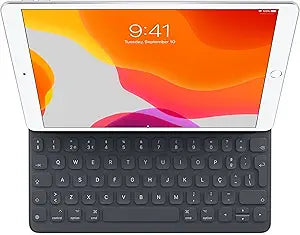
Apple Portuguese Smart Keyboard 10.5-Inch iPad Pro
Battery-free Smart Connector keyboard with broad iPad compatibility serves three device generations from a single accessory.
View price on Amazon
Affiliate Disclosure: As an Amazon Associate, Studio Supplies earns from qualifying purchases made through links on this page, at no additional cost to you. This helps support our editorial team.
Notice a mistake? Let Us Know
Overview
Key Features
Smart Keyboard lets you write a term paper or create a presentation on a full-size keyboard whenever you need one
It connects easily without the need for pairing or charging, so it’s always ready to go
And when you’re done, it folds to create a slim, lightweight cover
Compatible with iPad 10.2-Inch, iPad Air 10.5-Inch, and iPad Pro 10.5-Inch
Specifications
Brand
Apple
Keyboard Layout
Portuguese
Connection
Smart Connector
Power
No batteries or charging required
Compatible Devices
iPad 10.2-inch, iPad Air 10.5-inch, iPad Pro 10.5-inch
Function
Full-size keyboard and protective front cover
Pairing Required
No
Frequently Asked Questions
Which iPad models does this Smart Keyboard actually work with?
It is compatible with the iPad 10.2-inch (7th gen), iPad Air 10.5-inch (3rd gen), and iPad Pro 10.5-inch. All three share the same Smart Connector placement and form factor. It will not fit the 11-inch iPad Pro or any iPad without a Smart Connector.
Does this keyboard require any software setup or driver installation?
No. The Smart Connector is a hardware-level interface — the iPad recognizes the keyboard the moment it is unfolded and attached. There are no drivers, no firmware updates, and no settings to configure beyond standard iPadOS keyboard preferences.
What is the Portuguese keyboard layout, and can I switch it to English in software?
The physical keys are printed with Portuguese character assignments, including diacritical marks specific to the Portuguese language. You can set iPadOS to use any software keyboard language, but the printed labels on the keys will still reflect the Portuguese layout, which may cause confusion for non-Portuguese typists.
How does this Smart Keyboard handle protection when not being used for typing?
It folds over the iPad's display as a front cover, providing scratch and minor impact protection for the screen. The rear and edges of the iPad remain exposed — this is not a full enclosure case.
Can I use a separate case alongside this Smart Keyboard?
Most back-panel cases will interfere with the magnetic alignment and Smart Connector contact. Slim skin-type adhesive protectors may work, but anything with raised edges around the connector area will prevent proper attachment.
Related Products

