
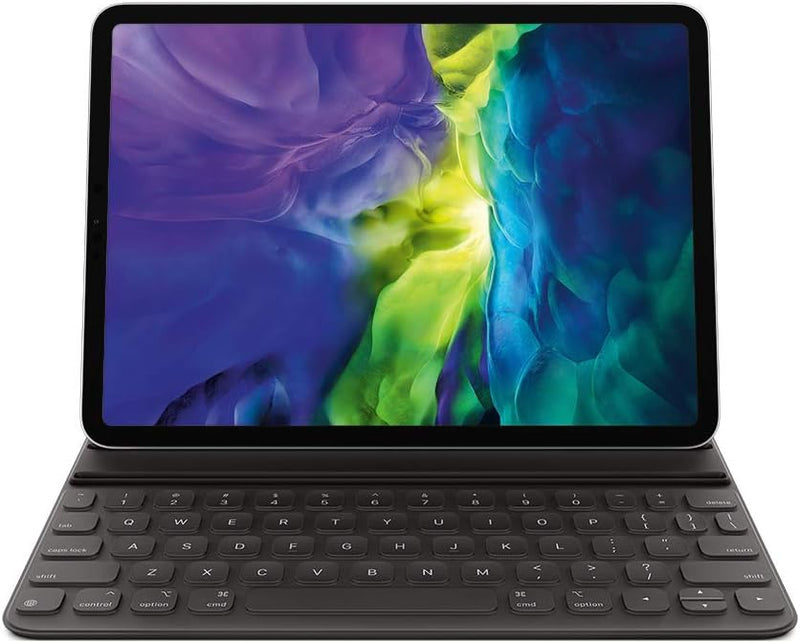


Apple Smart Keyboard Folio for iPad Pro 11" & iPad Air — Editorial Review & Use Cases
The Apple Smart Keyboard Folio is Apple's no-trackpad keyboard cover for 11-inch iPad Pro (USB-C and Lightning generations) and iPad Air (USB-C and Lightning generations). It positions the iPad in a propped-up writing angle, connects via Smart Connector (no Bluetooth pairing, no charging required), and provides full-size laptop-style keys with the standard iPad keyboard shortcuts. Per Apple's official iPad Keyboards page, the Smart Keyboard Folio is positioned below the Magic Keyboard for iPad ($249 vs $299) as the keyboard option without trackpad.
What the Smart Keyboard Folio Specifically Wins
- Smart Connector pairing — no Bluetooth, no charging — physically docks to the iPad's three-pin Smart Connector. Keyboard powers from iPad battery, never needs separate charging. No pairing dance, no Bluetooth latency, no "keyboard disconnected" popups
- Lighter than Magic Keyboard for iPad — folio design is ~½ the weight of the Magic Keyboard for iPad. Better for backpack carry + travel productivity
- Two viewing angles — folds back to support iPad in either typing-position or video-watching position
- Lower price vs Magic Keyboard — $50-100 cheaper than Magic Keyboard for iPad, depending on iPad-model variant. Significant savings for productivity users who don't need a trackpad
- Apple-direct quality + Apple ecosystem support — vs cheaper third-party iPad keyboard cases, the Apple-built folio has stable firmware updates, proper Smart Connector implementation, and won't disappear from drivers
- Better than typing on iPad screen — the soft-touch keys + key travel make extended writing substantially better than on-screen typing
Where the Smart Keyboard Folio Specifically Fits
- Writers / journalists / students who type extensively on iPad as the primary device but rarely need precision cursor work
- iPad-as-laptop replacements for users who do most work in Safari + email + iWork + iA Writer + Drafts (text-heavy workflows)
- Note-taking with iPad in classrooms / meetings where the iPad alternates between typing-mode and Pencil-handwriting mode
- Travel productivity for content creators / journalists needing lightweight typing solution
- iPad Pro 11" / Air owners on a budget who want a real keyboard without paying for the Magic Keyboard's trackpad + backlight
- Field reporters / on-location workflows where typing reliability + low weight matter more than features
- Users who already have a separate Bluetooth trackpad / mouse for precision work and only need the folio for typing
Honest Limits Buyers Should Know
- No trackpad. The defining difference vs Magic Keyboard for iPad. Cursor work + dragging + multi-touch gestures still require the touchscreen. Heavy cursor-based workflows (spreadsheets, design tools, code editors) feel constrained without trackpad — Magic Keyboard is the option for them
- No backlight. Typing in dim environments (airplane cabins, low-light rooms) is harder than on the Magic Keyboard's backlit keys. Most users adjust; light-sensitive typers will notice
- Two-angle limitation. The Magic Keyboard for iPad has a much wider range of viewing angles via its cantilevered hinge. The Smart Keyboard Folio has two fixed positions — adequate for desk + couch typing, less flexible for lap typing
- iPad-version-specific. The Smart Keyboard Folio SKU must match the iPad's port type (USB-C vs Lightning) and size (11" vs 12.9" / Air 4+ vs older Air). Apple's product page filters by iPad model — verify compatibility before purchase
- No USB pass-through. The Magic Keyboard for iPad has a USB-C passthrough; the Smart Keyboard Folio does not. Charging through the keyboard while typing isn't possible
- Discontinued / out-of-print for some iPad generations. Apple has retired the Smart Keyboard Folio for some current iPad models (M4 iPad Pro pivoted to Magic Keyboard for iPad as primary). Verify Apple's current-availability list before committing
- Folio cover doesn't fully protect screen — only the keys. The folio closes over the screen, providing scratch resistance but not impact protection like a full enclosed case
Where Buyers Should Look Elsewhere
- Trackpad / cursor-based workflows → Magic Keyboard for iPad (with trackpad, backlight, wider angles, USB-C pass-through)
- Maximum portability / minimum weight → Logitech Slim Folio Pro / Logitech Combo Touch (lighter than Magic Keyboard with similar trackpad)
- Premium third-party → Brydge Bluetooth keyboards (more laptop-like; require Bluetooth pairing)
- iPad mini owners → no Smart Keyboard Folio for mini; use Bluetooth keyboards (Logitech K380, Magic Keyboard standalone)
- Bargain / budget approach → standalone Bluetooth keyboards (Logitech K380, ~$40) — works but lacks Smart Connector benefits + integrated case
Sources & Citations
- Apple, "iPad Keyboards product page," apple.com (accessed 2026-05-18)
- Apple Support, "Use the Smart Keyboard Folio with iPad," support.apple.com (accessed 2026-05-18)
- The Verge, "Smart Keyboard Folio review coverage," theverge.com (accessed 2026-05-18)
Last verified: 2026-05-18


