



ASRock
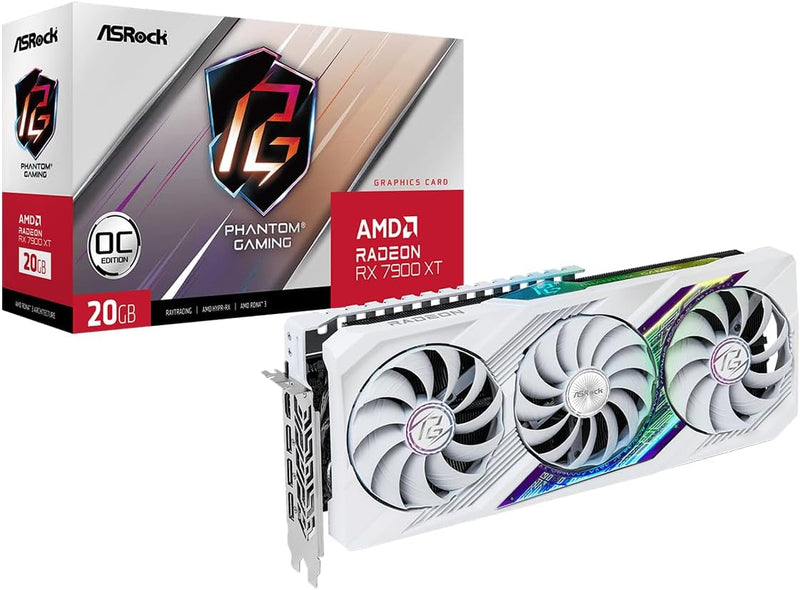
ASRock 90-GA4XZZ-00UANF Radeon RX 7900 XT Phantom Gaming OC
8K
20GB GDDR6 and PCIe 4.0 muscle deliver 4K-to-8K headroom that most GPUs in this class can't touch.
$719.99*
View on Amazon
✓ In Stock on Amazon.com
*Price sourced from Amazon.com. Last updated:Sep 12, 2026.Price and availability are subject to change — details.
Affiliate Disclosure: As an Amazon Associate, Studio Supplies earns from qualifying purchases made through links on this page, at no additional cost to you. This helps support our editorial team.
Notice a mistake? Let Us Know
Overview
Key Features
PCI Express 4.0 Support
8K Resolution Support
Stylish Metal Backplate Solid, Fancy, Cool.
Reinforced Metal Frame Be solid. No sag.
LED On/Off Switch On or Off? Switch as You Want.
Polychrome SYNC Create your own unique colorful light effects.
0dB Silent Cooling Spin For Cooling, Stop For Silence.
Specifications
GPU
AMD Radeon RX 7900 XT
Video Memory
20GB GDDR6
Memory Speed
2450 MHz
Interface
PCI Express 4.0 x16
Max Resolution
7680 x 4320 (8K)
Display Outputs
DisplayPort, HDMI
Cooling
0dB Silent Triple-Fan
Lighting
Polychrome SYNC ARGB
Frame
Reinforced Metal Frame
Backplate
Stylish Metal Backplate
LED Control
Hardware On/Off Switch
Color
White
Model
90-GA4XZZ-00UANF
Similar Products
Other products from the same family that visitors often consider:
 ✓ Available
ASRock Phantom Gaming D Radeon RX 580 Renewed
$298.98
View on Amazon → Currently Unavailable
ASRock 90-GA0K00-00UANF Phantom Gaming D Radeon RX 570
Check on Amazon → Currently Unavailable
ASRock RX7900XT PG 20GO Radeon RX 7900 XT Phantom Gaming - 20GB GDDR6
Check on Amazon → Currently Unavailable
ASRock RX7600 PG 8GO Phantom Gaming Radeon RX 7600 OC - 8GB
Check on Amazon → ✓ Available
ASRock Radeon RX 5700 XT Taichi X 8G OC+ (Renewed)
$214.97
View on Amazon →Frequently Asked Questions
Does the RX 7900 XT Phantom Gaming OC require PCIe 5.0 to perform at full speed?
No. This card runs on PCIe 4.0 x16, and that interface provides sufficient bandwidth for the RX 7900 XT's memory bus. PCIe 5.0 motherboards will host it without issue via backward compatibility, but you won't see a measurable performance delta versus PCIe 4.0.
What power supply wattage is recommended for this card?
AMD specifies a 300W TDP for the RX 7900 XT. ASRock's OC configuration pushes that slightly higher. A quality 850W PSU is the practical minimum for a mid-to-high-end build; 1000W gives you headroom with a modern CPU under simultaneous load.
How does the 0dB fan mode work and when does it disengage?
The fans remain completely stopped at low and idle loads — no movement, no noise. They spin up automatically once the GPU die temperature crosses a configured threshold (typically around 60°C). Under gaming load they engage continuously; you won't be gaming in silence, but desktop and light productivity workloads stay inaudible.
What display outputs does this card provide?
The Phantom Gaming OC includes DisplayPort and HDMI outputs. This supports AMD's multi-display configurations, including driving an 8K display at the card's maximum supported resolution of 7680×4320.
Is the Polychrome SYNC lighting controllable without ASRock software?
The onboard LED On/Off switch lets you disable lighting entirely without any software. For full per-zone RGB control and sync with other Polychrome-compatible components, the ASRock Polychrome SYNC application is required.
Related Products


