



Asus
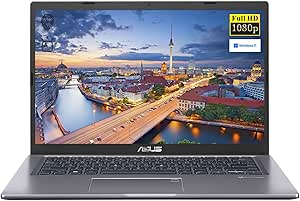
ASUS 14 VivoBook Intel Core i3 FHD 8GB RAM 256GB SSD Laptop
FHD1080p1920 x 108014 inchi3-1115G4
An 11th Gen Intel Core i3 with 4.1GHz Turbo and a 256GB NVMe SSD deliver responsive everyday performance in a thin, portable 14-inch package at an accessible entry-level price.
$419.99*
View on Amazon
✓ In Stock on Amazon.com
*Price sourced from Amazon.com. Last updated:Aug 29, 2026.Price and availability are subject to change — details.
Affiliate Disclosure: As an Amazon Associate, Studio Supplies earns from qualifying purchases made through links on this page, at no additional cost to you. This helps support our editorial team.
Notice a mistake? Let Us Know
Overview
Key Features
[Memory and Storage] 8GB high-bandwidth RAM to smoothly run multiple applications and browser tabs all at once, 256GB PCIe NVMe M.2 Solid State Drive provides fast bootup, ample storage space and speedy data transfer
[Intel i3 Processor] 11th Generation Intel Core i3-1115G4 (2 Cores, 4 Threads, 6MB Cache, Base Frequency at 1.7 GHz, up to 4.1 GHz) Intel Turbo Boost Technology delivers dynamic extra power when you need it
[Display] 14 inch Full HD Display, the 1920 x 1080 resolution with native 1080p support to showcase your games and HD movies with impressive color and clarity
[Tech Specs] 2 x USB 2.0 Ports, 1 x USB 3.2 Port, 1 x USB 3.2 Type C, 1 x Headphone/Microphone Combo, 1 x HDMI Output; Webcam; Backlit Keyboard
Specifications
RAM
8GB
Storage
256GB PCIe NVMe M.2 Solid State Drive
Processor Model
11th Generation Intel Core i3-1115G4
Processor Cores
2 Cores
Processor Threads
4 Threads
Processor Cache
6MB
Processor Base Frequency
1.7 GHz
Processor Max Turbo Frequency
Up to 4.1 GHz
Display Size
14 inch
Display Resolution
Full HD (1920 x 1080)
USB 2.0 Ports
2
USB 3.2 Ports
1
USB 3.2 Type C Ports
1
Audio Port
1 x Headphone/Microphone Combo
Video Output
1 x HDMI
Webcam
Yes
Keyboard
Backlit
Frequently Asked Questions
How does the i3-1115G4 perform under multitasking, and when will I notice its limits?
The i3-1115G4 is a dual-core, 4-thread processor with a 4.1GHz Turbo Boost ceiling. Under typical workloads — web browsing, Office documents, video streaming, light photo editing — it performs responsively. Where its limits appear is during sustained parallel tasks: compiling code, running background OS updates while video conferencing, or working with large spreadsheets and multiple apps simultaneously. Four threads is a ceiling that power users bump against; for light daily use it's not a practical barrier.
Is the 256GB NVMe SSD sufficient as a primary drive, or will it fill quickly?
Windows 11 Home consumes approximately 30–40GB on installation, leaving a practical usable space of 200–220GB. For a student or light professional user with a managed document library and cloud storage, 256GB is workable. Users who store large media files, game libraries, or raw photos locally will find 256GB constraining and should plan for an external drive or cloud storage supplement from day one.
Does the USB 3.2 Type-C port support DisplayPort output or charging?
The VivoBook 14's USB 3.2 Type-C port's specific capabilities depend on the SKU revision — the specification lists USB 3.2 Gen 1 Type-C (5Gbps data), but does not confirm DisplayPort Alt Mode or USB Power Delivery in all configurations. Verify the specific unit's Type-C capabilities in the ASUS product documentation before relying on it for monitor output or USB-C charging without the included power adapter.
How does Intel UHD Graphics perform for basic creative tasks like photo editing?
Intel UHD Graphics on the i3-1115G4 handles basic photo editing in Lightroom, Photoshop, and similar tools at moderate resolution. GPU-accelerated effects and filters will process more slowly than on systems with discrete graphics, but the workflow is functional for culling and basic adjustments. Video export and effects rendering are CPU-bound on this hardware — expect longer export times than GPU-accelerated systems.
Is the 37Wh battery sufficient for a full workday of use?
At 37Wh, the battery is on the smaller end for a 14-inch laptop. Real-world battery life under mixed light use (web, documents, moderate screen brightness) lands in the 5–7 hour range, depending on workload intensity. Sustained heavier tasks like video playback or light productivity under high brightness will pull that toward the lower end. For a full 8-hour workday, carry the charger or plan around available outlets.
Related Products


