



Avid
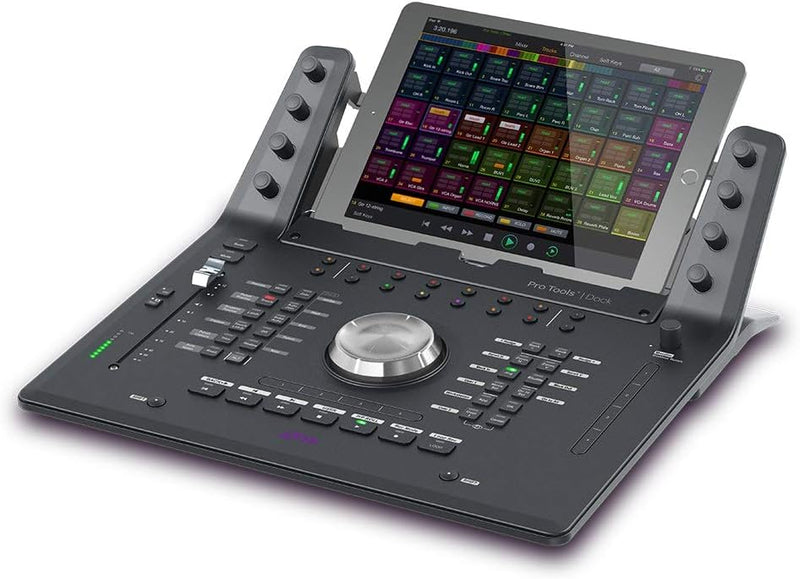
Avid 99006567600 Pro Tools Dock Control Surface
Command Your Sound with Precision and Control The Avid Pro Tools | Dock Control Surface is a portable, ergonomic, and affordable solution for accelerating your editing and mixing tasks. Leveraging the advanced touchscreen workflows of the Pro Tools | S6 and the hybrid command of the artist | con...
$995.00*$1,195.00Save 16%
View on Amazon
✓ In Stock on Amazon.com
*Price sourced from Amazon.com. Last updated:Sep 05, 2026.Price and availability are subject to change — details.
Affiliate Disclosure: As an Amazon Associate, Studio Supplies earns from qualifying purchases made through links on this page, at no additional cost to you. This helps support our editorial team.
Notice a mistake? Let Us Know
Overview
Command Your Sound with Precision and Control
The Avid Pro Tools | Dock Control Surface is a portable, ergonomic, and affordable solution for accelerating your editing and mixing tasks. Leveraging the advanced touchscreen workflows of the Pro Tools | S6 and the hybrid command of the artist | control, the Pro Tools | Dock offers intelligent studio control. Paired with your iPad and favorite DAWs, it provides quick touchscreen access and tactile precision for music and post-production projects.
Specifications:
- Compatibility: iPad
- Hardware Interface: USB, Ethernet
- USB Ports: 1
- Color: Black
- Dimensions: 20"L x 17.5"W x 9.5"H
- Item Weight: 4.18 pounds / 1.9 Kilograms
Key Features
With the combination of touchscreen, fader, knob, and switch control, you gain incomparable navigation speed and tactile precision to create better sounding mixes faster
Work with multiple software tools in parallel instead of porting projects. Get extensive audio, video, and monitoring software integration and control from the surface. Take control of DAWs and video editing applications to mix music or audio post projects
Because the dock is eucon-aware, it automatically switches its controls to the application in focus on your computer
Gain powerful touchscreen capabilities, attention channel control, and soft knob Mapping when you dock your iPad running The free Pro Tools | Control app
Specifications
Control Type
Touchscreen, Fader, Knob, Switch
Software Integration
Audio, Video, Monitoring Software
Compatibility
DAWs, Video Editing Applications
Technology
EUCON-aware
iPad Integration
Requires Pro Tools | Control app
Frequently Asked Questions
What types of controls are available on the Pro Tools Dock?
The Pro Tools Dock offers a combination of touchscreen, fader, knob, and switch controls, designed for precise and fast navigation within your audio projects.
Can this control surface be used with other software besides Pro Tools?
Yes, the dock provides extensive audio, video, and monitoring software integration and control, allowing it to take control of various DAWs and video editing applications.
How does the EUCON-aware feature work?
Because the dock is EUCON-aware, its controls automatically switch and adapt to the application currently in focus on your computer, streamlining your workflow across different software.
What additional capabilities are gained by docking an iPad?
When you dock your iPad running the free Pro Tools | Control app, you gain powerful touchscreen capabilities, attention channel control, and soft knob mapping, enhancing your interaction with the control surface.
Is the Pro Tools | Control app free to use?
Yes, the Pro Tools | Control app, which expands the functionality of the dock with an iPad, is available for free.
Does this product improve mixing speed?
Yes, the combination of its various control methods and software integration is designed to provide incomparable navigation speed, helping users create better-sounding mixes faster.
Related Products


