



BenQ
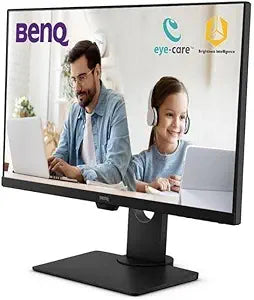
BenQ GW2780T 27" FHD IPS Eye-Care Monitor
FHD1080P
Full-HD IPS accuracy with ergonomic height adjustment and built-in speakers delivers a no-compromise 27-inch productivity panel at a practical price point.
$266.00*
Check availability
*Price sourced from Amazon.com. Last updated:Sep 04, 2026.Price and availability are subject to change — details.
Affiliate Disclosure: As an Amazon Associate, Studio Supplies earns from qualifying purchases made through links on this page, at no additional cost to you. This helps support our editorial team.
Notice a mistake? Let Us Know
Overview
Key Features
Work Productively and Comfortably: 27" 1080P FHD IPS computer monitor featuring an edge-to-edge display that allows you to focus on the important work. Work, play, and learn all in one place!
Ultra Slim Bezel: Ultra-slim bezel allows for an extended view while the space saving base and elegant design is perfect for any home office.
Built-In Speakers: Free up desk space with a built-in sound system that delivers premium audio.
Invisible Cable Management: Easily hide all wires inside the monitor stand for a clean and sleek look.
Seamless Connectivity: Easily access content via HDMI, DP, D-Sub, and VGA ports.
Specifications
Screen Size
27 Inches
Resolution
1920x1080 (FHD)
Panel Type
IPS
Aspect Ratio
16:9
Eye-Care Features
Flicker-Free, Low Blue Light, Anti-Glare, Adaptive Brightness
Connectivity
DisplayPort, HDMI, D-Sub (x2 / VGA)
Ergonomics
Height Adjustment, Tilt
Audio
Built-In Speakers
Bezel Design
Ultra-Slim
Cable Management
Integrated stand routing channel
Frequently Asked Questions
What does IPS panel technology mean for everyday productivity versus a TN or VA display?
IPS (In-Plane Switching) maintains accurate color and contrast when viewed from an angle — up to 178 degrees horizontally and vertically. In practice, this means no color shift when you lean to one side or share your screen with a colleague. For document work and spreadsheets, text rendering on IPS panels is uniformly sharp across the full panel.
How does the BenQ Eye-Care technology on the GW2780T reduce fatigue during long sessions?
The GW2780T uses a flicker-free backlight and a Low Blue Light filter to address the two primary sources of display-related eye strain. The flicker-free backlight eliminates the 60Hz pulse that PWM-dimmed panels emit, and the Low Blue Light mode reduces the high-energy blue wavelengths associated with melatonin suppression and eye fatigue during extended sessions.
Does the GW2780T support VESA mounting for monitor arms or wall mounting?
The GW2780T is compatible with standard VESA mounting patterns, allowing use with third-party monitor arms. Check BenQ's published specification sheet for the exact VESA pitch before purchasing a mount.
What connectivity options does the GW2780T provide and is VGA still worth using?
The GW2780T includes DisplayPort, HDMI, D-Sub (VGA), and a second VGA port — broad legacy compatibility for workplaces with older hardware. For best image quality, use DisplayPort or HDMI; VGA is an analog signal path and will produce softer output compared to the digital alternatives.
Is the built-in cable management on the GW2780T stand functional for daily use?
Yes — the stand includes a cable routing channel that hides power, video, and peripheral cables inside the stand column. It is a genuine quality-of-life feature that keeps a desk visually clean without requiring cable clips or additional management hardware.
Related Products


