



BenQ
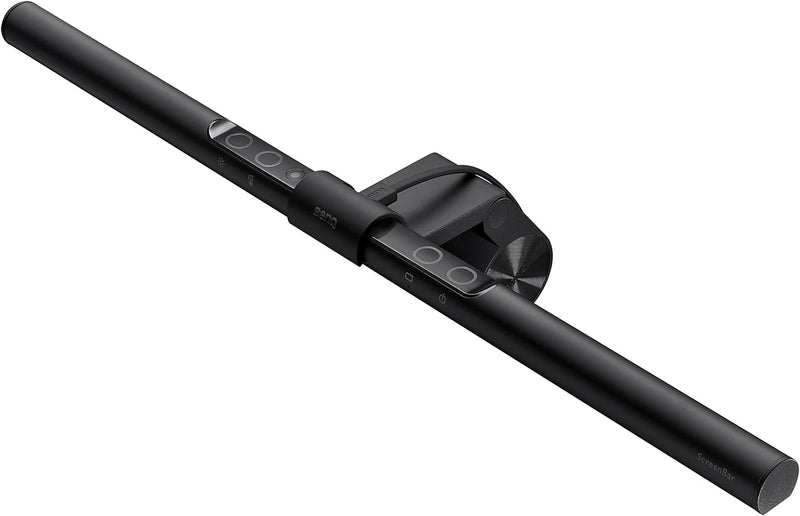
BenQ ScreenBar_Black Monitor Light with Auto-Dimming
A USB-powered monitor light bar with auto-dimming and 95+ CRI for glare-free desk illumination.
$109.00*
View on Amazon
✓ In Stock on Amazon.com
*Price sourced from Amazon.com. Last updated:Sep 05, 2026.Price and availability are subject to change — details.
Affiliate Disclosure: As an Amazon Associate, Studio Supplies earns from qualifying purchases made through links on this page, at no additional cost to you. This helps support our editorial team.
Notice a mistake? Let Us Know
Overview
Key Features
EYE CARING & TOP QUALITY - Flicker-free and anti-blue light hazard LED light source with CRI>95 for natural colours. Long lifespan LED tested to last for 17 years with 8 hours of daily use.
PATENTED CLAMP - Mounts securely on monitors 0.4"-1.2" thick, saving space with a patented counterweight clamp with great stability. Fits ultrawide and curved monitors of 1500R and above. (Note: Special monitor back design may affect compatibility.)
NO SCREEN GLARE - With carefully calculated beams, ScreenBar’s ASYM-Light technology prevents screen reflections and direct glare, ensuring comfortable screen reading.
WIDE LIGHTING COVERAGE - Provides a 500lx brightness across a wide 23.6" x 11.8" (60x30cm) area, effectively balancing ambient light and screen brightness for better eye comfort. Easily powered via USB-A.
AUTO DIMMING & TOUCH CONTROL - Built-in light sensor automatically adjusts brightness based on ambient light. Intuitive touch controls allow manual adjustments of brightness and colour temperature from 2700K-6500K.
Specifications
Light Source
Flicker-free, anti-blue light hazard LED
Color Rendering Index (CRI)
>95
Color Temperature
2700K–6500K (adjustable)
Brightness Coverage
500 lux over 60x30 cm
Glare Reduction
ASYM-Light asymmetric optics
Power
USB-A (5V/1A or higher)
Controls
Auto Dimming & Touch Control
Monitor Compatibility
1–3 cm bezel thickness; ultrawide/curved ≥1500R
Material
Aluminum, Polycarbonate
Dimensions
4"D x 18"W x 4"H
Weight
1.2 lbs
Brand
BenQ
Model
ScreenBar_Black
Frequently Asked Questions
Will the BenQ ScreenBar cause glare on my monitor?
No. The ScreenBar uses BenQ's patented ASYM-Light asymmetric optical design, which directs light downward onto your desk while keeping it off your screen to prevent reflections.
How does the auto-dimming feature work?
A built-in ambient light sensor detects the brightness in your environment and automatically adjusts the ScreenBar's output to maintain a comfortable 500 lux across your workspace.
What monitors is the ScreenBar compatible with?
It fits monitors with bezels between 1 and 3 cm thick. It also works with ultrawide and curved monitors with a curvature of 1500R or greater, though compatibility with some curved displays may vary.
Does the ScreenBar need a wall outlet or power adapter?
No. It is powered entirely through a USB-A connection (5V/1A or higher), so you can plug it into your monitor's USB port, a computer, or any standard USB adapter.
Can I adjust the color temperature?
Yes. The touch controls on top of the bar let you adjust color temperature from a warm 2700K to a cool 6500K, so you can match your ambient lighting or personal preference.
Related Products


