



BenQ
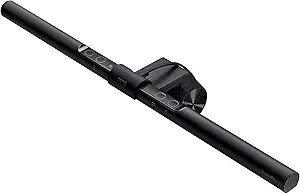
BenQ ScreenBar Monitor Light Auto-Dimming USB Lamp
Auto-dimming monitor light with asymmetric optics that illuminates your desk without casting glare on your screen.
$109.00*
View on Amazon
✓ In Stock on Amazon.com
*Price sourced from Amazon.com. Last updated:Sep 05, 2026.Price and availability are subject to change — details.
Affiliate Disclosure: As an Amazon Associate, Studio Supplies earns from qualifying purchases made through links on this page, at no additional cost to you. This helps support our editorial team.
Notice a mistake? Let Us Know
Overview
Specifications
Light Source
LED
Mounting
Monitor clip (gravity-based)
Power Source
USB
Auto-Dimming
Yes, built-in ambient light sensor
Color Temperature
Adjustable (warm to cool)
Optical Design
Patented asymmetrical (no screen glare)
Color
Black
Frequently Asked Questions
Will the BenQ ScreenBar cause glare or reflections on my monitor?
No, it uses a patented asymmetrical optical design that directs light downward onto your desk while keeping the screen completely free of glare and reflections.
How does the auto-dimming feature work?
A built-in ambient light sensor continuously reads the surrounding light level and automatically adjusts the ScreenBar's brightness to maintain comfortable, consistent illumination.
How does the ScreenBar attach to a monitor?
It uses a weighted clip that balances on top of your monitor bezel. No adhesive, screws, or desk space required — it simply sits on the top edge of your display.
Does the BenQ ScreenBar need a power outlet?
No, it is powered via USB, so you can connect it to a USB port on your monitor, computer, or any USB power source.
Can I adjust the color temperature on the ScreenBar?
Yes, it offers hue adjustment so you can shift between warmer and cooler light temperatures depending on whether you want a relaxed or focused work environment.
Related Products


