



Canon
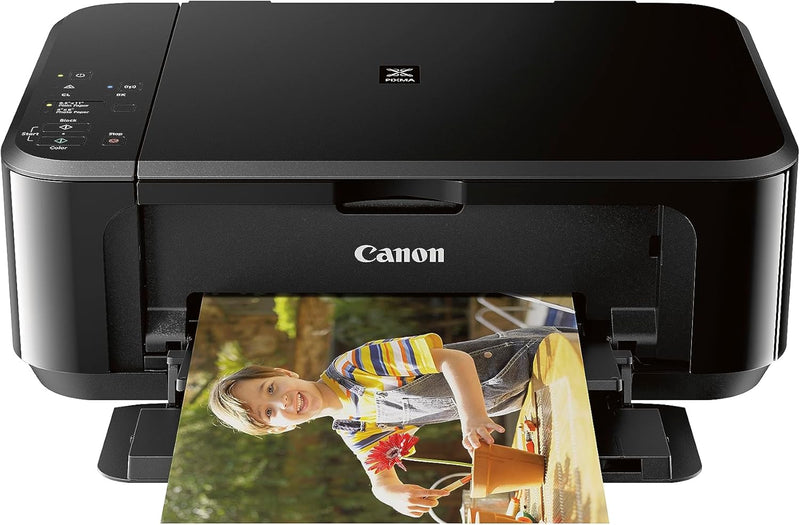
Canon 0515C002 Pixma MG3620 Wireless All-in-One Inkjet Printer
Auto-duplexing wireless print, copy, and scan at 9.9ipm in a compact footprint designed for home and small office use.
$89.99*$103.99Save 13%
Check availability
*Price sourced from Amazon.com. Last updated:Aug 30, 2026.Price and availability are subject to change — details.
Affiliate Disclosure: As an Amazon Associate, Studio Supplies earns from qualifying purchases made through links on this page, at no additional cost to you. This helps support our editorial team.
Notice a mistake? Let Us Know
Overview
Key Features
Wireless 3-in-1 (print | copy | scan)
Easily print and scan photos and documents directly from your mobile devices.
9.9 / 5.7 ipm print speed
100 sheet capacity
Auto 2-sided printing
ENERGY STAR
Compact, space-saving design.
Never run out of ink or toner. Connect your printer to Alexa and receive notifications when you’re running low. Alexa can even place a smart reorder from Amazon on your behalf, if you enroll in smart reorders.
Enrolling in smart reorders with Alexa ensure that you never have too much or too little ink or toner. No subscription needed.
Specifications
Functions
Print, Copy, Scan
Print Technology
Inkjet
Print Speed (Black)
9.9 ipm
Print Speed (Color)
5.7 ipm
Max Color Print Resolution
4800 x 1200 dpi
Max B&W Print Resolution
600 x 600 dpi
Scanner Type
Flatbed
Color Depth
48-bit Input / 24-bit Output
Paper Capacity
100 Sheets
Max Media Size
8.5 x 14 inches
Supported Sheet Sizes
4x6, 5x7, 8x10 inches
Duplex Printing
Automatic
Connectivity
Wi-Fi (802.11 b/g/n), USB 2.0
Mobile Printing
AirPrint, Google Cloud Print
Ink Cartridges
PG-245 (Black), CL-246 (Tri-color)
Memory
64 MB
Power Consumption
16 Watts
Dimensions
12"D x 17.7"W x 6"H
Weight
11.9 lbs
Energy Certification
ENERGY STAR
Frequently Asked Questions
What wireless protocols does the MG3620 support for printing from mobile devices?
The MG3620 supports AirPrint for iOS devices and Google Cloud Print for Android and Chrome OS, plus Canon's own PIXMA Printing Solutions app. It connects via 802.11 b/g/n Wi-Fi — there is no Ethernet port, so all network printing goes through wireless. Direct USB connection is also available for setups without Wi-Fi.
What is the actual print resolution, and what does 4800 x 1200 dpi mean for output quality?
The MG3620 prints at up to 4800 x 1200 dpi in color. That resolution is achieved by the print head placing droplets at 4800 horizontal positions per inch, with 1200 vertical positions — sufficient for sharp photo output at 4x6 and 5x7 sizes. Black text prints at 600 x 600 dpi, which is standard for crisp document output at normal reading sizes.
Does the auto-duplex feature work reliably on standard paper weights?
Automatic two-sided printing functions on standard 20–24 lb plain paper. Heavier card stock or photo paper is not supported by the duplexer — those sheets must be manually flipped. The 100-sheet input tray capacity also limits how long unattended duplex jobs can run before requiring a paper reload.
What ink cartridges does the MG3620 use, and does it support individual color replacement?
The MG3620 uses the PG-245 black (pigment-based) and CL-246 tri-color (dye-based cyan, magenta, yellow combined) cartridges. The tri-color cartridge is a single unit — when one color runs out, the entire CL-246 must be replaced even if the other two colors have ink remaining. This is a cost efficiency disadvantage compared to printers using individual color tanks.
Is the MG3620 compatible with Windows 11?
Canon's listed OS compatibility tops out at Mac OS X 10.10 and Windows Vista SP1/SP2 through Windows 10 in the original spec sheet. However, Canon has released updated drivers supporting Windows 11 through their support site — compatibility is achievable but requires a manual driver download rather than plug-and-play detection.
Related Products


