Canon

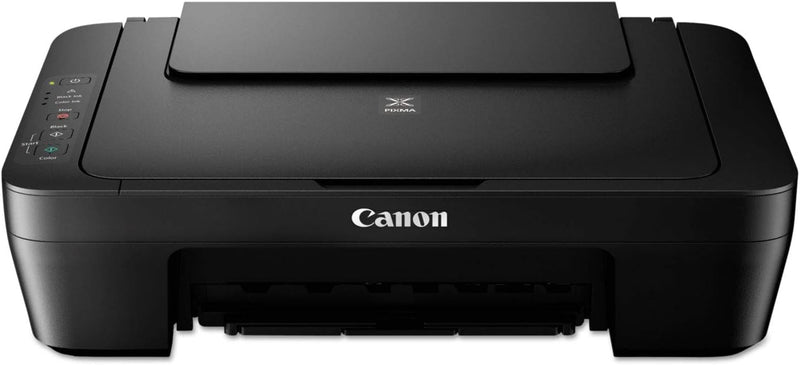
Canon 0727C002 Pixma MG2525 Inkjet Printer

3.5 (11 reviews)

Print, copy, and scan from a single compact footprint — the PIXMA MG2525 delivers USB-connected all-in-one functionality at the lowest possible entry cost.

$51.63*$69.99Save 26%
Check availability

*Price sourced from Amazon.com. Last updated:Jun 28, 2026.Price and availability are subject to change.

Affiliate Disclosure: Studio Supplies may earn a commission from qualifying purchases made through links on this page, at no additional cost to you. This helps support our editorial team.

Notice a mistake? Let Us Know

Overview

The Canon PIXMA MG2525 is an entry-level USB-connected all-in-one inkjet printer offering print, copy, and scan functions in a compact chassis. The hardware interface is USB 2.0 exclusively — no Wi-Fi, no Ethernet, no AirPrint. Print speed is rated at 1 page per minute for both color and monochrome output, which positions this unit firmly in the occasional-use tier; it is not designed to sustain any meaningful print volume. Maximum media size reaches 11" x 17", a meaningful spec advantage over competitors that top out at letter size. The scanning subsystem is a flatbed image scanner accessible via Canon's IJ Scan Utility software on Windows and macOS.

The MG2525 exists for a specific use case: a household or small workspace that prints infrequently, has a dedicated computer to cable it to, and wants the lowest possible acquisition cost for an all-in-one device. It is not the right hardware for shared-network printing, mobile workflows, photo production, or document-intensive environments. The two-cartridge ink system — PG-245 black and CL-246 tri-color — is cost-effective at the shelf but becomes a running expense concern for anyone printing more than a few pages per week. Buyers who anticipate even moderate print volume should evaluate the per-page cost against printers with higher-yield cartridge options before committing to this platform.

Key Features

Sold as 1 Each.

Just the right size and has all the right features.

Affordable.

Designed for efficiency.

Specifications

Functions
Print, Copy, Scan
Printing Technology
Inkjet
Maximum Media Size
11" x 17"
Print Speed (Color)
1 page per minute
Print Speed (Monochrome)
1 page per minute
Scanner Type
Flatbed image scanner
Hardware Interface
USB 2.0
Wireless
None
Duplex Printing
Manual only

Pros & Cons

👍 Pros

  • Supports media up to 11" x 17", giving it a larger maximum print area than most competitors at this price point.
  • All-in-one print, copy, and scan functionality in a compact footprint suitable for small desks or home office corners.
  • USB 2.0 plug-and-play connectivity means no network configuration, no router dependency, and no wireless driver troubleshooting.
  • Entry-level purchase price makes it a viable option for low-frequency print tasks where per-page cost is a secondary concern.
  • Flatbed scanner included — not an ADF-only unit — enabling book pages and irregularly shaped documents to be scanned.

👎 Cons

  • No wireless connectivity of any kind — USB tether to a host computer is mandatory, limiting placement flexibility and ruling out mobile or shared-network printing scenarios.
  • Two-cartridge ink system (one black, one tri-color) means replacing the color cartridge when any single color runs out, increasing effective cost-per-page versus separate-tank systems.
  • Rated print speed of 1 page per minute for both color and monochrome is among the slowest in the all-in-one category — unsuitable for any volume above occasional single-sheet tasks.
  • No automatic document feeder (ADF) on the scanner; multi-page document digitization requires manual page-by-page placement on the flatbed.
  • No duplex (double-sided) printing — manual paper flipping required for two-sided output.

Frequently Asked Questions

No. The Canon PIXMA MG2525 connects exclusively via USB 2.0. There is no Wi-Fi, Bluetooth, AirPrint, or network port on this model. All print jobs must originate from a directly cabled computer.
The MG2525 supports media up to 11" x 17" (tabloid/ledger size), which is larger than the letter/legal formats typical of entry-level printers in this tier.
The MG2525 uses Canon PG-245 (black) and CL-246 (color) ink cartridges. These are widely available at retail, but yield per cartridge is modest at standard capacity — high-volume printing will make consumable costs a significant factor relative to the printer's purchase price.
Basic scan-to-computer functionality requires Canon's IJ Scan Utility driver package, available for Windows and macOS. The hardware interface is USB 2.0 only; there is no standalone scan-to-USB-drive or cloud-scan capability.
The MG2525 uses a two-cartridge system (one black, one tri-color), which limits color gamut compared to dedicated photo printers with separate ink tanks. It can produce photo prints, but color accuracy and tonal range are constrained by the dual-cartridge architecture.