

Price history
Canon
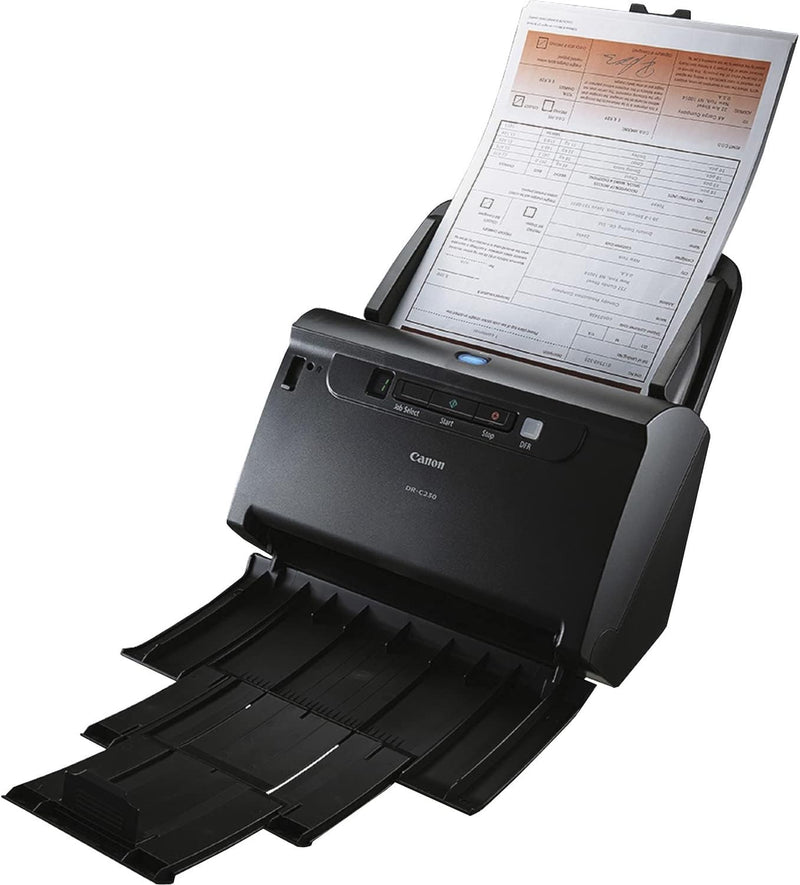
Canon 2646C002 imageFORMULA DR-C230 Office Document Scanner
★★★★★
30 pages per minute, duplex scanning, and mixed-batch flexibility make the DR-C230 a genuine productivity upgrade for document-heavy offices.
$524.95*
View on Amazon
✓ In Stock on Amazon.com
*Price sourced from Amazon.com. Last updated:Aug 12, 2026.Price and availability are subject to change.
Affiliate Disclosure: Studio Supplies may earn a commission from qualifying purchases made through links on this page, at no additional cost to you. This helps support our editorial team.
Notice a mistake? Let Us Know
Overview
Key Features
WIDE RANGE OF USES: Sectors such as government, financial/banking, insurance, accommodation services, transportation, rental and leasing services, legal services, and more can benefit from the dynamic scanning the DR-C230 scanner offers. It can be used to integrate information into digital workflows for process automation and information distribution while helping to increase collaboration among individuals or workgroups. DR-C230 scanner can assist with efficient records management and help reduce paperwork in paper-intensive environments.
DYNAMIC, RELIABLE, FLEXIBLE FEEDING: The DR-C230 scanner can scan at up to 30 ppm, both sides of an item in a single pass, in color or black-and-white. Capable of holding up to 60 sheets, it can handle a variety of document types including thick, thin, long, or oversized documents; plastic or embossed cards; and even passports for greater versatility and flexibility. In addition, the DR-C230 comes equipped with double-feed release functions and one-touch release button to allow scanning to resume when double-feed is detected for a seamless and more efficient scanning experience.
USER-FRIENDLY: Designed with the user in mind, the DR-C230 scanner’s easy-to-use operation panel contains accessible controls to start scanning operations, preconfigure job tasks, and more with one-touch job buttons. It can scan different-size documents in mixed batches to help eliminate the time wasted presorting document types. Bundled with both Canon CaptureOnTouch v4 and Canon CapturePerfect software, users can preconfigure scan tasks and choose from a wide selection of file distribution options.
HIGH-QUALITY IMAGING: To help enhance and maintain image quality of documents, the DR-C230 scanner contains various features such as Auto Resolution setting, useful for scanning mixed batches of documents and photographs by automatically adjusting the output resolution to improve quality and reduce image file size. Other image processing features include Character Emphasis and Text Enhancement that can help to improve text legibility on hard-to-read documents to help ensure accurate document capture.
ENVIRONMENT IN MIND: The DR-C230 scanner is ENERGY STAR certified and complies with both the EU RoHS and WEEE directives for the reduction of hazardous substances and waste products.
CUSTOMER C ARE: For investment protection, eCarePAK options are available to extend service beyond the initial, three-year advanced exchange limited warranty period. This helps save on costs associated with post-purchasing maintenance and helps maximize uptime throughout the product life.
Specifications
Brand
Canon
Model
2646C002 (DR-C230)
Scan Speed
Up to 30 ppm (simplex and duplex)
ADF Capacity
60 sheets
Optical Resolution
600 dpi
Color Depth
24-bit color
Max Document Size
8.50 x 14.02 inches
Media Types
Plain paper, business card, plastic card, embossed card, passport
Connectivity
USB
Duplex Scanning
Yes (single pass)
Bundled Software
Canon CaptureOnTouch v4, Canon CapturePerfect
Certifications
ENERGY STAR, EU RoHS, WEEE
Warranty
3-year advanced exchange (5-year with online registration)
Frequently Asked Questions
What connection interface does the DR-C230 use — is it compatible with modern workstations?
The DR-C230 connects via USB, which is universally supported across Windows and macOS workstations. There is no Wi-Fi or Ethernet option, so it requires a direct connection to a host computer. For network-shared scanning workflows, you'd need to route through the connected PC.
Can it handle mixed document sizes in a single batch, or do I need to sort first?
Mixed-batch scanning is a supported feature — the scanner can process documents of varying sizes in a single pass without presorting. The Auto Resolution setting also adjusts output resolution automatically when it detects mixed content types like documents and photographs together.
What happens when the DR-C230 detects a double-feed?
It stops and alerts you, then allows you to resume via the one-touch release button without losing your place in the batch. This double-feed release function prevents misfed pages from corrupting a scan job, which is a meaningful reliability feature in high-volume production use.
What is the maximum document size and what card types does it support?
The DR-C230 handles documents up to 8.5 x 14.02 inches (legal size). Beyond standard paper, it accepts business cards, standard plastic cards, embossed cards, and passports — the physical media flexibility is broader than many scanners in this class.
What software is included and what file distribution options does it support?
The scanner bundles both Canon CaptureOnTouch v4 and Canon CapturePerfect. These allow you to preconfigure scan tasks, set up one-touch job buttons on the device itself, and distribute scanned files to a range of destinations including folders, email, cloud services, and document management systems.
Related Products


