



Canon
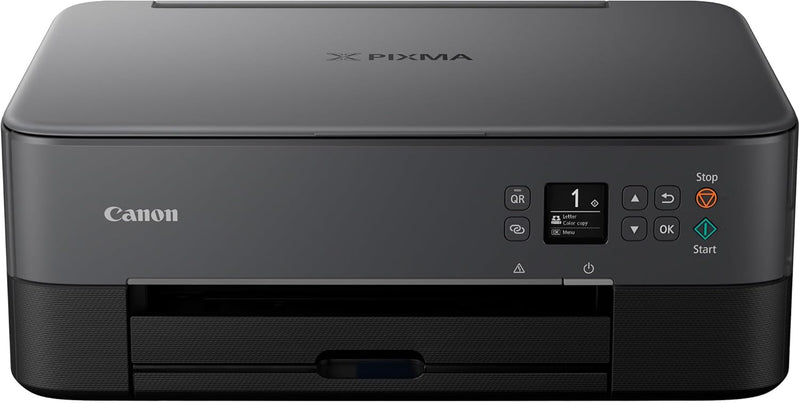
Canon 4462C002 TS6420 All-in-One Wireless Printer - Black
Experience Effortless Printing with the Canon TS6420 Introducing the Canon PIXMA TS6420, a stylish and space-saving All-in-One printer designed to simplify your daily tasks. With its user-friendly interface and versatile paper handling, the TS6420 makes printing documents, photos, and creative p...
$132.95*
View on Amazon
✓ In Stock on Amazon.com
*Price sourced from Amazon.com. Last updated:Aug 31, 2026.Price and availability are subject to change — details.
Affiliate Disclosure: As an Amazon Associate, Studio Supplies earns from qualifying purchases made through links on this page, at no additional cost to you. This helps support our editorial team.
Notice a mistake? Let Us Know
Overview
Experience Effortless Printing with the Canon TS6420
Introducing the Canon PIXMA TS6420, a stylish and space-saving All-in-One printer designed to simplify your daily tasks. With its user-friendly interface and versatile paper handling, the TS6420 makes printing documents, photos, and creative projects a breeze, whether you're working from your computer or mobile device.
- Easy Setup: Quickly connect to your smartphone or computer for immediate printing.
- Intuitive Operation: Navigate print, copy, and scan functions effortlessly using the bright 1.44" OLED screen.
- Wireless Connectivity: Print from anywhere in your home via built-in Wi-Fi.
- Mobile Printing: Seamlessly print from your smartphone or tablet with the Canon PRINT app, Apple AirPrint, and Mopria.
- Creative Options: Unleash your creativity with the Easy-PhotoPrint Editor app and Canon Creative Park App.
- Square Photo Printing: Easily print square photos directly from your smartphone or social media accounts.
Specifications:
- Product Dimensions: 15.9"D x 12.5"W x 5.9"H
- Controller Type: Android
- Printer Media Size Maximum: 8.5 x 14 inch
- Power Consumption: 19 Watts
- Included Components: Printer, Ink, Power Cord
- Print Media: Paper (plain)
- Scanner Type: Flatbed
- Max Input Sheet Capacity: 100
- Display Type: OLED
- Compatible Devices: Smartphones
- Maximum Color Print Resolution: 4800 x 1200 Dots Per Inch
- Sheet Size: 3.5 x 3.5, 4 x 6, 5 x 5, 5 x 7, 7 x 10, 8 x 10, 8.5 x 11, 8.5 x 14
- Dual-sided printing: Yes
- Maximum copies per run: 100
- Duplex: Duplex Printing
- Hardware Interface: USB 2.0
- Ink Color: Black
- Resolution: 4800 x 1200
- Additional Printer Functions: Copy, Scan
- Control Method: App
- Compatible Cartridge: PG-245 and CL-246
- Output sheet capacity: 100
- Number of Trays: 2
- Processor Count: 1
- Series Number: 4462
- Number of USB 2 Ports: 1
- Total USB Ports: 1
- Model Series: PIXMA TS6420
- Specific Uses For Product: Home
- UPC: 013803329575
- Printer Ink Type: Pigment-Based Ink, Dye-Based Ink
- Item Weight: 13.8 pounds
- Item model number: 4462C002
- Manufacturer: Canon USA
- Brand: Canon
- Connectivity Technology: Bluetooth, Wi-Fi, USB
- Printing Technology: Inkjet
- Special Feature: Wireless Printing, Scanning and Copying, Borderless and Square Format Printing, 2 Cartridge Fine Hybrid System
- Color: Black
- Model Name: TS6420 BK
- Printer Output: Color
- Maximum Print Speed (Color): 6.8
- Max Printspeed Monochrome: 13
- Item Weight: 13.8 Pounds
Key Features
Easy Setup for smartphone and computer so you can get to work faster
Print, copy, scan and navigate the features you need using the clear, brightly-lit1.44" OLED Screen
Easily print from any room -from laptops, tablets, and smartphones -with built-inWi-Fi(R)[1]
Print from your favorite mobile devices using the Canon PRINT app[3], Apple AirPrint(R)[4], and Mopria(R)[5]
You can also download the Easy-PhotoPrint Editor app[6] or Canon Creative Park App[22] for creative printing options
Easily print square photos right from your smartphone or social media. Choose from either 5" x 5" or 3.5" x 3.5" square Canon photo paper
For numbers listed in product description see “specification sheet” in technical specification section below
Specifications
Model Number
4462C002
Type
All-in-One Wireless Printer
Color
Black
Display
1.44" OLED Screen
Connectivity
Built-in Wi-Fi
Mobile Printing Apps
Canon PRINT app, Apple AirPrint, Mopria
Creative Apps
Easy-PhotoPrint Editor app, Canon Creative Park App
Square Photo Print Sizes
5" x 5", 3.5" x 3.5"
Frequently Asked Questions
Is this printer difficult to set up?
No, the Canon TS6420 is designed for easy setup with both smartphones and computers, allowing you to get started quickly.
Can I print from my mobile phone or tablet?
Yes, this printer features built-in Wi-Fi and supports printing from mobile devices using the Canon PRINT app, Apple AirPrint, and Mopria.
What kind of display does this printer have?
It features a clear, brightly-lit 1.44" OLED screen for easy navigation of its print, copy, and scan functions.
Can I print square photos with this printer?
Yes, you can easily print square photos directly from your smartphone or social media using 5" x 5" or 3.5" x 3.5" Canon photo paper.
Are there any apps available for creative printing?
Yes, you can download the Easy-PhotoPrint Editor app or the Canon Creative Park App for various creative printing options.
Where can I find detailed technical specifications for this printer?
For specific technical details and numbers listed in the product description, you should refer to the "specification sheet" in the technical specification section.
Related Products


