

Canon
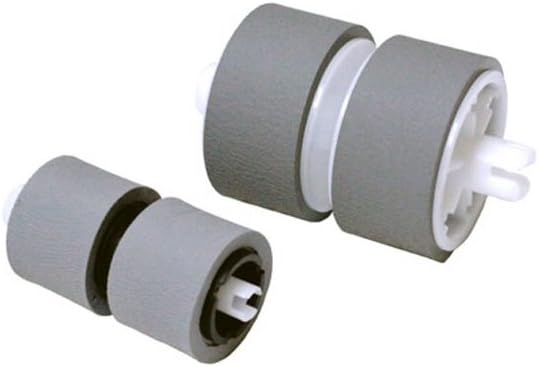
Canon 5484B001AA DR-C125 Scanner Exchange Roller Kit
Restore your DR-C125 scanner to factory feed performance with a direct-fit roller replacement you can install without a technician.
$54.00*$57.98Save 6%
Check availability
*Price sourced from Amazon.com. Last updated:Aug 28, 2026.Price and availability are subject to change — details.
Affiliate Disclosure: As an Amazon Associate, Studio Supplies earns from qualifying purchases made through links on this page, at no additional cost to you. This helps support our editorial team.
Notice a mistake? Let Us Know
Overview
Key Features
Exchange roller kit
Works with the DR-C125
User installable
Specifications
Compatibility
Canon DR-C125 document scanner
Installation
User installable (no tools required)
Product Dimensions
2.75 x 4 x 4 inches
Item Weight
1.59 oz (45g)
Frequently Asked Questions
How do I know when the DR-C125 rollers actually need replacing?
The DR-C125 tracks a roller usage counter in its driver software. When the counter reaches Canon's recommended replacement threshold, the driver will alert you. Physical symptoms — repeated paper jams, multi-feeds where two sheets pull through together, or skewed documents — are also reliable indicators that the pickup and feed rollers have worn past reliable tolerance.
Is installation of this roller kit something a non-technical user can do?
Yes — Canon designates this as a user-installable kit specifically to avoid service calls. The process involves opening the scanner's front cover, unclipping the existing rollers, and snapping in the replacements. No tools are required. Canon's documentation for the DR-C125 walks through the steps, and most users complete the swap in under ten minutes.
Will installing this kit reset the roller counter in the scanner's driver software?
After installing the kit, you'll need to manually reset the roller counter through the Canon DR-C125 driver utility or scanner properties panel. The hardware swap itself doesn't auto-reset the counter — skipping the reset means the driver will continue showing a false maintenance alert.
Does this kit include both the pickup roller and the feed roller, or just one?
The kit is described as an exchange roller kit for the DR-C125 — it covers the rollers responsible for document feeding and pickup. Verify the kit contents against Canon's documentation for your specific unit serial range to confirm which roller assemblies are included.
What happens if I continue using the scanner past the recommended roller replacement interval?
Worn rollers increase the risk of multi-feeds, which can cause document jams and — more critically — missed pages in a scanned batch. In document management workflows, a missed page can corrupt a filing sequence. Replacing on schedule is the lower-risk option versus reactive replacement after a misfeed damages a document.
Related Products


