

Canon
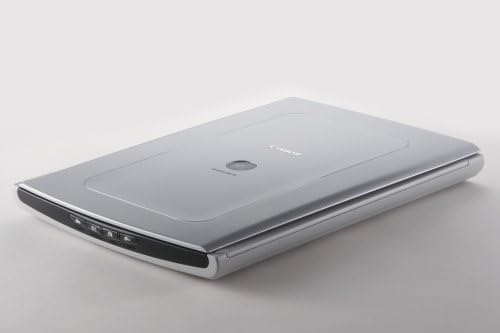
Canon CanoScan LiDE70 USB Flatbed Scanner
USB 2.0
Digitize Your Memories with EaseThe Canon CanoScan LiDE70 offers a compact and elegant solution for high-quality scanning. With its user-friendly design and convenient features, this scanner simplifies the process of digitizing your photos and documents. Scanning Resolution: Up to 2400 x 4800 c...
View price on Amazon
Affiliate Disclosure: As an Amazon Associate, Studio Supplies earns from qualifying purchases made through links on this page, at no additional cost to you. This helps support our editorial team.
Notice a mistake? Let Us Know
Overview
Digitize Your Memories with Ease
The Canon CanoScan LiDE70 offers a compact and elegant solution for high-quality scanning. With its user-friendly design and convenient features, this scanner simplifies the process of digitizing your photos and documents.
- Scanning Resolution: Up to 2400 x 4800 color dpi
- Color Depth: 48-bit color depth
- Interface: USB 2.0 Hi-Speed
- Buttons: 4 Easy Buttons (Copy, Scan, E-mail, PDF)
- Z-Lid Expansion: Advanced Z-Lid expansion for scanning bulky items
- Power: One USB 2.0 Hi-Speed Cable for USB power
Key Features
4 easy buttons to copy, scan, e-mail or create PDF files
One USB 2.0 Hi Speed Cable for USB power
Advanced Z-lid expansion for scanning bulky items
Specifications
Brand
Canon
Model
CanoScan LiDE70
Type
Flatbed Scanner
Buttons
Copy, Scan, E-mail, PDF
Connectivity
USB 2.0 Hi-Speed
Power Source
USB Powered
Lid Feature
Advanced Z-lid expansion
Frequently Asked Questions
How does the CanoScan LiDE70 get its power?
The Canon CanoScan LiDE70 USB Flatbed Scanner receives its power directly through a single USB 2.0 Hi-Speed cable, eliminating the need for an external AC adapter.
What are the quick access buttons on this scanner used for?
This scanner is equipped with four easy buttons that allow you to quickly copy, scan, e-mail documents, or create PDF files with a single touch.
Can this scanner handle thick items like books?
Yes, the CanoScan LiDE70 features an advanced Z-lid expansion, which enables it to scan bulky items such as books and magazines without difficulty.
What type of USB connection does this scanner use?
The scanner connects and draws power via a single USB 2.0 Hi-Speed cable, offering a streamlined connection to your computer.
Is there any information about the scanning resolution?
The product features mention a 2.0 Hi Speed Cable but do not specify the optical scanning resolution of the Canon CanoScan LiDE70.
Related Products


