

Canon
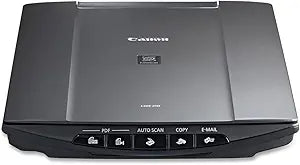
Canon LiDE210 Document Scanner High-Resolution Scanning
★★★★★
Digitize with Ease: Canon CanoScan LiDE210 Document Scanner Transform your document management with the Canon CanoScan LiDE210 Color Image Scanner. This ultra-compact scanner delivers high-quality scans with ease, thanks to its advanced features such as Auto Document Fix and Auto Scan Mode. Perfe...
View price on Amazon
Affiliate Disclosure: Studio Supplies may earn a commission from qualifying purchases made through links on this page, at no additional cost to you. This helps support our editorial team.
Notice a mistake? Let Us Know
Overview
Digitize with Ease: Canon CanoScan LiDE210 Document Scanner
Transform your document management with the Canon CanoScan LiDE210 Color Image Scanner. This ultra-compact scanner delivers high-quality scans with ease, thanks to its advanced features such as Auto Document Fix and Auto Scan Mode. Perfect for home or office, the LiDE210 streamlines your workflow and enhances your digital filing system.
Specifications:
- Brand: Canon
- Model: LiDE210 (4508B002)
- Type: Flatbed Scanner
- Maximum Resolution: 4800 x 4800 dpi (Optical), 19,200 x 19,200 dpi (Interpolated)
- Color Depth: 48-bit
- Scanning Speed: Approx. 10 seconds (Letter Size Color)
- Connectivity: Hi-Speed USB
- EZ Buttons: 5 (Scan, Copy, Email, PDF x 2)
- Features: Auto Scan Mode, Auto Document Fix, Advanced Z-Lid
- Dimensions: N/A
- Weight: N/A
Key Features
easy-to-view scans by advanced image analysis and area-by-area data correction while the auto scan mode feature automatically detects the original you're scanning and saves it using the appropriate settings
enable you to scan, copy, email or create a PDF faster than ever
speed and ease of use
Specifications
Brand
Canon
Model
LiDE210
Product Type
Document Scanner
Key Features
Advanced image analysis, area-by-area data correction, Auto Scan Mode
Functions
Scan, copy, email, create PDF
Frequently Asked Questions
How does the Canon LiDE210 scanner ensure easy-to-view scans?
The Canon LiDE210 scanner ensures easy-to-view scans through advanced image analysis and area-by-area data correction, optimizing the output.
Does this scanner have an automatic setting for different document types?
Yes, the Auto Scan Mode feature automatically detects the original you're scanning and saves it using the most appropriate settings.
Can this scanner perform multiple functions quickly?
Yes, it is designed to enable you to scan, copy, email, or create a PDF faster than ever, prioritizing speed and ease of use.
Is the Canon LiDE210 scanner easy for beginners to use?
The scanner is designed for speed and ease of use, suggesting it is user-friendly for a variety of experience levels.
What types of documents can the scanner detect automatically?
The auto scan mode feature automatically detects the "original you're scanning," implying it can recognize various document types to apply correct settings.
Related Products


