



Canon
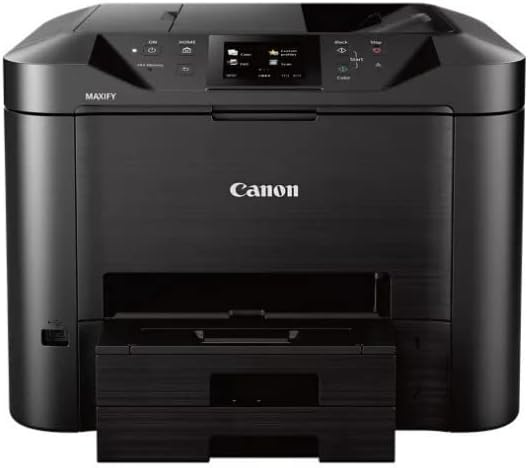
Canon MB5420 Wireless All-in-One Office Printer
Efficient Printing Solutions for Small BusinessesIntroducing the Canon MAXIFY MB5420 Wireless All-in-One Printer. Designed to meet the needs of smaller businesses.Specifications: Brand: Canon Model: MB5420 Type: Wireless All-in-One Printer Functions: Print, Scan, Copy, Fax Printing Technolog...
$317.00*$410.99Save 22%
View on Amazon
✓ In Stock on Amazon.com
*Price sourced from Amazon.com. Last updated:Aug 31, 2026.Price and availability are subject to change — details.
Affiliate Disclosure: As an Amazon Associate, Studio Supplies earns from qualifying purchases made through links on this page, at no additional cost to you. This helps support our editorial team.
Notice a mistake? Let Us Know
Overview
Efficient Printing Solutions for Small Businesses
Introducing the Canon MAXIFY MB5420 Wireless All-in-One Printer. Designed to meet the needs of smaller businesses.
Specifications:
- Brand: Canon
- Model: MB5420
- Type: Wireless All-in-One Printer
- Functions: Print, Scan, Copy, Fax
- Printing Technology: Inkjet
- Connectivity: Wi-Fi, Ethernet
Key Features
Save time with single pass duplex scanning and copying, by scanning both sides of 2-Sided documents simultaneously
Be ready to print in as little as 6 seconds from power on with Quick First Print
By using XL ink tanks MAXIFY printers feature a Low Cost per Print with a High Page Yield that can save you money by delivering a high volume of prints from one set of ink tanks
With a 30, 000 page peak Monthly Duty Cycle, the MAXIFY MB5420 is built to last for all your business needs.
Built to handle big jobs, this MAXIFY Printer features a 500 Sheet Paper Capacity with two 250 Sheet paper trays
Specifications
Scanning Feature
Single Pass Duplex Scanning
Copying Feature
Single Pass Duplex Copying
First Print Out Time
6 seconds from power on
Ink System
XL Ink Tanks
Monthly Duty Cycle
30,000 pages (peak)
Paper Capacity
500 Sheets (two 250-sheet trays)
Frequently Asked Questions
How quickly can the printer start printing after being powered on?
The MAXIFY MB5420 is designed for a Quick First Print, becoming ready to print in as little as 6 seconds from power on.
Does this printer support scanning both sides of a document at once?
Yes, the Canon MB5420 features single pass duplex scanning, allowing it to scan both sides of two-sided documents simultaneously.
What is the paper capacity of this printer?
The MAXIFY MB5420 has a total paper capacity of 500 sheets, distributed across two separate 250-sheet paper trays.
Is this printer suitable for high-volume office environments?
With a 30,000 page peak Monthly Duty Cycle, the MAXIFY MB5420 is built to handle significant business printing demands.
How does this printer help manage printing costs?
By utilizing XL ink tanks, MAXIFY printers like the MB5420 offer a low cost per print combined with a high page yield, aiming to save money on ink over time.
Related Products


