



Canon
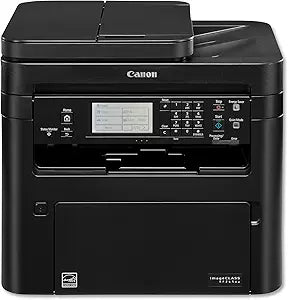
Canon imageCLASS MF269dw Wireless Laser Printer
Canon's MF269dw all-in-one laser printer delivers fast 30 PPM output with wireless connectivity and automatic duplex printing.
$469.00*
View on Amazon
✓ In Stock on Amazon.com
*Price sourced from Amazon.com. Last updated:Aug 28, 2026.Price and availability are subject to change — details.
Affiliate Disclosure: As an Amazon Associate, Studio Supplies earns from qualifying purchases made through links on this page, at no additional cost to you. This helps support our editorial team.
Notice a mistake? Let Us Know
Overview
Key Features
Print at speeds of up to 30 pages per minute, with your first print in your hands in approximately 5 seconds
Supports mobile solutions, including apple AirPrint, Canon Print business, Mopria print service, and Google cloud print. Connect mobile devices without a router using Wi Fi Direct connection
6 Line, black and white touch LCD for easy navigation; Temperature: 50 to 86º F. Operating System (Print/Scan) - Windows 10/8.1/7, Windows Server 2016/ 2012 R2/ 2012/ 2008 R2/ 2008; Mac OS 10.8.5 and Up
Paper capacity allows for 250 sheets in the standard cassette and 1 sheet in the multipurpose tray
All in one functionality allows you to print, scan, copy and fax with ease
Specifications
Brand
Canon
Model
MF269dw
Type
All-in-One Monochrome Laser Printer
Functions
Print, Scan, Copy, Fax
Print Speed
Up to 30 Pages Per Minute
First Print Time
Approximately 5.1 Seconds
Connectivity
Wireless, Wi-Fi Direct, USB
Mobile Printing
Apple AirPrint, Canon PRINT Business, Mopria Print Service, Google Cloud Print
Display
Six-Line Touch LCD
Paper Capacity
250 Sheets (Standard Cassette), 1 Sheet (Multipurpose Tray)
Duplex Printing
Automatic Two-Sided
Frequently Asked Questions
What functions does the Canon imageCLASS MF269dw perform?
It is a four-in-one device that prints, scans, copies, and faxes, all from a single compact unit.
What mobile printing options are supported?
The MF269dw supports Apple AirPrint, Canon PRINT Business, Mopria Print Service, and Google Cloud Print for printing from smartphones and tablets.
Does this printer support automatic two-sided printing?
Yes, it features built-in automatic duplex printing, so you can print on both sides of the page without manually flipping sheets.
How much paper can the MF269dw hold?
The standard cassette holds 250 sheets, and there is an additional single-sheet multipurpose tray for specialty media.
What type of display does the printer have?
It features a six-line touch LCD panel for easy navigation of settings, job status, and configuration menus.
Related Products


