



Canon
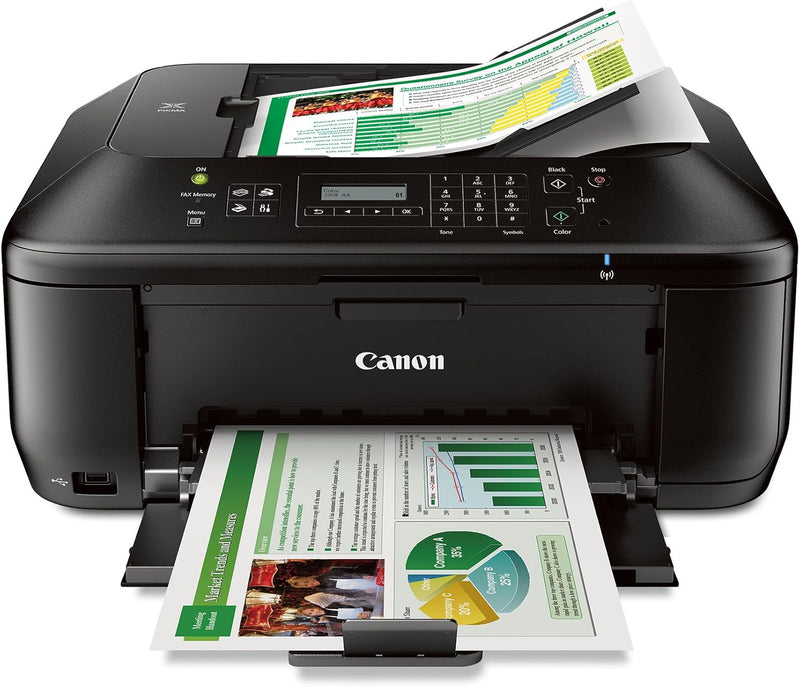
Canon MX532 PIXMA Wireless All-in-One Printer
Wireless all-in-one printing, scanning, copying, and faxing with AirPrint and auto duplex — a capable home office workhorse at an accessible price point.
$449.00*
Check availability
*Price sourced from Amazon.com. Last updated:Aug 30, 2026.Price and availability are subject to change — details.
Affiliate Disclosure: As an Amazon Associate, Studio Supplies earns from qualifying purchases made through links on this page, at no additional cost to you. This helps support our editorial team.
Notice a mistake? Let Us Know
Overview
Key Features
Air Print: print wirelessly and effortlessly from your compatible iPhone, iPad, or iPod touch- no drivers needed!
Built-in auto duplex printing: automatically Print on both sides of the page without the hassle of turning it over manually
Fully-integrated, 30-sheet auto document feeder: easily copy, scan and fax multiple documents without having to load them one page at a time.Easy-WebPrint EX requires Internet Explorer 7 or 8 for Windows, Internet Explorer 9 for Windows Vista SP2 (or later) or Windows 7, or Safari 4.0 – 5.0 for Mac OS X v10.5 – 10.6.x
With Google cloud Print, you can print from wherever you are, from applications You use every day. You can even share your home and work printers with anyone you choose
Compatible with CL-241 XL ink tanks & PG-240 XL or PG-240 XXL pigment black ink tanks. Save even more on COMBO/value packs!
Specifications
Brand
Canon
Model
PIXMA MX532
Functions
Print, Copy, Scan, Fax
Printing Technology
Inkjet
Wireless Connectivity
Wi-Fi
Mobile Printing
AirPrint, Google Cloud Print, PIXMA Printing Solutions
Duplex Printing
Automatic
Auto Document Feeder
30-sheet capacity
Memory
64 MB
Max Print Speed (Mono)
9.7 ppm
Max Print Speed (Color)
16 ppm
Max Media Size
8.5 x 14 inches
Compatible Ink
PG-240 XL / PG-240 XXL (Black), CL-241 XL (Color)
Connectivity
Wi-Fi, USB
Dimensions
18.1" W x 15.2" D x 7.9" H
Weight
18.7 lbs
Frequently Asked Questions
Does the MX532 support wireless printing from mobile devices without installing drivers?
Yes. The MX532 supports Apple AirPrint, which allows printing directly from iPhone, iPad, and iPod touch without drivers or additional software. Google Cloud Print support extends wireless printing to Android devices and any browser-connected computer.
What is the MX532's maximum print speed, and is that achievable in typical use?
Canon rates the MX532 at 9.7 ppm monochrome and 16 ppm color under ISO 24734 conditions. In typical mixed-document office use, effective throughput will be lower due to processing overhead and ink drying time, but these speeds are competitive for an inkjet in this class.
Does the MX532 print on both sides of the page automatically?
Yes. Built-in auto duplex printing handles two-sided output without manual page flipping. This applies to standard print jobs; duplex scanning is handled by the 30-sheet auto document feeder, which processes multi-page originals automatically.
What ink cartridges does the MX532 use, and is there a high-yield option?
The MX532 is compatible with the PG-240 XL and PG-240 XXL pigment black cartridges and the CL-241 XL color cartridge. The XXL black cartridge provides the highest page yield and the lowest cost-per-page for monochrome-heavy workflows. Combo/value packs reduce per-cartridge cost further.
What is the maximum document size the MX532 can print or scan?
The maximum print media size is 8.5 x 14 inches (legal). The 30-sheet ADF handles standard letter and legal originals for copying, scanning, and faxing without manual feeding.
Related Products


