

Canon
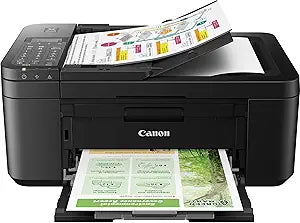
Canon TR4720 PIXMA Wireless All-in-One Printer
Compact Wireless All-in-One Printing SolutionThe Canon PIXMA TR4720 is a wireless all-in-one inkjet printer designed for home and office use. With its compact size and versatile functionality, this printer offers seamless printing, copying, scanning, and faxing from your PC or mobile devices. Fea...
Check availability
Affiliate Disclosure: As an Amazon Associate, Studio Supplies earns from qualifying purchases made through links on this page, at no additional cost to you. This helps support our editorial team.
Notice a mistake? Let Us Know
Overview
Compact Wireless All-in-One Printing Solution
The Canon PIXMA TR4720 is a wireless all-in-one inkjet printer designed for home and office use. With its compact size and versatile functionality, this printer offers seamless printing, copying, scanning, and faxing from your PC or mobile devices. Featuring auto 2-sided printing and a 20-sheet auto document feeder, the PIXMA TR4720 simplifies your printing tasks.
- Functions: Print, Copy, Scan, Fax
- Print Resolution: 4800 x 1200 dpi
- Connectivity: Wireless 802.11b/g/n 2.4GHz
- Paper Capacity: 100 Sheets
- Duplex Printing: Auto 2-Sided
- Auto Document Feeder: 20 Sheets
- Display: 2-Line LCD
- Dimensions: 7.5"H x 17.2"W x 11.7"D
- Features: Mobile Printing, Borderless Photo Printing, Auto Power On/Off, Document Removal Reminder
Key Features
PRINT, COPY, SCAN, FAX: The PIXMA TR4723 is a true 4-in-1 printer that is compact, versatile and easy-to-use. EASY SETUP: Enjoy simple setup through the Canon PRINT Inkjet/SELPHY app. EASY TO INSTALL: Designed for easy ink cartridge installation and replacement. FRONT PAPER TRAY: A fast and easy to load front paper tray with 100 sheet plain paper capacity.
FRONT PAPER TRAY: A fast and easy to load front paper tray with 100-sheet plain paper capacity reduces the need to refill paper as frequently. DESIGNED FOR YOUR SPACE: PIXMA TR4723 has a compact design, available in black or white, to fit your space at the office or at home.
EFFICIENT DOCUMENT PRINTING & SCANNING: Scan up to Legal size multi-page documents efficiently with the Auto Document Feeder. And save up to 50% of your paper costs with Auto 2-Sided (Duplex) Printing for Letter size documents. QUALITY DOCUMENTS & PHOTOS: The PIXMA TR4723 utilizes a hybrid ink system with pigment-based black and dye-based color for sharp black text and vivid color prints. Product quality documents, photos, and also borderless11 prints up to 8.5" x 11".
SIMPLE PRINTER INTERFACE: With the 2-Line LCD display and simple buttons, easily adjust printer settings, make copies, and send faxes with the number pad. Receive a Document Removal Reminder on the display if you forget your original document on the scanner.
In the Box: PIXMA TR4723 Wireless All-in-One Printer; Set of Starter (PG-275/CL-276) Ink Cartridges; RJ-11 Telephone/Modem Cable; Power Cord; Documentation. Tillsiy
Specifications
Functionality
Print, Copy, Scan, Fax
Paper Tray Capacity
100-sheet plain paper (Front Tray)
Document Feeder
Auto Document Feeder (Legal size)
Printing Type
Auto 2-Sided (Duplex) for Letter size
Ink System
Hybrid (Pigment-based black, Dye-based color)
Max Print Size
Borderless prints up to 8.5" x 11"
Display
2-Line LCD
Connectivity
Wireless
Included Accessories
Set of Starter (PG-275/CL-276) Ink Cartridges, RJ-11 Telephone/Modem Cable, Power Cord
Frequently Asked Questions
What functions does the Canon PIXMA TR4720 printer offer?
The PIXMA TR4720 is an all-in-one printer that offers print, copy, scan, and fax capabilities.
How is the setup process for this printer?
Setup is designed to be easy, primarily through the Canon PRINT Inkjet/SELPHY app.
Does this printer support automatic double-sided printing?
Yes, it features Auto 2-Sided (Duplex) Printing for Letter size documents to help save on paper.
What type of ink system does the PIXMA TR4720 use?
The printer uses a hybrid ink system, combining pigment-based black ink for sharp text and dye-based color inks for vivid photos.
What is the paper capacity of the front paper tray?
The front paper tray has a capacity of 100 sheets of plain paper.
Is there an automatic document feeder for scanning?
Yes, it includes an Auto Document Feeder for efficiently scanning multi-page documents up to Legal size.
What kind of display does the printer have?
The printer features a 2-Line LCD display with simple buttons for adjusting settings and performing tasks.
Related Products


