

Canon
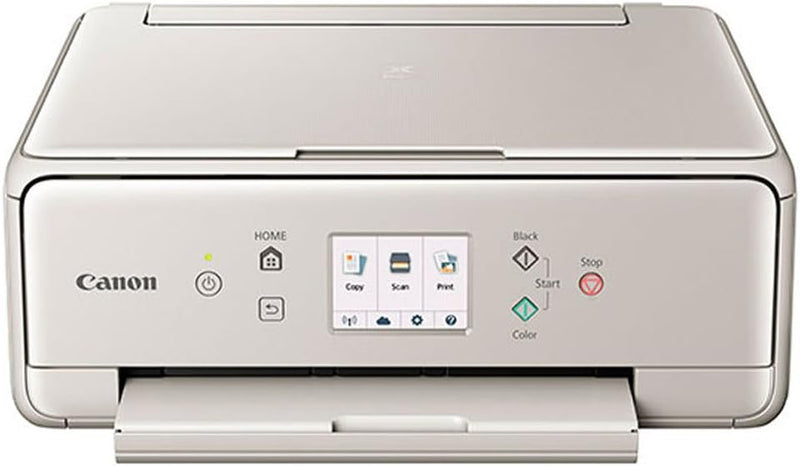
Canon TS6020 GY PIXMA Wireless Color Photo Printer
Five-ink precision and cloud-ready wireless connectivity make the Canon PIXMA TS6020 the compact home printer that doesn't compromise on photo quality.
View price on Amazon
Affiliate Disclosure: As an Amazon Associate, Studio Supplies earns from qualifying purchases made through links on this page, at no additional cost to you. This helps support our editorial team.
Notice a mistake? Let Us Know
Overview
Key Features
Stunning Print quality. Inspire your creativity and Print beautiful photographs and documents with the 5 individual ink system.
Enhanced connectivity. Enjoy the simplicity of connecting your smartphone, tablet and all your favorite devices with ease. Print hassle free - whether from the cloud, on social media or on the go.
Stylish & compact. The PIXMA TS6020 Wireless printer is the all-in-one that fits perfectly anywhere in the home, is simple to use, and delivers outstanding quality results every time.
Call our US- Based Service and Support Center at 1-800-OK-CANON for expedited repairs and expert technical support.
Specifications
Brand
Canon
Model
TS6020 GY
Color
Gray
Functions
Print, Scan, Copy
Print Technology
Inkjet
Ink System
5 Individual Ink Cartridges (PGBK, C, M, Y, GY)
Connectivity
Wi-Fi, USB, SD Card
Wireless Standards
Wi-Fi (2.4GHz), AirPrint, Google Cloud Print
Voice Assistant
Works with Alexa
ASIN
B01NAGLQHJ
Frequently Asked Questions
What does the five-ink system actually improve over a standard four-ink setup?
The TS6020 uses five individual cartridges — adding a dedicated gray ink — which expands tonal range in monochrome photos and reduces color cast in neutral tones. In practice, this means smoother gradients and more accurate skin tones versus CMYK-only systems at the same price point.
What wireless printing methods does the TS6020 support?
The printer connects via Wi-Fi (2.4GHz), supports AirPrint for iOS/macOS, Google Cloud Print, and Canon's PRINT Inkjet/SELPHY app. It also accepts direct SD card input, bypassing a host device entirely for standalone photo printing.
Does the TS6020 work with Alexa, and what can you actually do with it?
Yes — the TS6020 is Alexa-compatible. You can use voice commands to check ink levels and printer status. Actual print jobs still require a connected device; Alexa does not initiate print tasks independently.
How does USB connectivity work alongside wireless on this printer?
USB connects directly to a single host computer for driver-based printing. Wireless and USB can coexist, but the TS6020 is designed primarily as a wireless device — the USB port is a fallback for environments where Wi-Fi access is restricted.
What is the duty cycle and how does it hold up for moderate home use?
Canon rates this as a home-use device. It handles typical household print volumes — documents, occasional photo sheets, school projects — without issue. It is not rated for sustained high-volume runs; expect ink costs to be the primary constraint before mechanical wear becomes relevant.
Related Products


