



CFNXKTWBR
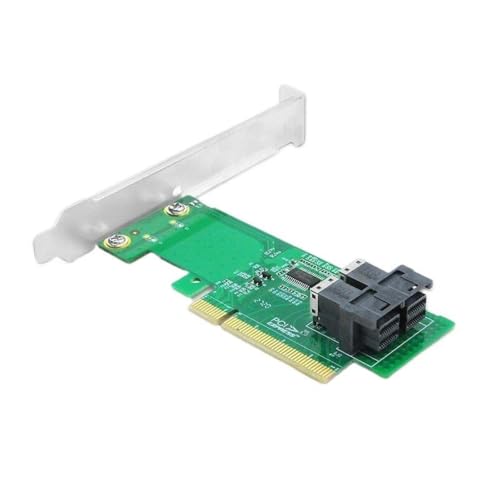
CFNXKTWBR Dual U.2 PCIe 3.0 NVMe SSD Adapter Card
Run two enterprise U.2 NVMe SSDs from a single PCIe 3.0 x8 slot with dual SFF-8643 ports
$98.21*
Check availability
*Price sourced from Amazon.com. Last updated:Oct 17, 2026.Price and availability are subject to change — details.
Affiliate Disclosure: As an Amazon Associate, Studio Supplies earns from qualifying purchases made through links on this page, at no additional cost to you. This helps support our editorial team.
Notice a mistake? Let Us Know
Overview
Key Features
Memory Cards
PCIe 3.0 stable high-speed bandwidth, dual U.2 SFF-8643 ports support two NVMe solid state drives, steady signal transmission, solid circuit structure, plug-and-play friendly, widely compatible with mainstream motherboards for desktop and server storage upgrade
Specifications
Brand
CFNXKTWBR
Interface
PCIe 3.0 x8
Ports
Dual U.2 SFF-8643
Drives Supported
Two NVMe solid state drives
Drive Form Factor
U.2
Installation
Plug-and-play
Compatibility
Mainstream desktop and server motherboards
Use Case
Desktop and server storage upgrade
Frequently Asked Questions
How many NVMe drives can this adapter connect at once?
Two. The card provides dual U.2 SFF-8643 ports, allowing a pair of NVMe solid state drives to run simultaneously from a single PCIe 3.0 x8 slot.
What kind of PCIe slot does the card require?
A PCIe 3.0 x8 slot. The adapter is built on the PCIe 3.0 interface, so your motherboard needs an available x8 slot to provide full bandwidth to both drives.
Does this work with M.2 SSDs or only U.2 drives?
It is designed for U.2 drives via its SFF-8643 connectors. M.2 SSDs use a different interface, so this adapter is intended specifically for U.2 NVMe storage.
Will it work with my motherboard?
The manufacturer lists it as widely compatible with mainstream motherboards for desktop and server storage upgrades. Confirm you have an open PCIe x8 slot before purchasing.
Is any special software or configuration needed to set it up?
The card is described as plug-and-play, meaning it is meant to be recognized on supported systems without elaborate configuration or dedicated driver installation.
Related Products


