Corsair

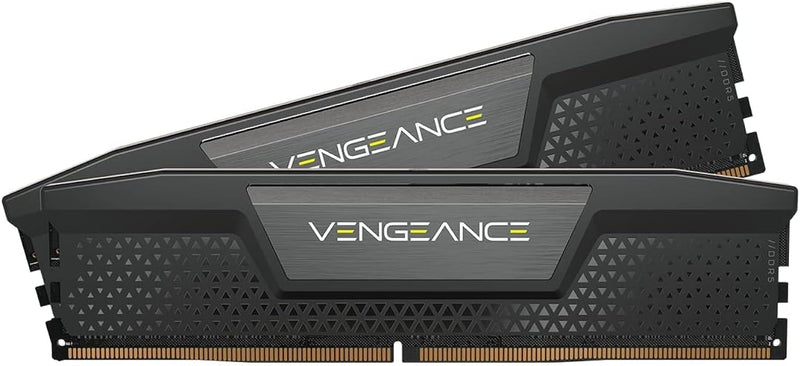
Corsair CMK16GX5M2B5200C40 Vengeance 16GB DDR5 5200MHz RAM

4.7 (2465 reviews)
16GB DDR5

Corsair Vengeance DDR5 RAM delivers 5200MHz speed with onboard voltage regulation for optimized Intel builds.

$264.99*
Check availability

*Price sourced from Amazon.com. Last updated:Jul 19, 2026.Price and availability are subject to change.

Affiliate Disclosure: Studio Supplies may earn a commission from qualifying purchases made through links on this page, at no additional cost to you. This helps support our editorial team.

Notice a mistake? Let Us Know

Overview

The Corsair Vengeance DDR5 (CMK16GX5M2B5200C40) is a 16GB memory kit consisting of two 8GB modules rated at 5200MHz with CL40-40-40-77 timings. Built for Intel DDR5 platforms, it takes advantage of Intel XMP 3.0 to enable its rated speed with a single BIOS toggle, and goes further by allowing users to create and save custom XMP profiles through Corsair's iCUE software — tailoring memory performance to specific applications or workloads without repeated manual BIOS adjustments.

A key architectural advantage of DDR5 is onboard voltage regulation, and the Vengeance kit leverages this with iCUE integration that lets you adjust voltage directly on the module's PMIC for finer overclocking control than was possible with DDR4's motherboard-dependent regulation. The compact, low-profile heat spreader design keeps the modules well within clearance limits for tower coolers and top-mounted AIO radiators, making them a practical fit for builds where component spacing is tight. Running at 1.25V, the kit balances performance with reasonable power consumption, and dual-channel operation across the two modules ensures the CPU has the bandwidth to feed its cores during demanding multithreaded workloads.

Key Features

Do it All, and Do it Faster: As modern CPUs feature more and more cores, the unprecedented speed of DDR5 ensures your high-end CPU gets data quickly, enabling faster processing, rendering, and buffering than ever before.

Onboard Voltage Regulation: Makes for easier, more finely-tuned, and more stable overclocking through CORSAIR iCUE software than previous generation motherboard control.

Custom Intel XMP 3.0 Profiles: Customize and save your own XMP profiles via iCUE to tailor performance by app or task for greater efficiency.

Powerful CORSAIR iCUE Software: Enables real-time frequency readings, onboard voltage regulation, and custom XMP profiles.

Compact Form-Factor: Low clearance ensures wide compatibility with nearly any DDR5 build.

Specifications

Brand
Corsair
Model
CMK16GX5M2B5200C40
Capacity
16GB (2 x 8GB)
Memory Type
DDR5
Speed
5200MHz
CAS Latency
CL40-40-40-77
Voltage
1.25V
Form Factor
Low-Profile DIMM
Platform Optimization
Intel XMP 3.0

Corsair Vengeance DDR5 Desktop Memory (16GB / 32GB / 64GB Kits) — Editorial Review & Compatibility Guide

The Corsair Vengeance DDR5 family (CMK16GX5M2B5200C40, CMK64GX5M2B5200C40, CMH32GX5M2D6000C36, CMH64GX5M2B6400C32, plus the RGB CMH variants and SODIMM CMSX laptop variants) is Corsair's mainstream-to-enthusiast DDR5 desktop memory line — targeting Intel 12th/13th/14th gen + AMD Ryzen 7000+ AM5 + Threadripper 7000 platforms that moved to DDR5. Per Corsair's official Vengeance DDR5 product family page, the line ships at 4800MHz baseline JEDEC speed, with overclocked XMP 3.0 / Intel XMP / AMD EXPO profiles for 5200MHz, 6000MHz, 6400MHz, and faster speeds depending on SKU.

What Vengeance DDR5 Specifically Wins

  • DDR5 architecture — 2x DDR4 bandwidth per module — each module has two independent 32-bit channels (vs DDR4's single 64-bit). Modern CPUs benefit from improved parallelism
  • On-die ECC — DDR5 spec includes error correction inside the module (different from server ECC, but improves data integrity)
  • 5200MHz CL40 / 6000MHz CL30 / 6400MHz CL32 XMP/EXPO profiles — one-click BIOS enable for overclocked speeds. AMD EXPO profiles work natively on Ryzen 7000+ for optimal Infinity Fabric ratios
  • 1.1V operating voltage — DDR5 standard, lower than DDR4's 1.2V. Lower power draw + lower heat
  • Low-profile heatspreader on standard Vengeance — clears tower coolers (Noctua NH-D15, be quiet! Dark Rock 5, Deepcool AK620). RGB variants are slightly taller; verify cooler clearance
  • Lifetime warranty
  • Wide motherboard compatibility — Intel Z690/Z790/Z890, AMD X670/B650/X870, Threadripper TRX50/WRX90
  • SODIMM laptop variant (CMSX*GX5M*) for DDR5 laptops
  • Power Management IC (PMIC) on module — more sophisticated power delivery than DDR4 (which relied on motherboard voltage regulation)

Where Vengeance DDR5 Specifically Fits

  • Intel 12th/13th/14th gen + Ryzen 7000+ gaming desktop builds — 32GB sweet spot for current games
  • Content creator workstations on current platforms — Premiere/After Effects/DaVinci Resolve benefit from 32-64GB DDR5
  • AM5 / Z890 motherboards built 2024-2025 — DDR5 is the default for modern motherboards
  • Compact ITX DDR5 builds — low-profile fits under tower cooler in small chassis
  • Streaming PCs — DDR5 bandwidth helps with OBS + game + browser + Discord workflow
  • VR gaming systems — bandwidth headroom for high-refresh-rate VR rigs
  • Higher-end home office workstations
  • Server / NAS upgrades on DDR5-supporting motherboards
  • AI/ML development workstations — 64GB+ DDR5 for small LLM training
  • Threadripper 7000 high-end workstation — server-tier memory for VFX / rendering

Honest Limits Buyers Should Know

  • NOT backward compatible with DDR4 motherboards. DDR5 has different keyway position than DDR4 — physically WON'T install. Verify motherboard memory generation before purchase. DDR4 buyers need Vengeance LPX DDR4 (see [[pdp-corsair-vengeance-lpx-ddr4-3200-review]])
  • 5200MHz JEDEC vs higher XMP/EXPO speeds. Faster speeds (6000+/6400+) only enable via XMP/EXPO profile in BIOS. Verify motherboard CPU memory controller supports the speed (Ryzen 7950X3D supports up to 6000MHz natively; higher speeds may require manual subtiming)
  • RGB Vengeance is taller than standard Vengeance. RGB variants ~50mm vs standard ~34mm. Tall RAM with large CPU coolers may have clearance issues. Verify before buying RGB tier
  • AMD AM5 + DDR5 may need BIOS update for highest speeds. Early AM5 BIOS releases capped at 5200MHz; current BIOS versions support 6400+. Update before assuming highest speeds work
  • SODIMM laptop variants (CMSX) are different SKU. Desktop Vengeance DDR5 modules DO NOT fit laptop SODIMM slots. For DDR5 laptop SODIMM, use CMSX*GX5M* (or Crucial DDR5 SODIMM family)
  • Premium pricing vs DDR4. DDR5 is 30-50% more expensive than DDR4 at the same capacity tier. Pays for newer architecture; some users wait for prices to drop
  • Memory training takes longer on cold boot. DDR5 has more complex training procedures; 15-30 seconds cold boot vs DDR4's 5-10 seconds. Subsequent boots are normal speed
  • 4-stick configurations sometimes downclock. Most AM5 / Intel motherboards lose speed when populating all 4 DIMM slots vs 2. For maximum speed, 2-stick configuration with higher-capacity modules is preferred
  • Memory controller is the gate, not the modules. Even with 6400MHz modules, if the CPU's integrated memory controller is rated to 6000MHz, modules will run at 6000MHz max

Where Buyers Should Look Elsewhere

  • Premium / enthusiast DDR5 with tighter timings → G.SKILL Trident Z5 / Z5 Neo at CL30-32, Kingston Fury Renegade DDR5
  • RGB aesthetic → Corsair Vengeance RGB DDR5 (in this family) or G.SKILL Trident Z5 RGB
  • DDR4 motherboards (older platforms) → Corsair Vengeance LPX DDR4 (see linked article)
  • DDR5 SODIMM laptop memory → Crucial DDR5 SODIMM family (see [[pdp-crucial-ddr5-sodimm-family-review]])
  • Server / ECC workstation → Corsair Server Premier DDR5, Kingston Server Premier DDR5
  • Highest possible speed (6800+ MHz) → G.SKILL Trident Z5 Neo / Royal Neo (AMD-tuned at extreme speeds)
  • Pure budget DDR5 → Crucial Pro DDR5, Kingston Fury Beast DDR5 (slower XMP speeds but cheaper)

Sources & Citations

  1. Corsair, "Vengeance DDR5 product family page," corsair.com (accessed 2026-05-18)
  2. AMD, "Ryzen 7000+ AM5 memory documentation," amd.com (accessed 2026-05-18)
  3. Intel, "Intel 12th-14th gen platform memory documentation," intel.com (accessed 2026-05-18)
  4. Tom's Hardware, "DDR5 memory comparison and benchmarks," tomshardware.com (accessed 2026-05-18)

Last verified: 2026-05-18

How to Upgrade Desktop RAM — DDR4 & DDR5

Upgrading desktop RAM is one of the most accessible hardware improvements available. No specialized tools are required, the process takes under 30 minutes, and the performance benefit is immediate for multitasking, content creation, and gaming workloads. The installation procedure is identical for DDR4 and DDR5 modules at the physical level — the key difference is the notch position on the module edge, which physically prevents cross-generation insertion.

Before You Begin: Compatibility Check

Confirm the memory type the motherboard supports (DDR4 or DDR5 — boards support only one), the maximum capacity per slot and total, and the validated speeds listed in the board's QVL. Crucial's online scanner and the motherboard manufacturer's QVL page are the most reliable sources for this information. Installing a kit rated above the board's maximum supported speed is safe — the module defaults to JEDEC baseline (DDR4-3200 or DDR5-4800) and requires an XMP or EXPO profile enable in BIOS to unlock rated speed.

Safety

Electrostatic discharge is the primary physical risk. Before handling any module, touch the bare metal interior of the case chassis with power unplugged to discharge any static charge. Work on a hard, non-carpeted surface. Most builders skip a wrist strap for a quick RAM swap, but one is recommended in low-humidity or carpeted environments.

Quick Installation Summary

  1. Shut down completely, disconnect power, and discharge residual capacitor charge by pressing the power button once after unplugging.
  2. Remove the side panel and touch the case chassis interior to discharge static.
  3. Locate the DIMM slots — consult the board manual for the correct dual-channel pair (typically A2 and B2 on a four-slot board).
  4. Press the latch(es) open, then insert the new module with the notch aligned to the key ridge in the slot.
  5. Press down firmly with both thumbs until both latches click audibly into the module's side notches.
  6. Replace the panel, reconnect power, and boot to BIOS to verify the new capacity is detected.
  7. Enable XMP (Intel) or EXPO (AMD AM5) in BIOS to unlock the kit's rated speed — without this step the memory runs at JEDEC baseline only.

DDR4 vs. DDR5 — Platform Context

DDR4 and DDR5 modules are not interchangeable between platforms. DDR4 is standard on Intel LGA1700 DDR4 boards (12th–14th Gen) and AMD AM4 (Ryzen 3000–5000). DDR5 is the sole option on Intel LGA1851 (Core Ultra 200 series) and AMD AM5 (Ryzen 7000/9000 series), as well as some LGA1700 boards that offer a DDR5 variant. For new platform builds as of mid-2026, DDR5-5600 or DDR5-6000 32GB kits represent the best price-to-performance range, according to Tom's Hardware's 2026 RAM buying guide. For existing DDR4 systems, properly timed DDR4-3200 to DDR4-3600 kits deliver the full bandwidth the platform supports.

Troubleshooting in Brief

  • No POST / no display: Module not fully seated — reseat until both latches click.
  • BIOS shows less RAM than installed: One module not detected — reseat and confirm correct slot pair.
  • Instability after XMP/EXPO enabled: Try a lower speed profile or disable XMP/EXPO to confirm the base configuration is stable.
  • Module does not fit: Stop — wrong DDR generation for the board. Do not force.

The full step-by-step guide with detailed safety instructions, dual-channel slot guidance, and extended troubleshooting is available at studio-supplies.com/blogs/guides/desktop-ram-upgrade-guide-ddr4-ddr5.

Sources & Citations

  1. Tom's Hardware, "How to Install RAM in a PC," tomshardware.com (accessed 2026-05-30)
  2. Tom's Hardware, "How to Enable XMP to Improve RAM Speeds," tomshardware.com (accessed 2026-05-30)
  3. Tom's Hardware, "Best RAM for Gaming 2026," tomshardware.com (accessed 2026-05-30)
  4. Crucial, "Memory Support & Installation Resources," crucial.com (accessed 2026-05-30)
  5. Crucial / Micron, "DRAM Installation Guide (PDF)," assets.micron.com (accessed 2026-05-30)

Last verified: 2026-05-30

Now that you've seen the details — ready to take a closer look?

Check availability

Frequently Asked Questions

This kit is optimized for Intel motherboards with Intel XMP 3.0 profile support. While it may physically fit in AMD DDR5 boards, the XMP profiles are designed for Intel platforms. AMD systems use EXPO profiles, which this kit does not include.
This is a 16GB kit consisting of two 8GB modules (2x8GB), designed to run in dual-channel mode for optimal memory bandwidth.
Unlike DDR4 where voltage was controlled by the motherboard, DDR5 modules like the Vengeance include a power management IC (PMIC) directly on the module. This allows for more precise and stable voltage control, which benefits overclocking stability and can be adjusted through Corsair iCUE software.
Yes, the Vengeance DDR5 uses a compact, low-profile form factor specifically designed to clear large air coolers and AIO radiator tubing, providing broad compatibility with aftermarket cooling solutions.
The kit runs at CAS latency CL40 with timings of 40-40-40-77 at 1.25V when the XMP 3.0 profile is enabled.