

Corsair
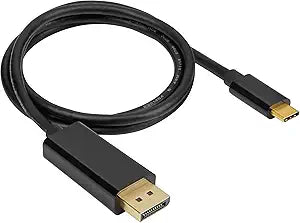
Corsair CU-9000005-WW USB-C to DisplayPort 4K HDR Cable
4KUSB-CDisplayPortHDR
Seamless 4K Connectivity for Stunning VisualsThe Corsair USB Type-C to DP Cable lets you effortlessly connect your USB Type-C device to a DisplayPort display. Experience high-resolution video with HDR support and a smooth 60Hz refresh rate, perfect for gaming, streaming, and professional applicat...
$64.72*
Check availability
*Price sourced from Amazon.com. Last updated:Sep 15, 2026.Price and availability are subject to change — details.
Affiliate Disclosure: As an Amazon Associate, Studio Supplies earns from qualifying purchases made through links on this page, at no additional cost to you. This helps support our editorial team.
Notice a mistake? Let Us Know
Overview
Seamless 4K Connectivity for Stunning Visuals
The Corsair USB Type-C to DP Cable lets you effortlessly connect your USB Type-C device to a DisplayPort display. Experience high-resolution video with HDR support and a smooth 60Hz refresh rate, perfect for gaming, streaming, and professional applications.
- Cable Type: USB Type-C to DisplayPort
- Length: 3ft
- Video Resolution Support: Up to 4K
- Refresh Rate: 60Hz
- HDR Support: Yes
Key Features
USB Type-C to DP Cable: A 3ft-long cable connects a USB Type-C port to an DisplayPort 1.4 input.
Incredible Video Output: Supports high quality video up to stunning 4K resolution with 60Hz refresh rate in HDR.
Specifications
Cable Type
USB Type-C to DisplayPort
Connector 1
USB Type-C
Connector 2
DisplayPort 1.4
Length
3ft
Max Resolution
4K
Max Refresh Rate
60Hz
Video Standard
HDR
Frequently Asked Questions
What is the maximum video resolution and refresh rate this cable supports?
This Corsair cable supports high-quality video up to a stunning 4K resolution with a 60Hz refresh rate.
Does this cable support HDR content?
Yes, the Corsair CU-9000005-WW USB-C to DisplayPort cable supports High Dynamic Range (HDR) video output.
What is the length of this USB-C to DisplayPort cable?
The cable is 3ft long, providing a convenient length for connecting devices.
What kind of ports does this cable connect?
This cable connects a USB Type-C port on a source device to a DisplayPort 1.4 input on a display or monitor.
Can this cable be used to connect a DisplayPort source to a USB-C monitor?
No, this cable is specifically designed for unidirectional connection from a USB Type-C port (source) to a DisplayPort 1.4 input (display).
Related Products

