

Crucial
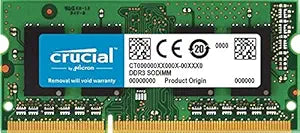
Crucial 4GB Upgrade for Apple Mac Mini DDR3 Memory
Boost your Mac Mini (Mid 2010) performance with a reliable Crucial 4GB DDR3 memory upgrade.
Check availability
Affiliate Disclosure: As an Amazon Associate, Studio Supplies earns from qualifying purchases made through links on this page, at no additional cost to you. This helps support our editorial team.
Notice a mistake? Let Us Know
Overview
Key Features
204-pin SODIMM
DDR3-1066
Desktop/PC
Specifications
Capacity
4GB
Memory Type
DDR3
Speed
PC3-8500 (DDR3-1066)
Form Factor
204-pin SODIMM
ECC
Non-ECC
Compatibility
Apple Mac Mini (Mid 2010) — Intel Core 2 Duo 2.66GHz
Frequently Asked Questions
Which Mac Mini models does this Crucial 4GB module support?
This module is specifically designed for the Apple Mac Mini (Mid 2010) with Intel Core 2 Duo 2.66GHz processor.
Is this memory ECC or non-ECC?
This is a non-ECC (non-error-correcting code) memory module, which is the standard type used in consumer Mac Mini systems.
What speed and form factor is this memory module?
It is a 204-pin SODIMM running at DDR3-1066 (PC3-8500) speed.
Can I install two of these modules to get 8GB total in my Mac Mini?
Yes, the Mid 2010 Mac Mini has two SODIMM slots, so installing two 4GB modules would give you 8GB of total system memory.
Does this module require any special configuration after installation?
No, the Mac Mini will automatically detect and configure the new memory module upon startup — no BIOS changes or drivers are needed.
Related Products


