Crucial BX500 1TB vs MX500 vs P3 — Which Crucial SSD Is Right?
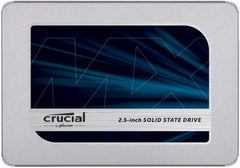
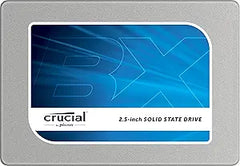
The Crucial BX500 (CT1000BX500SSD1) is Crucial's entry-tier 2.5-inch SATA SSD — the cheapest path from a 1 TB HDD to a 1 TB SSD on any PC with a SATA bay. Per Crucial's official BX500 product page, the drive ships in a 7 mm 2.5-inch form factor with the company's standard 3-year warranty. The BX500 is best understood by comparing it against its two natural upgrade targets — the DRAM-equipped MX500 (still SATA) and the PCIe Gen3 NVMe P3 (M.2 slot required). This module walks through the trade-offs so buyers can match the drive to the host system and workload.
The Three-Way Comparison at a Glance
| Spec | BX500 1TB | MX500 1TB (SATA upgrade) | P3 1TB (NVMe step-up) |
|---|---|---|---|
| Interface | SATA III (6 Gb/s) | SATA III (6 Gb/s) | PCIe 3.0 x4 NVMe |
| Form factor | 2.5" 7 mm | 2.5" 7 mm or M.2 2280 (SATA) | M.2 2280 NVMe |
| Sequential read | 540 MB/s rated | 560 MB/s rated | 3,500 MB/s rated |
| Sequential write | 500 MB/s rated | 510 MB/s rated | 3,000 MB/s rated |
| DRAM cache | None (DRAM-less) | Yes (DRAM-equipped) | None (HMB via PCIe) |
| NAND | 3D TLC/QLC (varies) | 3D TLC | 176-layer 3D NAND |
| Endurance (TBW) | 120 TBW @ 1 TB | 360 TBW @ 1 TB | 220 TBW @ 1 TB |
| Warranty | 3-year limited | 5-year limited | 5-year limited |
What the BX500 Specifically Wins
The BX500 has the lowest entry price in Crucial's SATA SSD line and the broadest host-compatibility profile — any desktop with a free 2.5-inch drive bay or any laptop with a 2.5-inch SATA bay accepts it without a motherboard or BIOS check. For a buyer whose primary goal is replacing a spinning HDD on an older system (Intel 4th-gen Core, AMD A-series, anything that predates widespread M.2 NVMe adoption), the BX500 is the right tier. Per Crucial's BX500 product page, the drive ships with the Acronis True Image cloning utility, making the HDD-to-SSD migration a one-tool, one-click process.
Tom's Hardware on the DRAM-Less Trade-Off
Tom's Hardware's Crucial BX500 review documents the DRAM-less architecture's most visible limitation: sustained-write performance drops to approximately 100 MB/s once the on-drive SLC cache is exhausted. For typical desktop loads (boot drive + office apps + the occasional 50 GB game install), the SLC cache absorbs the workload and the drive runs at its rated ~500 MB/s. For sustained-write workloads (video-editing scratch, multi-hundred-GB cloud-sync downloads, large database imports), the post-cache slowdown is significant. Tom's Hardware's overall recommendation: the BX500 is a competent HDD replacement, but for a few dollars more the MX500 delivers materially better real-world performance.
When the MX500 Is the Right Step-Up
Per Crucial's MX500 product page, the MX500 carries Micron's full-featured SATA SSD package: full DRAM cache (typically 1 GB DRAM on the 1 TB model), 360 TBW endurance, AES-256 hardware encryption, Opal 2.0 management, and Crucial's 5-year limited warranty. The MX500 is the right pick when:
- The host system has a 2.5-inch SATA bay but no M.2 NVMe slot, AND the workload is more than light desktop use
- The user wants AES-256 hardware encryption for confidential data (not available on the BX500)
- The user values the longer 5-year warranty + higher TBW endurance for a primary system drive
- The price gap to the BX500 has shrunk to less than 15-20%, which is typical at the 1 TB tier
The MX500 also has an M.2 2280 SATA variant (CT1000MX500SSD4), which fits in an M.2 slot but still runs at SATA speeds — useful for laptops that only have an M.2 slot but lack NVMe support.
When the P3 Is the Right Step-Up
If the host system has a free M.2 NVMe slot (any modern desktop motherboard, any laptop from 2018 onward with M.2 PCIe support), the P3 is the higher-value choice at similar 1 TB price points. Per Crucial's P3 product page, the P3 1 TB runs PCIe 3.0 x4 NVMe with 3,500 MB/s read and 3,000 MB/s write, with 176-layer Micron 3D NAND and 1.5 million hours MTTF. Tom's Hardware's Crucial P3 review positions the P3 as a "solid secondary SSD" — meaning the P3 is well-suited as a games / storage drive on systems where a faster Gen4 NVMe handles the OS, but it is also a sound primary OS drive for users coming from any HDD or SATA SSD.
The headline takeaway: the P3's sequential bandwidth is approximately 6-7x the BX500's rated SATA III ceiling. For boot times, large file transfers, and game-load times, this difference is visible — though for routine desktop use (web, office, video playback) most users will not notice the gap once they have already upgraded from an HDD.
Honest Cons Across the Three Tiers
- BX500 endurance is meaningfully lower. 120 TBW at 1 TB is roughly one-third of the MX500's 360 TBW for the same capacity. For most consumer use this is still many years of write cycles, but for high-write workloads (database, video scratch, NAS), the BX500 is undersized
- BX500 lacks AES-256 hardware encryption. Per Crucial's specifications, AES-256 + Opal 2.0 are available on the MX500 but not on the BX500. Buyers needing per-drive hardware encryption for confidential content should step up to the MX500 or use host-OS-level encryption (BitLocker, FileVault) on top of the BX500
- P3 requires an M.2 NVMe slot. Older systems (pre-2017 desktops, many sub-$400 laptops) have only SATA support and cannot accept the P3. The host system's motherboard manual is the source of truth — confirm M.2 PCIe NVMe support before buying
- P3 is Gen3, not Gen4. The P3 is one PCIe generation behind current-mainstream Gen4 drives. For host systems with Gen4 slots, the P3 Plus (CT1000P3PSSD8) is the same product line on Gen4 with ~5,000 MB/s read for similar pricing. The P3 is appropriate when the host motherboard is Gen3-only (no Gen4 slot exists)
- MX500 is the same SATA III ceiling as the BX500. Buyers who already have a SATA SSD and are upgrading should NOT step from BX500 to MX500 (still SATA, still ~550 MB/s ceiling) — they should step to NVMe instead
Upgrade Verdict by Buyer Profile
- Replacing an HDD on an older PC with no M.2 NVMe slot → BX500 is the right tier. Cheapest path to SSD performance; the host bottlenecks at SATA III regardless
- Replacing an HDD on a system with an M.2 NVMe slot → P3 instead of BX500. Same price tier, NVMe speeds make the upgrade more meaningful
- Primary OS drive for moderate-to-heavy daily use on a SATA-only system → MX500. The DRAM cache, higher endurance, AES-256, and 5-year warranty justify the small premium over BX500
- Adding a secondary drive for games/storage on a modern system → P3 if the motherboard has a free M.2 slot (better cost-per-GB than SATA), BX500 only if all M.2 slots are filled
- Laptop with M.2 SATA-only slot (not NVMe) → MX500 M.2 SATA variant (CT1000MX500SSD4), since the P3 won't physically be recognized as bootable
Sources & Citations
- Crucial, "BX500 1TB 3D NAND SATA 2.5-inch SSD — CT1000BX500SSD1," crucial.com (accessed 2026-05-17)
- Crucial, "MX500 500GB 3D NAND SATA 2.5-inch SSD — CT500MX500SSD1," crucial.com (accessed 2026-05-17)
- Crucial, "P3 1TB PCIe M.2 2280 SSD — CT1000P3SSD8," crucial.com (accessed 2026-05-17)
- Tom's Hardware, "Crucial BX500 SSD Review: The DRAMless Invasion Continues," tomshardware.com (accessed 2026-05-17)
- Tom's Hardware, "Crucial P3 SSD Review: Solid Secondary SSD," tomshardware.com (accessed 2026-05-17)
Last verified: 2026-05-17