

Crucial
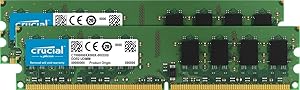
Crucial CT2KIT12864AA800 2GB DDR2 PC2-6400 Memory Kit
Enhance Your System's Performance with Crucial Memory Give your computer a boost with the Crucial 2GB (1GBx2) DDR2 PC2-6400 Memory Kit. This DRAM upgrade offers a simple and cost-effective solution to improve system speed and reliability. Designed to enhance productivity for both everyday tasks ...
$24.99*
Check availability
*Price sourced from Amazon.com. Last updated:Oct 22, 2026.Price and availability are subject to change — details.
Affiliate Disclosure: As an Amazon Associate, Studio Supplies earns from qualifying purchases made through links on this page, at no additional cost to you. This helps support our editorial team.
Notice a mistake? Let Us Know
Overview
Enhance Your System's Performance with Crucial Memory
Give your computer a boost with the Crucial 2GB (1GBx2) DDR2 PC2-6400 Memory Kit. This DRAM upgrade offers a simple and cost-effective solution to improve system speed and reliability. Designed to enhance productivity for both everyday tasks and demanding applications.
Specifications:- Brand: Crucial
- Model: CT2KIT12864AA800
- Capacity: 2GB (1GB x 2)
- Type: 240-pin DIMM DDR2
- Speed: PC2-6400
Key Features
240-pin DIMMs are used to provide DDR2 SDRAM memory for desktop computers
To use DDR2 memory, your system motherboard must have 240-pin DIMM slots and a DDR2-enabled chipset
Specifications
Capacity
2GB
Memory Type
DDR2 SDRAM
Form Factor
240-pin DIMM
Speed
PC2-6400
Application
Desktop Computers
Frequently Asked Questions
What type of computer is this memory kit designed for?
This Crucial CT2KIT12864AA800 memory kit is specifically designed to provide DDR2 SDRAM memory for desktop computers.
What are the compatibility requirements for using this DDR2 memory?
To use this DDR2 memory, your system motherboard must have 240-pin DIMM slots and be equipped with a DDR2-enabled chipset.
What is the total memory capacity provided by this kit?
This memory kit provides a total of 2GB of DDR2 RAM, which can be used to upgrade or expand your desktop's memory.
Is this memory suitable for newer computer systems?
No, this memory is DDR2, an older standard. Newer computer systems typically require DDR3, DDR4, or DDR5 memory and would not be compatible.
How can I check if my computer has 240-pin DIMM slots?
You can usually find information about your motherboard's memory slot type (e.g., 240-pin DIMM for DDR2) in your computer's user manual or by checking the motherboard manufacturer's specifications online.
Related Products


