



Crucial
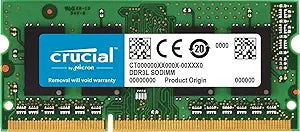
Crucial CT4G3S1339M 4GB DDR3 1333MHz Mac Memory
Drop-in 4GB DDR3 upgrade that meets Apple's own specifications to restore and extend the usable life of aging Mac systems.
View on Amazon for pricing
Affiliate Disclosure: As an Amazon Associate, Studio Supplies earns from qualifying purchases made through links on this page, at no additional cost to you. This helps support our editorial team.
Notice a mistake? Let Us Know
Overview
Key Features
Increases system performance
Compatible with select Mac systems
All memory stick modules extensively tested at the component and function level
Meets or exceeds, Apple's quality standards and requirements
Easy installation
Specifications
RAM Capacity
4GB
RAM Type
DDR3
RAM Speed
1333MHz
Compatibility
Select Mac systems
Brand
Crucial
Similar Products
Other products from the same family that visitors often consider:
 ✓ Available
Crucial CT51264BA1339 4GB DDR3 1333MHz Desktop Memory
$19.96
View on Amazon → ✓ Available
Crucial CT51264BD1339 4GB DDR3 1333MHz Notebook Module
View on Amazon → Currently Unavailable
Crucial 4GB Upgrade for Apple Mac Mini DDR3 Memory
Check on Amazon → Currently Unavailable
Crucial 4GB DDR3 RAM Upgrade for Apple Mac Mini
Check on Amazon → ✓ Available
Crucial CT8G3S1339M 8GB DDR3 1333MHz SODIMM Mac Memory
$24.97
View on Amazon →Frequently Asked Questions
Will this CT4G3S1339M module work in my specific Mac, and how do I verify compatibility?
This module is validated for select Mac systems — not all Macs that use DDR3. The key identifiers are DDR3 SO-DIMM form factor, 1333MHz (PC3-10600) speed, and CL9 latency. Crucial's online compatibility tool cross-references your Mac's model identifier against a validated parts database, which is the most reliable way to confirm fit before purchasing.
Can I run this 4GB module alongside my existing Mac RAM, or must I replace all sticks?
You can mix this module with an existing stick if your Mac has two SO-DIMM slots, but matched pairs running in dual-channel mode deliver measurably better memory bandwidth. For best throughput, install two identical CT4G3S1339M modules for 8GB total in dual-channel configuration.
Is DDR3 1333MHz the same as PC3-10600?
Yes — these are two naming conventions for the same specification. DDR3-1333 refers to the clock speed; PC3-10600 refers to the module's peak bandwidth of approximately 10,600 MB/s. Both designations describe this exact module, and either label on a Mac's memory slot spec confirms compatibility.
Does installing this module void my Mac's warranty?
Apple explicitly supports user RAM upgrades on Mac models with accessible SO-DIMM slots, and Crucial memory meets or exceeds Apple's specifications. For Macs still under AppleCare, RAM upgrades do not void coverage on the rest of the system, though the RAM module itself is not covered by Apple.
What performance improvement should I realistically expect after installing this module?
The measurable benefit depends on your current RAM amount. Going from 4GB to 8GB in a Mac running macOS eliminates swap file usage during typical multitasking — the OS stops writing to the SSD/HDD for memory paging, which reduces latency and extends storage longevity. If you're already at 8GB, the improvement is less pronounced.
Related Products


