
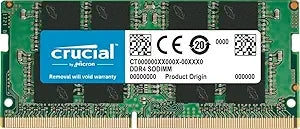


Crucial CT2K16G4SFRA32A 32GB DDR4 3200MHz SODIMM Kit — Editorial Review & Compatibility Guide
The Crucial CT2K16G4SFRA32A is Crucial's 32GB (2×16GB) DDR4 3200MHz CL22 SODIMM laptop memory kit — designed for laptop / mini-PC / NUC / SFF systems with two SODIMM slots that need a maximum-capacity upgrade. Per Crucial's official CT2K16G4SFRA32A product page, the kit uses Micron-made memory dies with Crucial's QVL-tested compatibility across 90+ laptop / NUC models, ships at 3200MHz CL22-22-22-52, and includes a limited lifetime warranty. The CT2K nomenclature means "Crucial Twin-Kit" — matched pair purchase from a single manufacturing batch.
What the CT2K16G4SFRA32A Specifically Wins
- Crucial-built (Micron parent company) — top-tier QVL compatibility — Crucial publishes a verified compatibility list of laptops + NUCs + SFF systems where this kit is tested-to-work. Reduces "will it work?" uncertainty
- 3200MHz at CL22 is the laptop DDR4 sweet spot — most laptop motherboards lock at 3200MHz max regardless of installed module rate; CL22 (vs CL18-20 on some kits) is the latency tier most laptops accept stably
- Matched 2-module kit from same manufacturing batch — eliminates timing mismatch issues that can occur when buying separate modules at different times
- Lifetime limited warranty — Crucial / Micron RMA process for laptop SODIMM is reliable
- Wide laptop compatibility — works in Dell Latitude / Inspiron / Vostro, HP EliteBook / ProBook / Pavilion, Lenovo ThinkPad / IdeaPad / Legion, ASUS ROG / VivoBook / Zenbook, MSI Modern / Stealth / Gaming, Acer Aspire / Predator, and many more
- Compatible with Intel NUC, Mini PC, SFF builds — Intel NUC 10/11/12 series, ASUS PN50/PN51, GMK NucBox, Beelink mini PCs
- Backward compatible with 2400/2666MHz laptops — falls back to lower JEDEC speed automatically on older platforms
- Single-rank or dual-rank automatic — works in either single-rank or dual-rank laptop slots
Where the CT2K16G4SFRA32A Specifically Fits
- Laptop RAM upgrade from 8GB / 16GB to 32GB — common upgrade path for productivity / creative workflows
- Intel NUC 10 / 11 / 12 mini PC build needing maximum 32GB
- Mini PC home server / NAS build (ASUS PN50, Beelink, GMK NucBox)
- Mobile workstation laptops (Dell Precision, HP ZBook, Lenovo ThinkPad P-series) needing 32GB for CAD / 3D / video work
- Gaming laptops (ASUS ROG, Razer Blade, MSI Stealth) at 16GB needing upgrade for higher RAM-demand games
- Mac mini / Mac (Intel-based) upgrade — Intel Mac mini 2018+ supports SODIMM DDR4. Apple Silicon Macs are NOT user-upgradeable
- Older laptop revival — Lenovo ThinkPad T480/T490 + similar that ship at 8GB benefit substantially from 32GB upgrade
- Virtualization on laptop — running multiple VMs / development environments needs 32GB minimum
- Photo editing on laptop — Lightroom + Photoshop benefit from 32GB
- Video editing on laptop — 4K editing in Premiere Pro / Final Cut Pro / DaVinci Resolve needs 32GB minimum
Honest Limits Buyers Should Know
- Verify the laptop's MAX RAM specification first. Many laptops cap at 32GB total; some at 64GB; very few support more. Check the manufacturer's spec sheet OR Crucial's compatibility tool BEFORE purchase
- Verify laptop has TWO SODIMM slots. Many ultrabooks (MacBook Air, XPS 13, Surface Laptop) have soldered RAM — non-upgradeable. Some laptops have one SODIMM + soldered. The CT2K is a 2-stick kit; single-slot laptops cannot use the full kit
- Performance gain from upgrading 16GB → 32GB depends on workload. Light browsing / email users see no improvement. Heavy multi-app users (developers, content creators, virtualization) see substantial improvement. Verify the bottleneck is RAM (Activity Monitor / Task Manager memory pressure) before upgrading
- CL22 latency is mainstream — not enthusiast. Some gaming SODIMM kits at CL20 / CL18 exist for slight performance edge. Laptop platforms rarely benefit meaningfully; the CL22 is the safe-and-stable option
- Soldered-RAM laptops cannot use this kit AT ALL. MacBook Air / MacBook Pro M1/M2/M3/M4, Surface Laptop Studio, XPS 13/15/17 (most generations), Dell Latitude 7000 series — soldered RAM is fixed at factory. Verify socket type before buying
- Older laptops with 1.2V DDR4 requirement. The CT2K kit operates at 1.2V (standard DDR4). Older DDR3L laptops require DDR3L SODIMM, not DDR4 — these are NOT cross-compatible
- NOT compatible with DDR5 laptops. Current Intel 12th-gen+ laptops use DDR5 SODIMM. The CT2K is DDR4 only. For DDR5 laptops, look at CT2K8G4SFRA32A's DDR5 successor (CT2K8G5S6800SA or similar)
- BIOS update sometimes needed. Some older laptops require BIOS update to recognize 32GB modules. Verify BIOS is current before upgrade
- Installation requires laptop disassembly. Most laptops require removing bottom panel, locating SODIMM slots, snapping out old modules + inserting new. Manufacturers' instructions vary; consult laptop's service manual or iFixit guide
Where Buyers Should Look Elsewhere
- DDR5 laptops → Crucial DDR5 SODIMM family (different SKU prefix)
- Higher capacity (64GB) in supported laptops → 2× 32GB SODIMM kits (CT2K32G4SFRA32A) — verify laptop supports 64GB max
- Single 16GB module (8GB → 24GB upgrade) → CT16G4SFRA32A single module — replaces one of two pre-installed modules
- Single 32GB module (laptop with 1 SODIMM slot) → CT32G4SFRA32A — single high-capacity module
- Older DDR3 / DDR3L laptops → Crucial DDR3L SODIMM family (CT * SODIMM DDR3 SKUs)
- Premium / enthusiast laptop SODIMM → Kingston Fury Impact, G.SKILL Ripjaws DDR4 SODIMM at lower CL latency
- Apple Silicon Mac users → cannot upgrade RAM; need to buy higher-RAM model from Apple direct
Sources & Citations
- Crucial, "CT2K16G4SFRA32A product page," crucial.com (accessed 2026-05-18)
- Crucial Compatibility Tool, "Laptop / NUC / SFF SODIMM compatibility lookup," crucial.com (accessed 2026-05-18)
- Tom's Hardware, "Laptop RAM upgrade guide and SODIMM compatibility," tomshardware.com (accessed 2026-05-18)
- iFixit, "Laptop SODIMM installation guides," ifixit.com (accessed 2026-05-18)
Last verified: 2026-05-18


