Crucial

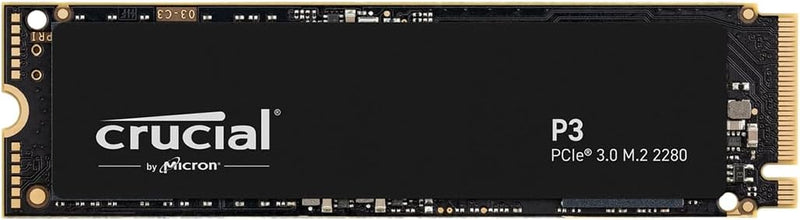
Crucial CT500P3SSD8 P3 500GB NVMe Gen3 M.2 SSD

4.7 (27440 reviews)
500GB NVMePCIe Gen2

Experience Blazing-Fast Performance with Crucial P3 SSDStep up your storage game with the Crucial P3 500GB NVMe SSD. Engineered to deliver speeds nearly 5x faster than traditional SATA drives, this SSD is perfect for work, gaming, and everything in between. Enjoy quicker boot times, rapid file tr...

$36.93*$39.99Save 7%
Check availability

*Price sourced from Amazon.com. Last updated:Jun 19, 2026.Price and availability are subject to change.

Affiliate Disclosure: Studio Supplies may earn a commission from qualifying purchases made through links on this page, at no additional cost to you. This helps support our editorial team.

Notice a mistake? Let Us Know

Overview

Experience Blazing-Fast Performance with Crucial P3 SSD

Step up your storage game with the Crucial P3 500GB NVMe SSD. Engineered to deliver speeds nearly 5x faster than traditional SATA drives, this SSD is perfect for work, gaming, and everything in between. Enjoy quicker boot times, rapid file transfers, and ample space for all your essential data.

  • Interface: NVMe (PCIe Gen3 x4)
  • Sequential Read Speed: Up to 3500MB/s
  • Sequential Write Speed: Up to 3000MB/s
  • Random Read Speed: 350K IOPS
  • Random Write Speed: 460K IOPS
  • Capacity: 500GB
  • NAND Type: Micron Advanced 3D NAND
  • Form Factor: M.2
  • MTTF: Greater than 1.5 million hours
  • Dimensions: 3.15 x 0.87 x 0.09 inches
  • Color: Black
  • Compatible Devices: Desktops & laptops that accept PCIe NVMe Gen 3.0 drives

Key Features

Fast Everyday Performance: Delivers up to 3,500MB/s for quicker bootups, app launches, and file transfers

Spacious 500GB Capacity: Provides space for essential apps, documents, and media with efficient Gen3 NVMe performance for home users

Broad Compatibility: Works with PCIe Gen2-enabled desktops and laptops for easy system upgrades at home

Proven Durability: Built with Micron 3D NAND and rated for over 1.5 million hours MTTF for long-lasting durability

Trusted Micron Quality: Backed by one of the world’s leading flash storage manufacturers for dependable home user performance

Acronis True Image and Adobe Software Bundle Included: Comes with Acronis cloning software for easy data recovery and transfers, plus a one-month Adobe Creative Cloud All-Apps subscription for creative photo, video, 3D projects and more

Specifications

Capacity
500GB
Interface
NVMe Gen3 M.2
Read Speed (Max)
3,500MB/s
NAND Technology
Micron 3D NAND
MTTF
>1.5 million hours
Compatibility
PCIe Gen2-enabled desktops and laptops
Included Software
Acronis True Image
Included Subscription
One-month Adobe Creative Cloud All-Apps

Independent Benchmarks & Real-World Performance

Studio Supplies aggregates published benchmark results from independent technology publications so buyers can see how the Crucial P3 500GB performs against its claimed specifications before deciding. The figures below come from third-party reviews; full citations are listed at the end of this section.

Sequential Read & Write

Crucial rates the P3 family for up to 3,500 MB/s sequential reads and up to 3,000 MB/s sequential writes on its product page (Crucial product specs). Independent testing largely tracks these manufacturer claims for read performance, though write performance varies by capacity. Tom's Hardware notes in its full P3 review that peak sequential write performance of 3.0 GB/s is reached at the 1TB tier, while the 500 GB capacity tops out near 1.9 GB/s sequential write — a normal pattern for NAND-controller architectures that scale write throughput with die count.

SLC Cache Behavior on Sustained Writes

The P3 uses dynamic SLC caching on QLC flash. Tom's Hardware's review measured the after-cache write speed drop from peak performance to approximately 100 MB/s once the SLC cache exhausted on sustained large-file writes. For routine workloads — OS boot, application launches, gaming-asset loading, photo and video file transfers — the cache is rarely fully consumed, but workflows that involve continuous multi-hundred-gigabyte writes (large video exports, drive-to-drive cloning) should expect that drop.

Endurance & Warranty

Crucial publishes a Terabytes Written (TBW) rating of 110 TBW for the 500 GB tier under a five-year limited warranty (Crucial spec sheet). At the typical desktop user's ~20 GB/day average host write rate, that endurance budget represents roughly 15 years of headroom — well beyond the five-year warranty term. The 1 TB tier doubles the TBW budget to 220 TBW, which is worth noting if planning to use the drive as a workstation scratch volume rather than an OS / general-purpose drive.

Where the P3 Fits

The P3 is a PCIe 3.0 x4 drive — it is intentionally not a flagship for benchmark contests, and reviewers consistently position it as a value tier. PCWorld's P3 review describes the drive as delivering the top of the PCIe 3.0 performance envelope at a price typical of much slower drives, making it a strong fit for older laptops and desktops without PCIe 4.0 support, secondary storage upgrades, and budget OS-drive installations where the difference between Gen3 and Gen4 sequential numbers is rarely user-visible. ServeTheHome's P3 Plus coverage notes the Phison E21T controller and Micron 176-layer flash combination delivers good efficiency for the price tier, with sequential read speed scaling reaching 5 GB/s on the Gen4 P3 Plus variant when that tier is required.

What This Means for Real-World Use

  • OS boot drive — sub-millisecond random I/O on QLC NVMe matters more than peak sequential numbers, and the P3 family delivers competitive 4K random read figures throughout published reviews
  • Game library drive — game install sizes have grown but the SLC cache (a portion of the 500 GB usable capacity) absorbs typical 50-100 GB install bursts cleanly
  • Photo / Lightroom scratch drive — 500 GB is on the small side for active raw libraries; consider the 1 TB or 2 TB P3 variants for serious photo workloads
  • Video editing scratch drive — sustained writes during large exports will hit the post-cache 100 MB/s floor; a Gen4 drive (P3 Plus or a higher-tier product) is the better fit for sustained-write workloads

Sources & Citations

  1. Tom's Hardware, "Crucial P3 SSD Review: Solid Secondary SSD," tomshardware.com (accessed 2026-05-16)
  2. PCWorld, "Crucial P3 SSD review: Top PCIe 3 speed, insanely low price," pcworld.com (accessed 2026-05-16)
  3. ServeTheHome, "Crucial P3 Plus 1TB PCIe Gen4 NVMe SSD Review," servethehome.com (accessed 2026-05-16)
  4. Crucial, "P3 NVMe SSD CT500P3SSD8 Specifications," crucial.com (accessed 2026-05-16)

Last verified: 2026-05-16

Crucial P3 NVMe SSD (Gen3 + P3 Plus Gen4, 500GB-4TB) — Editorial Review & Use Cases

The Crucial P3 family (CT500P3SSD8, CT1000P3SSD8, CT4000P3SSD8 — PCIe Gen3) and P3 Plus family (CT500P3PSSD8, CT1000P3PSSD8 — PCIe Gen4) are Crucial's mainstream M.2 NVMe SSD lines — designed for budget-conscious PC builds + laptops needing NVMe-class speeds without enthusiast-tier pricing. Per Crucial's official P3 Plus product page, the P3 hits up to 3,500 MB/s sequential read on Gen3 (the maximum the Gen3 interface allows); the P3 Plus pushes to 5,000 MB/s on Gen4 with the same QLC NAND + DRAM-less controller architecture.

What the P3 / P3 Plus Specifically Wins

  • NVMe-class speeds at SATA-SSD price points — P3 ~$50-80 for 1TB, ~$150 for 4TB. Comparable speeds to mid-tier NVMe at substantially lower cost
  • 3,500 MB/s sequential read (Gen3) / 5,000 MB/s (Gen4) — adequate for game loading, OS boot, application launch, content playback. The difference between 3,500 and 7,000 MB/s NVMe is rarely noticeable for typical workflows
  • M.2 2280 form factor — fits standard M.2 NVMe slots on virtually all modern motherboards (Intel 8th-gen+, AMD Ryzen 1st-gen+) + laptops with M.2 slots
  • 5-year warranty — Crucial / Micron standard
  • Capacity ladder: 500GB / 1TB / 2TB / 4TB — the 4TB option is particularly compelling for large-game-library users + content creators
  • Bootable without drivers on modern systems — Windows 10/11, macOS via NVMe driver (Mac Pro 2019 / Hackintosh), Linux 4.0+ all support NVMe natively
  • Cool-running design — no aggressive sustained-load throttling at typical PC temperatures (vs some enthusiast NVMe that throttle without heatsinks)

Where the P3 / P3 Plus Specifically Fits

  • Budget gaming PC builds — fast game loading at ~50% the cost of premium NVMe
  • Mainstream desktop boot drives — Windows 11 + Office + Adobe + Steam library fits comfortably on 1-2TB
  • Laptop NVMe upgrades — modern laptops with M.2 slot benefit from NVMe over SATA (faster boot, app load, less battery drain for I/O wait)
  • Mass game / media library storage — 4TB P3 holds 50-80 modern AAA games or huge media collections
  • Console expansion (PS5 / Xbox Series X) — when paired with the appropriate heatsink, P3 Plus meets PS5's 5,500 MB/s minimum (verify per-SKU)
  • Light content creation workstations — adequate scratch drive for Lightroom + Photoshop + Premiere Pro / DaVinci Resolve at 1080p / light 4K
  • Compact ITX / Mini-PC builds — single M.2 slot use, no SATA cable clutter
  • Older PC upgrade path — Z270 / X370 motherboards with M.2 Gen3 slots see significant boot + app load improvement vs SATA SSD
  • NUC / Mini PC builds — Intel NUC / ASUS PN / Beelink mini PCs typically use single M.2 NVMe slot
  • Steam Deck expansion (P3 2230 form factor not available; standard P3 is 2280 — needs Steam Deck OLED's 2230 socket adapter)

Honest Limits Buyers Should Know

  • QLC NAND — lower endurance than TLC. 220TBW on 1TB P3 vs 600TBW on Samsung 990 PRO (TLC) at the same capacity. For typical user workloads (boot drive + games + occasional photo edit), 220TBW lasts ~10 years; heavy daily-write workloads (video edit scratch, database) deplete it faster. NOT for write-heavy enterprise workloads
  • DRAM-less design — sustained random writes throttle. Real-world: after the SLC cache (varies by capacity, typically 10-15% of total) fills, sustained writes drop to ~80-150 MB/s direct-to-QLC. For bursty workloads this is fine; for sustained large-file copies (transferring 500GB), expect significant slowdown after the first 50-100GB
  • P3 caps at PCIe Gen3 speeds. Even on Gen4 motherboards, P3 only delivers ~3,500 MB/s. For full Gen4 speeds use P3 Plus or step up to Gen4-native SSDs (WD SN850X, Samsung 990 PRO)
  • Not for PS5 without verification. PS5 requires 5,500 MB/s minimum + heatsink. Most P3 Plus 1TB SKUs meet the speed; verify the specific 4TB SKU + add heatsink (built-in PCB heatsinks not always sufficient)
  • No hardware encryption. AES-256 / OPAL hardware encryption not supported. BitLocker + FileVault work via software-only encryption (slightly slower)
  • 4K random IOPS lower than premium NVMe. P3 hits ~400K 4K read IOPS; WD SN850X / Samsung 990 PRO hit 1M+. For database / VM workloads this matters; for everyday use it doesn't
  • Thermal throttling under sustained load. Long sustained writes (multi-hour video edit renders, bulk file transfers) trigger thermal throttling at ~70°C. Heatsink mitigates; most users don't hit this
  • SLC cache size depends on capacity. Small SKUs (500GB) have small SLC cache; large SKUs (4TB) have substantial SLC cache. Higher capacities are markedly more performant under sustained writes

Where Buyers Should Look Elsewhere

  • Premium / enthusiast tier (sustained write performance) → WD Black SN850X, Samsung 990 PRO, Crucial T700 (Gen5)
  • Mid-tier balance (TLC + DRAM) → WD Black SN770, Samsung 970 EVO Plus, Kingston KC3000
  • Storage-only secondary (cheaper) → Crucial P3 (Gen3) instead of P3 Plus when boot drive is separate
  • PS5 expansion → WD Black SN850P (PS5-certified), Samsung 990 PRO with heatsink
  • Enterprise / 24/7 write-heavy → Samsung PM893 / Intel D7 / Micron 7400 PRO datacenter SSDs
  • Steam Deck (2230 form factor) → WD SN770M, Sabrent Rocket 2230, Crucial T705 2230 — verify Steam Deck compatibility
  • Cheaper SATA-class (if NVMe slot not available) → Crucial MX500 (TLC) or BX500 (QLC)

Sources & Citations

  1. Crucial, "P3 Plus NVMe SSD product page," crucial.com (accessed 2026-05-18)
  2. Tom's Hardware, "Crucial P3 / P3 Plus review and NVMe SSD comparison," tomshardware.com (accessed 2026-05-18)
  3. AnandTech, "NVMe SSD reviews and benchmark coverage," anandtech.com (accessed 2026-05-18)
  4. TechPowerUp, "Crucial P3 / P3 Plus reviews," techpowerup.com (accessed 2026-05-18)

Last verified: 2026-05-18

Now that you've seen the details — ready to take a closer look?

Check availability

Pros & Cons

👍 Pros

  • The Crucial P3 SSD delivers fast everyday performance, with speeds up to 3,500MB/s for quicker bootups and app launches.
  • Its 500GB capacity offers sufficient space for essential applications, documents, and media for typical home users.
  • Broad compatibility with PCIe Gen2-enabled desktops and laptops ensures easy system upgrades.
  • Built with Micron 3D NAND, this SSD is rated for over 1.5 million hours MTTF, signifying long-lasting durability.
  • The inclusion of Acronis True Image cloning software simplifies data migration and recovery processes.
  • A one-month Adobe Creative Cloud All-Apps subscription is provided, adding significant value for creative projects.

👎 Cons

  • While 3,500MB/s is fast, it's a Gen3 NVMe drive and not as fast as newer Gen4 or Gen5 NVMe SSDs for cutting-edge systems.
  • The 500GB capacity might be restrictive for users with extensive game libraries or large media collections.
  • Compatibility is specified for PCIe Gen2, but optimal performance will be achieved on Gen3 slots, potentially causing confusion.
  • The Adobe Creative Cloud subscription is only for one month, after which continued use requires a separate purchase.
  • No specific endurance rating (TBW) is provided, making it harder to gauge its write longevity for very heavy workloads.

Frequently Asked Questions

The Crucial P3 delivers fast everyday performance with sequential read speeds up to 3,500MB/s for quicker system responsiveness.
This SSD offers a spacious 500GB capacity, suitable for essential apps, documents, and media for home users.
Yes, it offers broad compatibility and works with PCIe Gen2-enabled desktops and laptops, making it an option for easy system upgrades.
The SSD comes with Acronis True Image cloning software for data recovery and transfers, plus a one-month Adobe Creative Cloud All-Apps subscription.
Built with Micron 3D NAND, the SSD is rated for over 1.5 million hours MTTF, indicating long-lasting durability for dependable performance.