

Crucial
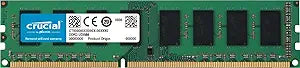
Crucial CT51264BD186DJ 4GB DDR3 1866MHz Desktop Memory
Reliable Performance for Your DesktopThe Crucial Technology 4GB DDR3 Desktop Memory Module provides a dependable upgrade for your system, enhancing responsiveness and multitasking capabilities. Specifications: Capacity: 4GB Pin Count: 240-Pin Type: UDIMM DDR3 Voltage: 1.35V ...
View on Amazon for pricing
Affiliate Disclosure: As an Amazon Associate, Studio Supplies earns from qualifying purchases made through links on this page, at no additional cost to you. This helps support our editorial team.
Notice a mistake? Let Us Know
Overview
Reliable Performance for Your Desktop
The Crucial Technology 4GB DDR3 Desktop Memory Module provides a dependable upgrade for your system, enhancing responsiveness and multitasking capabilities.
Specifications:
- Capacity: 4GB
- Pin Count: 240-Pin
- Type: UDIMM DDR3
- Voltage: 1.35V
- CAS Latency: CL=13
- Buffering: Unbuffered
- Error Correction: NON-ECC
- Speed: 1866 MT/s
- Configuration: 512Meg x 64
Specifications
Brand
Crucial
Model
CT51264BD186DJ
Memory Type
DDR3
Capacity
4GB
Speed
1866MHz
Form Factor
Desktop Memory
Similar Products
Other products from the same family that visitors often consider:
 ✓ Available
Crucial CT51264BD186DJ 4GB DDR3 1866 MT/s Desktop Memory
$21.46
View on Amazon → Currently Unavailable
Crucial BLS4G3N18AES4 4GB DDR3 1866MHz SODIMM Laptop Memory
Check on Amazon → ✓ Available
Crucial BLS4G3D169DS3 4GB DDR3 1600MHz Desktop Memory
View on Amazon → ✓ Available
Crucial CT51264BD160BJ 4GB DDR3 1600MHz Desktop Memory
View on Amazon → ✓ Available
Crucial CT51264BA1339 4GB DDR3 1333MHz Desktop Memory
$19.96
View on Amazon →Frequently Asked Questions
Is this Crucial 4GB DDR3 1866MHz memory compatible with my desktop?
This Crucial 4GB DDR3 1866MHz desktop memory is compatible with desktop motherboards that specifically support DDR3 memory and have available DDR3 DIMM slots.
How can adding this 4GB memory module improve my computer's performance?
Adding this 4GB memory module can improve your computer's performance by providing more RAM for applications to use, which can lead to smoother multitasking, faster application loading, and overall better system responsiveness if your current RAM is a bottleneck.
Is DDR3 memory still relevant for today's computing needs?
DDR3 memory is relevant for older systems that do not support newer RAM standards like DDR4 or DDR5. It's suitable for extending the life and improving the performance of compatible older desktop computers for basic and moderate tasks.
Can I use this 1866MHz module with a motherboard that only supports slower DDR3 speeds?
If your motherboard only supports slower DDR3 speeds (e.g., 1600MHz), this 1866MHz module will likely downclock to the highest speed supported by your motherboard, but it's always best to check your motherboard's specifications for full compatibility.
How do I know if my computer uses DDR3 memory?
You can determine if your computer uses DDR3 memory by checking your system's specifications in the operating system, consulting your computer's or motherboard's manual, or physically inspecting the RAM modules for "DDR3" markings.
Can I combine this 4GB module with existing RAM of a different size or speed?
You can often combine RAM modules of different sizes and speeds, but the system will typically operate at the speed of the slowest module. For optimal performance, it's generally recommended to use modules of the same size and speed.
What is the advantage of a higher MHz speed in RAM?
A higher MHz speed, such as 1866MHz, allows the RAM to transfer data more quickly, which can contribute to snappier system performance and faster processing of data for the CPU.
Related Products


